







Question: have changed the UNITS command and the dimensions are still not in the unit format, what commands needs to be modified? 2 Whern Where is
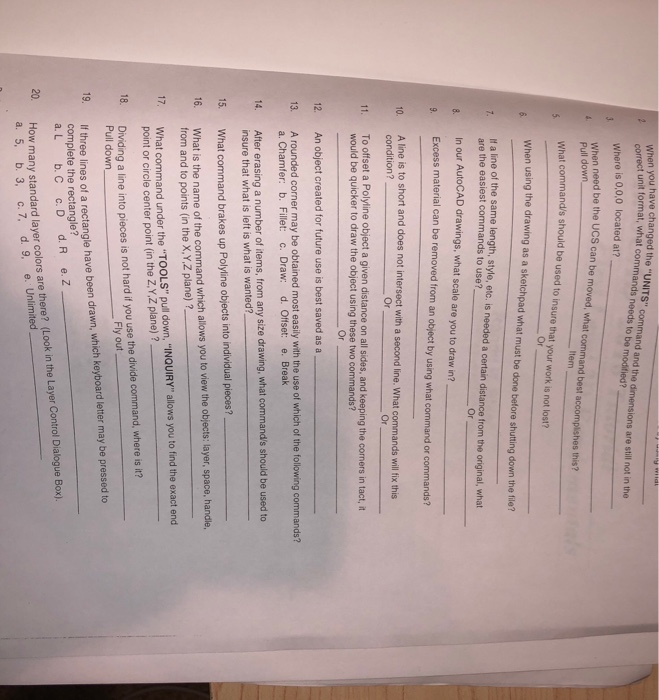
have changed the "UNITS" command and the dimensions are still not in the unit format, what commands needs to be modified? 2 Whern Where is 0,0,0 located at? need be the UCS can be moved, what command best accomplishes this? When Pull down Item at command/s should be used to insure that your work is not lost? Or When using the drawing as a sketchpad what must be done before shutting down the file , It a line of the same length, style, etc. is needed a certain distance from the original, what are the easiest commands to use? In our AutoCAD drawings, what scale are you to draw in? Excess material can be removed from an obiject by using what command or commands? Or A line is to short and does not intersect with a second line. What commands will fix this Or Or To offset a Polyline object a given distance on all sides, and keeping the coners in tact, it would be quicker to draw the object using these two commands? 11. Or 12. An object created for future use is best saved as a 13. A rounded corner may be obtained most easily with the use of which of the following commands? 4. After erasing a number of items, from any size drawing, what command's should be used to 15. What command brakes up Polyline objects into individual pieces? 16. What is the name of the command which allows you to view the objects: layer, space, handle, a. Chamfer: b. Fillet: c. Draw: d. Offset: e. Break insure that what is left is what is wanted? 17. What command under the "TOOLS" pull down, "INQUIRY"allows you to find the exact end o. Dividing a line into pieces is not hard if you use the divide command, where is it? 19. from and to points (in the X,Y Z plane) ?, point or circle center point (in the Z,Y,Z plane)? Pull down Fly out thre ines of a rectangle have been draw which kyboard leter may be pressed to complete the rectangle? How many standard layer colors are there? (Look in the Layer Control Dialogue Box). a. 5, b. 3, c. 7, d. 9, e. Unlimited 20
Step by Step Solution
There are 3 Steps involved in it

Get step-by-step solutions from verified subject matter experts
 Study Help