







Question: have the value Junior. Write SQL statements to insert the data into each of the five Garden Glory Database tables. Assume that any surrogate key
have the value Junior. 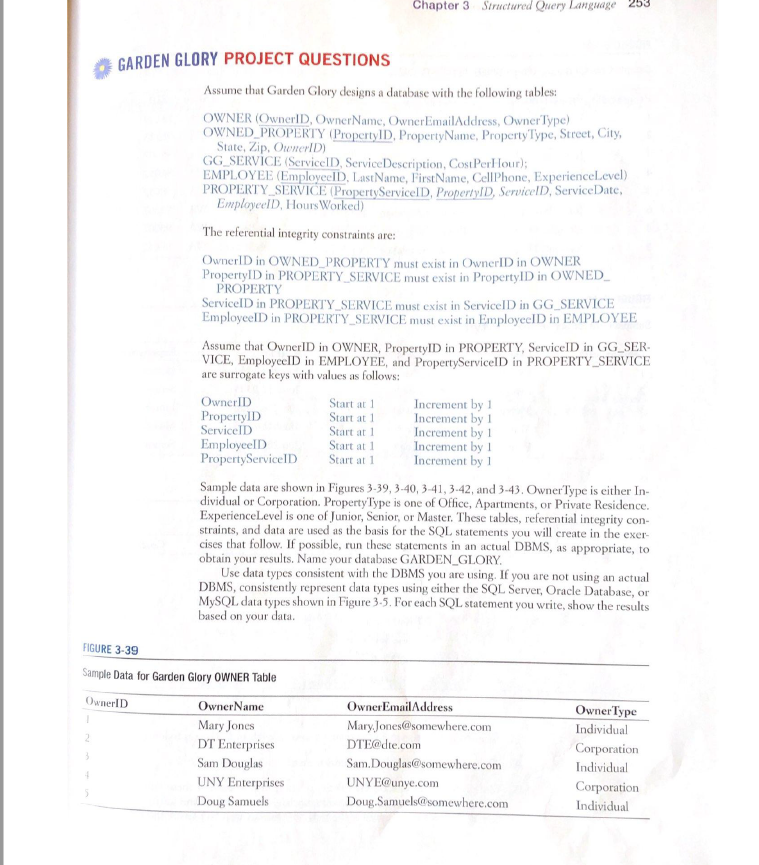
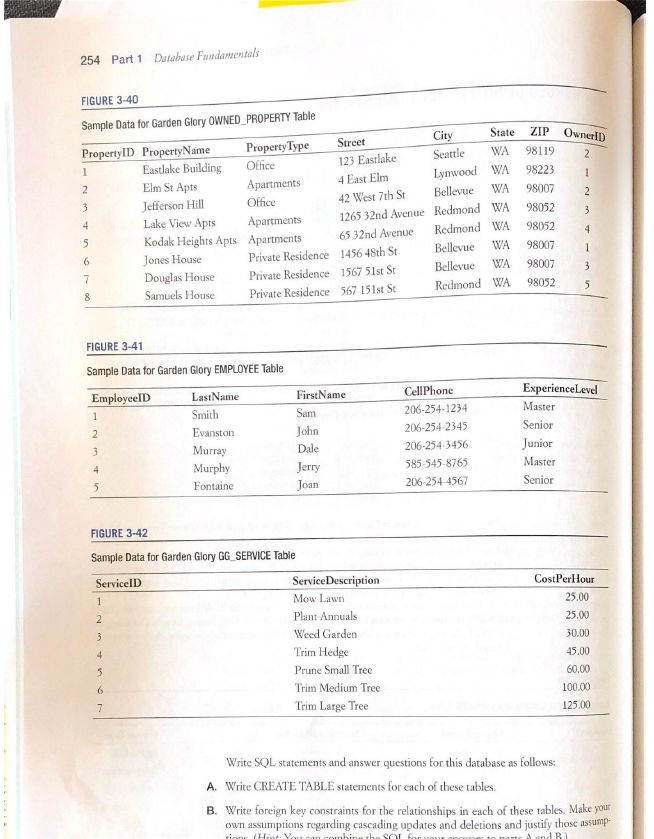
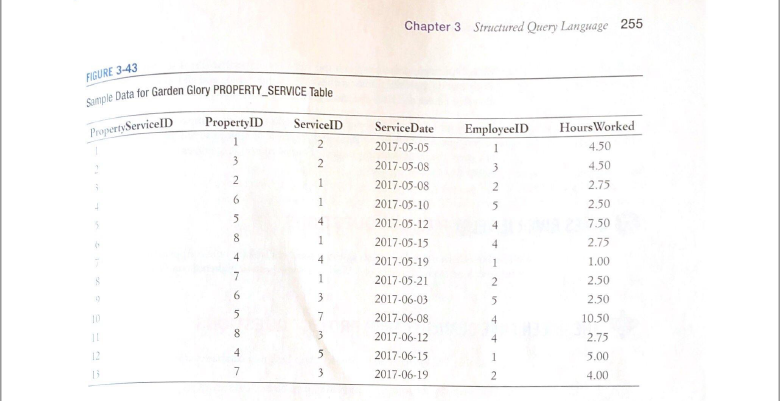
Write SQL statements to insert the data into each of the five Garden Glory Database tables. Assume that any surrogate key value will be supplied by the DBMS. Use the data in Figures 3-39, 3-40, 3-41, 3-42, and 3-43.
Write SQL statements to list all columns for all tables.
Write an SQL statement to list LastName, FirstName, and CellPhone for all employees having an experience level of Master.
Write an SQL statement to list LastName, FirstName, and CellPhone for all employees having an experience level of Master and FirstName that begins with the letter J.
Write an SQL statement to list LastName, FirstName, and CellPhone of employees who have worked on a property in Seattle. Use a subquery.
- Answer the question but Now use a join using Join On syntax.
Write an SQL statement to list LastName, FirstName, and CellPhone of employes who have worked on a property owned by a corporation. Use a subquery.
- Answer the question but Now use a join using Join On syntax.
Write an SQL statement to show the LastName, FirstName, CellPhone, and sum of hours worked for each employee.
Write an SQL statement to show the sum of hours worked for each ExperienceLevel of Employee. Sort the results by ExperienceLevel, in descending order.
Write an SQL statement to show the sum of HoursWorked for each type of OWNER but exclude services of employees who have ExperienceLevel of Junior.
Write an SQL statement to modify all EMPLOYEE rows with ExperienceLevel of Master to SUperMaster.
Write SQL statements to switch the values of ExperienceLevel so that all rows currently having the value Junior will have the value Senior and all rows currently having the value Senior will have the value Junior.
Chapter 3 Structured Query Language GARDEN GLORY PROJECT QUESTIONS Assume that Garden Glory designs a database with the following tables: OWNER (OwnerID, Owner Name Owner Email Address, Owner Type) OWNED PROPERTY (PropertyID, Property Name, Property Type, Street, City, State, Zip, OwnerID) GG SERVICE (Service Service Description, CostPerl lour); EMPLOYEE (Employeel D. LastName, First Name, CellPhone, Experience Level) PROPERTY SERVICE (Property Service D PropertyID, ServicelD, ServiceDate, Employeel D. Hours Worked) The referential integrity constraints are: OwnerID in OWNED_PROPERTY must exist in OwnerID in OWNER PropertyID in PROPERTY SERVICE must exist in Property ID in OWNED PROPERTY ServiceID in PROPERTY_SERVICE must exist in ServicelD in GG SERVICE EmployeeID in PROPERTY SERVICE must exist in EmployeeID in EMPLOYEE Assume that OwnerID in OWNER, Property ID in PROPERTY, Servicel in GG_SER- VICE, Employeel in EMPLOYEE, and PropertyServicelD in PROPERTY_SERVICE are surrogate keys with values as follows: OwnerID Start at 1 Increment by 1 Property ID Start at 1 Increment by 1 ServiceID Start at 1 Increment by 1 EmployeeID Start at 1 Increment by 1 Property ServicelD Start at 1 Increment by 1 Sample data are shown in Figures 3-39, 3-40,3-41, 3-42 and 3-43. Owner Type is either In dividual or Corporation Property Type is one of Office, Apartments, or Private Residence Experience Level is one of Junior, Senior, or Master. These tables, referential integrity con- straints, and data are used as the basis for the SQL statements you will create in the exer- cises that follow. If possible, run these statements in an actual DBMS, as appropriate, to obtain your results. Name your database GARDEN_GLORY. Use data types consistent with the DBMS you are using. If you are not using an actual DBMS, consistently represent data types using either the SOL Server, Oracle Database, or MySQL data types shown in Figure 3.5. For each SQL statement you write, show the results based on your data. FIGURE 3-39 Sample Data for Garden Glory OWNER Table OwnerlD Owner Name Mary Jones DT Enterprises Sam Douglas UNY Enterprises Doug Samuels 2 OwnerEmail Address Mary Jones@somewhere.com DTEdte.com Sam.Douglas@somewhere.com UNYE@unye.com Doug Samuelssomewhere.com Owner Type Individual Corporation Individual Corporation Individual 254 Part 1 Database Fundamentals FIGURE 3-40 ZIP Owner ID 2 98119 1 2 Sample Data for Garden Glory OWNED_PROPERTY Table Property ID Property Name State Street Property Type City 1 WA Eastlake Building 123 Eastlake Office Seattle 2 Elm St Apts Apartments 4 East Elm Lynwood WA 3 Office Jefferson Hill 42 West 7th St Bellevue WA 4 Lake View Apts Apartments 1265 32nd Avenue Redmond WA 5 Kodak Heights Apts Apartments 65 32nd Avenue Redmond WA 6 Jones House Private Residence 1456 48th St Bellevue WA 7 Douglas House Private Residence 1567 51st St Bellevue WA 8 Samuels House Private Residence 567 151st St Redmond WA 3 98223 98007 98052 98052 98007 98007 98052 4 1 3 5 FIGURE 3-41 Sample Data for Garden Glory EMPLOYEE Table EmployeeID LastName 1 Smith 2 Evanston 3 Murray Murphy 5 Fontaine First Name Sam John Dale Jerry Joan Cell Phone 206-254-1234 206-254-2345 206-2543456 585.545-8765 206-254-4567 Experience Level Master Senior Junior Master Senior FIGURE 3-42 Sample Data for Garden Glory GG SERVICE Table ServiceID Cost Per Hour 25.00 25.00 1 2 3 4 Service Description Mow Lawn Plant Annuals Weed Garden Trim Hedge Prune Small Tree Trim Medium Tree Trim Large Tree 30.00 45.00 60.00 5 100.00 125.00 7 Write SQL statements and answer questions for this database as follows: A. Write CREATE TABLE statements for each of these tables. B. Write foreign key constraints for the relationships in each of these tables. Make your own assumptions regarding cascading updates and deletions and justify those assump H H. Thanh V In and B Sample Data for Garden Glory PROPERTY SERVICE Table Chapter 3 Structured Query Language 255 FIGURE 3-43 Property ServiceID Property ID 1 3 ServiceID 2 EmployeeID 1 Hours Worked 4.50 4.50 2.75 2 3 2 1 2 6 - 1 5 5 4 4 8 1 4 ServiceDate 2017-05-05 2017-05-08 2017-05-08 2017-05-10 2017-05-12 2017-05-15 2017-05-19 2017-05-21 2017-06-03 2017-06-08 2017-06-12 2017-06-15 2017-06-19 4 4 2.50 7.50 2.75 1.00 2.50 2.50 10.50 7 1 2 1 6 3 5 5 7 4 8 3 4 2.75 4 5 1 5.00 7 3 2 4.00Step by Step Solution
There are 3 Steps involved in it

Get step-by-step solutions from verified subject matter experts
 Study Help