







Question: have to pass in mimir wk3 switch Write a program to compute the area of a shape selected from a menu by the user. The
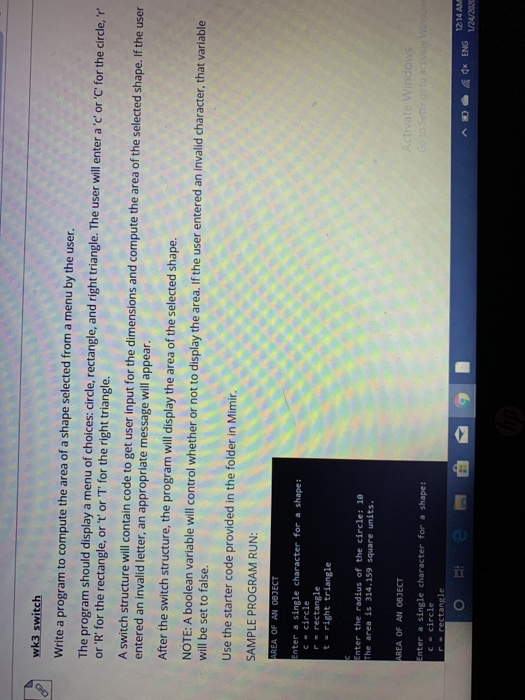
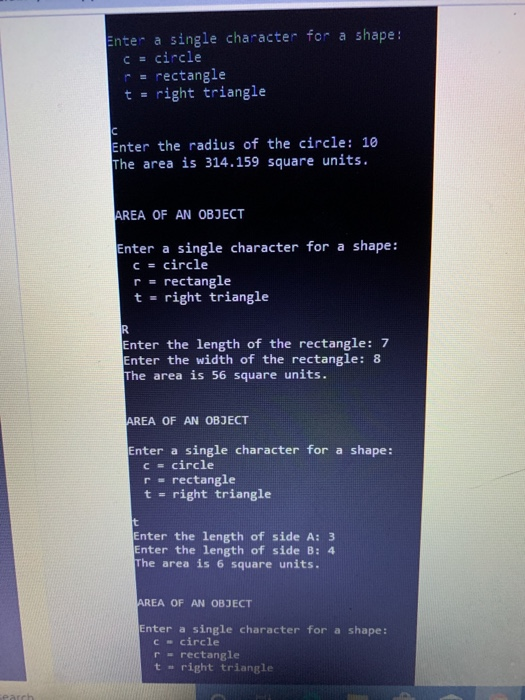
wk3 switch Write a program to compute the area of a shape selected from a menu by the user. The program should display a menu of choices: circle, rectangle, and right triangle. The user will enter a 'c' or 'C' for the circler or 'R' for the rectangle, or 't' or 'T' for the right triangle. A switch structure will contain code to get user input for the dimensions and compute the area of the selected shape. If the user entered an invalid letter, an appropriate message will appear. After the switch structure, the program will display the area of the selected shape. NOTE: A boolean variable will control whether or not to display the area. If the user entered an invalid character, that variable will be set to false. Use the starter code provided in the folder in Mimir. SAMPLE PROGRAM RUN: AREA OF AN OBJECT Enter a single character for a shape: C-circle - rectangle t = right triangle Enter the radius of the circle: 10 The area is 314.159 square units. AREA OF AN OBJECT Enter a single character for a shape: C= circle re rectangle Activate Windows Go to Settings to activate Window AD 0 12:14 AM ENG 1/24/2020 Enter a single character for a shape : c = circle p = rectangle t = right triangle Enter the radius of the circle: 10 The area is 314.159 square units. AREA OF AN OBJECT Enter a single character for a shape: c = circle r. rectangle t = right triangle Enter the length of the rectangle: 7 Enter the width of the rectangle: 8 The area is 56 square units. AREA OF AN OBJECT Enter a single character for a shape: C-circle r- rectangle t-right triangle Enter the length of side A: 3 Enter the length of side B: 4 The area is 6 square units. AREA OF AN OBJECT Enter a single character for a shape: C-circle - rectangle t-right triangle
Step by Step Solution
There are 3 Steps involved in it

Get step-by-step solutions from verified subject matter experts
 Study Help