







Question: Having trouble with an assignment. We need to make a game out of google maps and using the javascript API. I got the javascript started
Having trouble with an assignment. We need to make a game out of google maps and using the javascript API. I got the javascript started The html code and Css are fine. I have the basics down but dont know where to go to makke it into a full game that counts points. Any help is appriciated.
var gMap;
// initMap is a callback function that is initiated as part of the Google Maps API call at the bottom.
function initMap() {
// Create a new map and assign it to gMap
gMap = new google.maps.Map(document.getElementById('myMapID'), {
center: {lat: 41.878, lng: 10}, zoom: 3});
// Add a markers
var marker = new google.maps.Marker({position:{lat:41.525031,lng:-88.08172509999997}, map:gMap});
var marker2 = new google.maps.Marker({position:{lat:27.2669722,lng:-82.54634399999998}, map:gMap});
var marker3 = new google.maps.Marker({position:{lat:41.89238479999999,lng:-87.63407489999997}, map:gMap});
var marker4 = new google.maps.Marker({position:{lat:39.501419,lng:-106.15162650000002}, map:gMap});
var marker5 = new google.maps.Marker({position:{lat:45.133333,lng:-78.51666699999998}, map:gMap});
var marker5 = new google.maps.Marker({position:{lat:25.08212869999999,lng:-77.31344309999997}, map:gMap});
// Note that several message boards suggested using 'idle' instead of 'bounds_changed' because
// 'bounds_changed' gets called over and over when the user drags the map.
google.maps.event.addListener(gMap, 'idle', function() {
UpdateGame()
});
}
function UpdateGame() {
console.log('function UpdateGame() google-maps-step-04!');
var zoomLevel = gMap.getZoom()
var inBounds = false;
// Check if location is in place
if (gMap.getBounds().contains({lat:41.525031,lng:-88.08172509999997})) {
inBounds = true;
}
console.log("inBounds:"+inBounds+" zoomLevel:"+zoomLevel);
// We likely will need to update our "Hint" and "Score" fields dynamically here based on window location
// and inBounds or not.
// We will also need to add our marker when the user finds one and clicks on it.
// Finally, we will need to update to a new location or let them know they won.
}
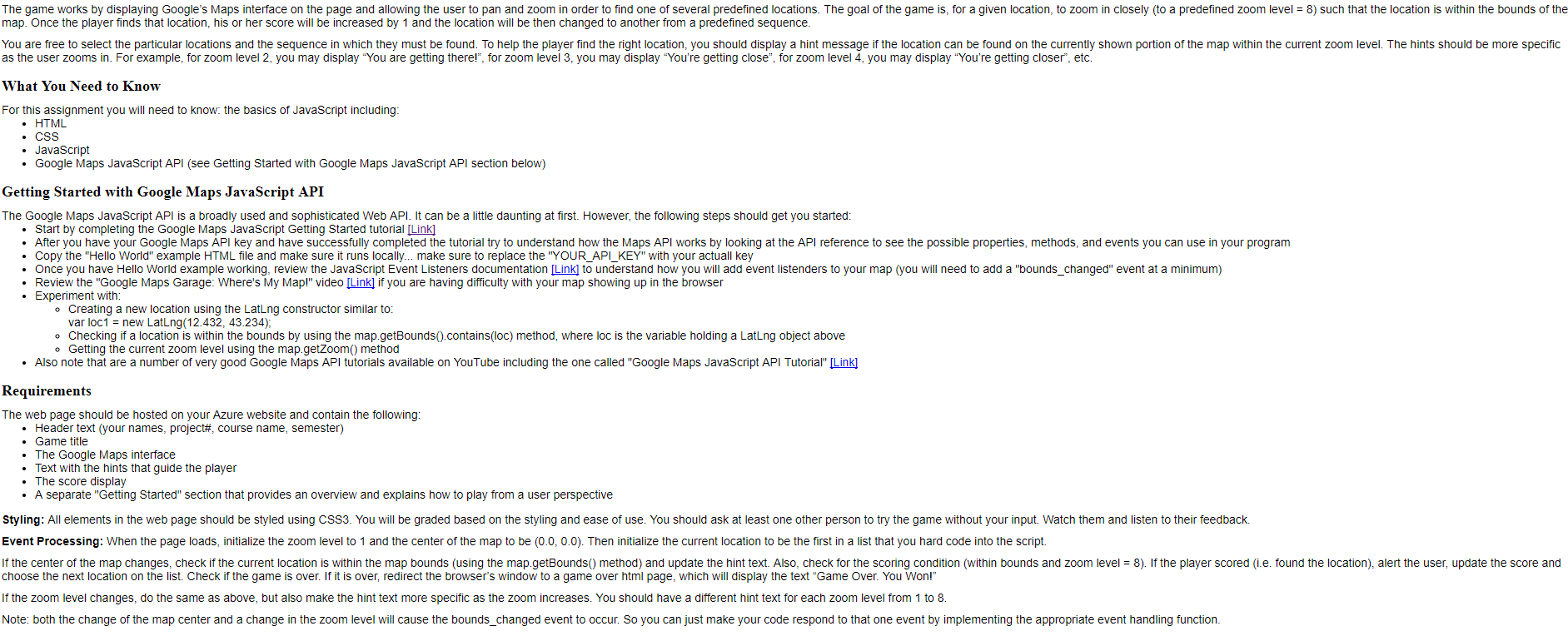
The game works by displaying Google's Maps interface on the page and allowing the user to pan and zoom in order to find one of several predefined locations. The goal of the game is, for a given location, to zoom in closely (to a predefined zoom level 8) such that the location is within the bounds of the map. Once the player finds that location, his or her score will be increased by 1 and the location will be then changed to another from a predefined sequence You are free to select the particular locations and the sequence in which they must be found. To help the player find the right location, you should display a hint message if the location can be found on the currently shown portion of the map within the current zoom level. The hints should be more specific as the user zooms in. For example, for zoom level 2, you may display "You are getting there!", for zoom level 3, you may display "You're getting close", for zoom level 4, you may display "You're getting closer", etc. What You Need to Know For this assignment you will need to know: the basics of JavaScript including . HTML . JavaScript Google Maps JavaScript API (see Getting Started with Google Maps JavaScript API section below) Getting Started with Google Maps JavaScript API The Google Maps JavaScript API is a broadly used and sophisticated Web API. It can be a little daunting at first. However, the following steps should get you started Start by completing the Google Maps JavaScript Getting Started tutorial [Link] After you have your Google Maps API key and have successfully completed the tutorial try to understand how the Maps API works by looking at the API reference to see the possible properties, methods, and events you can use in your program Copy the "Hello World" example HTML file and make sure it runs locally... make sure to replace the YOUR_API_KEY" with your actuall key Once you have Hello World example working, review the JavaScript Event Listeners documentation [Link] to understand how you will add event listenders to your map (you will need to add a "bounds_changed" event at a minimum) Review the "Google Maps Garage: Where's My Map!" video [Link] if you are having difficulty with your map showing up in the browser . Experiment with o Creating a new location using the LatLng constructor similar to var loc1 new LatLng(12.432, 43.234) o Checking if a location is within the bounds by using the map.getBounds().contains (loc) method, where loc is the variable holding a LatLng object above o Getting the current zoom level using the map.getZoom methood . Also note that are a number of very good Google Maps API tutorials available on YouTube including the one called "Google Maps JavaScript API Tutorial" [Link] Requirements The web page should be hosted on your Azure website and contain the following . Header text (your names, project, course name, semester) . Game title . The Google Maps interface Text with the hints that guide the player . The score display . A separate "Getting Started" section that provides an overview and explains how to play from a user perspective Styling: All elements in the web page should be styled using CSS3. You will be graded based on the styling and ease of use. You should ask at least one other person to try the game without your input. Watch them and listen to their feedback. Event Processing: When the page loads, initialize the zoom level to 1 and the center of the map to be (0.0, 0.0). Then initialize the current location to be the first in a list that you hard code into the script. lfthe center of the map changes check f the current location is within the map bounds using the map getBounds method and update he hint text Also. check or he scoring condition within bounds and zoom eve = 8 lf the player scored e found he location alert the user update the score and choose the next location on the list. Check if the game is over. If it is over, redirect the browser's window to a game over html page, which will display the text "Game Over. You Won!" If the zoom level changes, do the same as above, but also make the hint text more specific as the zoom increases. You should have a different hint text for each zoom level from 1 to 8 Note: both the change of the map center and a change in the zoom level will cause the bounds_changed event to occur. So you can just make your code respond to that one event by implementing the appropriate event handling function
Step by Step Solution
There are 3 Steps involved in it

Get step-by-step solutions from verified subject matter experts
 Study Help