







Question: , height Write a class called Rectangle with the following attributes and methods. (All attributes should be declared as private.) x-> int width y->int width>
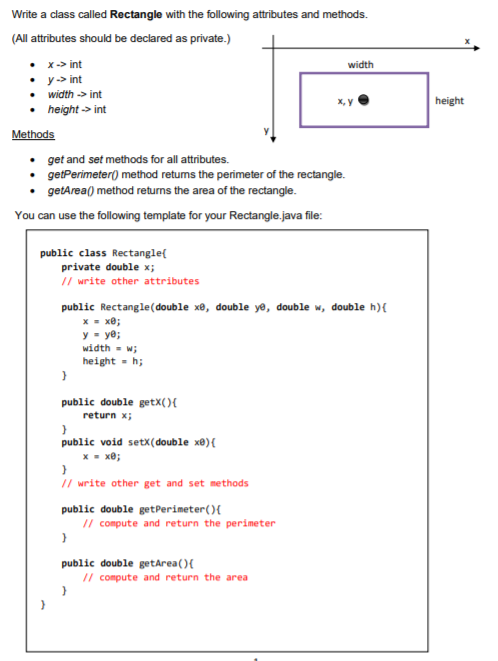
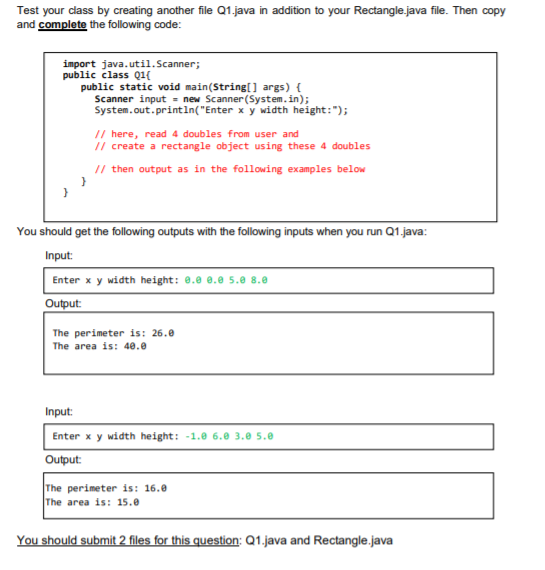
, height Write a class called Rectangle with the following attributes and methods. (All attributes should be declared as private.) x-> int width y->int width> int height -> int Methods get and set methods for all attributes. getPerimeter() method retums the perimeter of the rectangle. .getArea() method returns the area of the rectangle. You can use the following template for your Rectangle.java file: return x; public class Rectangle private double x; // write other attributes public Rectangle(double xe, double ye, double w, double h){ x = x; y = ye; width = w; height-h; } public double getX(){ ) public void setX(double x){ X = x; ) // write other get and set methods public double getPerimeter(){ // compute and return the perimeter } public double getArea(){ // compute and return the area ) ) Test your class by creating another file 01.java in addition to your Rectangle.java file. Then copy and complete the following code: import java.util.Scanner; public class 01{ public static void main(String[] args) { Scanner input = new Scanner(System.in); System.out.println("Enter x y width height: "); // here, read 4 doubles from user and // create a rectangle object using these 4 doubles // then output as in the following examples below } You should get the following outputs with the following inputs when you run Q1.java: Input: Enter x y width height: 0.0 0.2 5. 8.0 Output: The perimeter is: 26.0 The area is: 40.0 Input: Enter x y width height: -1.0 6.0 3.0 5.0 Output The perimeter is: 16.0 The area is: 15.0 You should submit 2 files for this question: 21.java and Rectangle.java
Step by Step Solution
There are 3 Steps involved in it

Get step-by-step solutions from verified subject matter experts
 Study Help