







Question: Hello again experts. Can someone please help me with a card game program called Spades. I will try to break it down as simple as
Hello again experts. Can someone please help me with a card game program called Spades. I will try to break it down as simple as possible so that you have ample time to work on it. The first part is the instructions on what needs to be in each Class and the second part is the code for the Class that I have written so far.
Thank you in advance!
So the class that I need help with is the HumanPlayerUi.java.
------------------- This is the first block of instructions that should go with the class HumanPlayerUi.java ----------------------------------------?
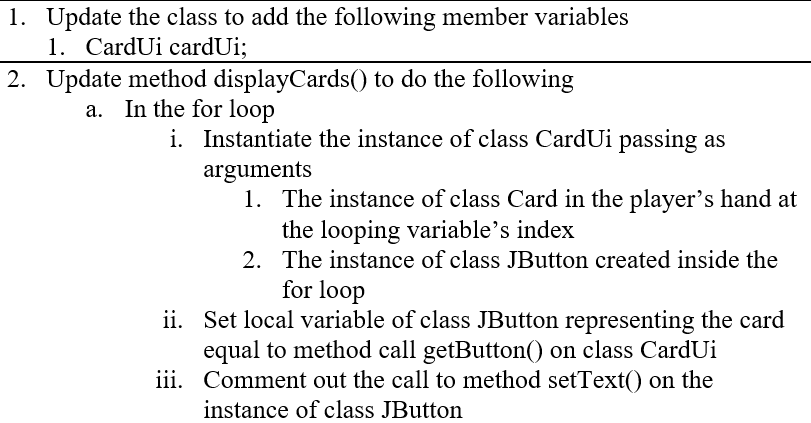
---------------- Here is the HumanPlayerUi.java code that I have completed right now -------------------------------------------
package userinterface;
import core.HumanPlayer; import core.Player; import constants.Constants; import java.awt.Color; import java.awt.Dimension; import java.util.ArrayList; import java.util.logging.Logger; import javax.swing.BorderFactory; import javax.swing.BoxLayout; import javax.swing.JLabel; import javax.swing.JPanel; import javax.swing.JButton;
public class HumanPlayerUi extends JPanel{ private HumanPlayer human; private ArrayList cards; private CardUi cardUi; public HumanPlayerUi(Player player){ human = (HumanPlayer)player; initComponents(); } private void initComponents(){ this.setBorder(BorderFactory.createTitledBorder(human.getName())); this.setMinimumSize(new Dimension(200, 180)); this.setPreferredSize(new Dimension(200, 180)); this.setLayout(new BoxLayout(this, BoxLayout.X_AXIS)); displayCards(); } private void displayCards(){ cards = new ArrayList(); for(int c = 0; c
-------------- This is the main Spades.java code just in case you need it --------------------------
package spades;
//Have to make to point to the JOptionPane libary import javax.swing.JOptionPane; import core.Game; import userinterface.GameUi;
public class Spades {
/** * @param args the command line arguments */ public static void main(String[] args) { //System.out.println("Welcome to Spades!"); JOptionPane.showMessageDialog(null, "Let's Play Spades!"); //Instantiate an instance of class Game calling the no-argument constructor Game game = new Game(); GameUi ui = new GameUi(game); } }
-------------- Here is the Player.java Class just in case you need it --------------------------
package core;
import java.util.ArrayList;
public abstract class Player implements IPlayer { //Declare member variables private String name; private int bid; private int score; private int tricks; private ArrayList
/** * @param hand the hand to set */ public void setHand(ArrayList
//Set getter/setter for each member variables /** * @param name the name to set */ public void setName(String name) { this.name = name; }
/** * @return the bid */ public int getBid() { return bid; }
/** * @param bid the bid to set */ public void setBid(int bid) { this.bid = bid; }
/** * @return the score */ public int getScore() { return score; }
/** * @param score the score to set */ public void setScore(int score) { this.score = score; }
/** * @return the tricks */ public int getTricks() { return tricks; }
/** * @param tricks the tricks to set */ public void setTricks(int tricks) { this.tricks = tricks; } public String getName(){ return name; } //abstract of the method from IPlayer public abstract Card playCard(); public abstract int placeBid(); public Player(){ hand = new ArrayList(); } //Method that allows player to display hand public void displayHand(){ for(Card card : hand){ //System.out.println(card.getFace() + " of " + card.getSuit()); } } //Method that allows player to sort by suit public void sortBySuit(){ ArrayList -------------- Here is the HumanPlayer.java Class -------------------------- package core; import java.util.Scanner; public class HumanPlayer extends Player{ //Implementing methods from class player @Override public Card playCard(){ return null; } /** * * @return */ @Override public int placeBid(){ //System.out.println(super.getName() + " place your bid"); Scanner scanner = new Scanner(System.in); int bid = scanner.nextInt(); if(bid -------------- Here is the CardUi.java Class -------------------------- package userinterface; import javax.swing.JButton; import javax.swing.JLabel; import javax.swing.ImageIcon; import core.Card; public class CardUi { private Card card; private ImageIcon imageIcon; private JButton button; private JLabel label; private int position; //CardUi getter & setter /** * @return the button */ public JButton getButton() { return button; } /** * @return the label */ public JLabel getLabel() { return label; } //CardUi Custom Constructor public CardUi(){ selectFrontImage(); selectVerticalBackImage(); selectHorizontalBackImage(); } private void selectFrontImage(){ } private void selectVerticalBackImage(){ } private void selectHorizontalBackImage(){ } } -------------- Here is the Game.java Class -------------------------- package core; import constants.Constants; import constants.Constants.Suit; import java.util.ArrayList; import java.util.Scanner; import java.util.Random; import java.util.Iterator; import javax.swing.JOptionPane; public class Game { //Member Variable private Suit trump = Suit.SPADES; private Player lead; private Player dealer; private Player wonTrick; private int round; private ArrayList /** * @param trump the trump to set */ public void setTrump(Suit trump) { this.trump = trump; } /** * @return the lead */ public Player getLead() { return lead; } /** * @param lead the lead to set */ public void setLead(Player lead) { this.lead = lead; } /** * @return the dealer */ public Player getDealer() { return dealer; } /** * @param dealer the dealer to set */ public void setDealer(Player dealer) { this.dealer = dealer; } /** * @return the wonTrick */ public Player getWonTrick() { return wonTrick; } /** * @param wonTrick the wonTrick to set */ public void setWonTrick(Player wonTrick) { this.wonTrick = wonTrick; } /** * @return the round */ public int getRound() { return round; } /** * @param round the round to set */ public void setRound(int round) { this.round = round; } /** * @return the teams */ public ArrayList /** * @param teams the teams to set */ public void setTeams(ArrayList /** * @return the deck */ public Deck getDeck() { return deck; } /** * @param deck the deck to set */ public void setDeck(Deck deck) { this.deck = deck; } /** * @return the scan */ public Scanner getScan() { return scan; } /** * @param scan the scan to set */ public void setScan(Scanner scan) { this.scan = scan; } /** * @return the table */ public ArrayList /** * @param table the table to set */ public void setTable(ArrayList
Step by Step Solution
There are 3 Steps involved in it

Get step-by-step solutions from verified subject matter experts
 Study Help