



Question: hello can I get some help with this? thank you! In the accompanying Sales Transactions data, use Excel's filtering capability to extract a. all orders
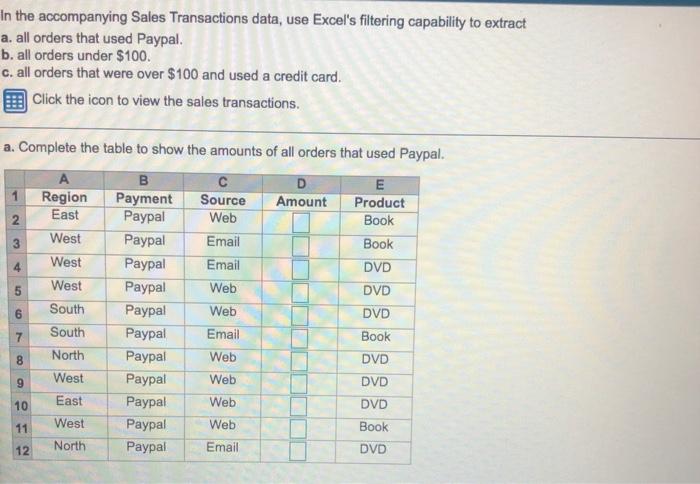
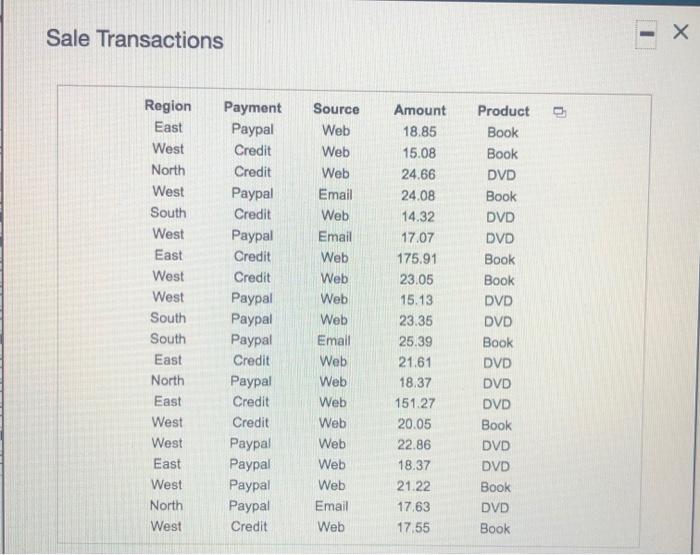
In the accompanying Sales Transactions data, use Excel's filtering capability to extract a. all orders that used Paypal. b. all orders under $100. c. all orders that were over $100 and used a credit card. Click the icon to view the sales transactions. 2 a. Complete the table to show the amounts of all orders that used Paypal. B E 1 Region Payment Source Amount Product East Paypal Web Book 3 West Paypal Email Book 4 West Paypal Email DVD 5 West Paypal Web DVD South Paypal Web DVD 7 South Paypal Email Book 8 North Paypal Web DVD 9 West Paypal Web DVD 10 East Paypal Web DVD 11 West Paypal Web Book 12 North Paypal Email DVD 6 9 Sale Transactions Region East West North West South West East West West South South East North East West West Payment Paypal Credit Credit Paypal Credit Paypal Credit Credit Paypal Paypal Paypal Credit Paypal Credit Credit Paypal Paypal Paypal Paypal Credit Source Web Web Web Email Web Email Web Web Web Web Email Web Web Web Web Web Web Web Email Web Amount 18.85 15.08 24.66 24.08 14.32 17.07 175.91 23.05 15.13 23.35 25.39 21.61 18.37 15127 20.05 22.86 18.37 21.22 17,63 17.55 Product Book Book DVD Book DVD DVD Book Book DVD DVD Book DVD DVD DVD Book DVD DVD Book DVD Book East West North West
Step by Step Solution
There are 3 Steps involved in it

Get step-by-step solutions from verified subject matter experts