







Question: Hello dear instructors. Please post the solution to this problem, thank you. Project Description Bank Account Management System Introduction The Bank Account Management System (BAMS)
Hello dear instructors. Please post the solution to this problem, thank you.
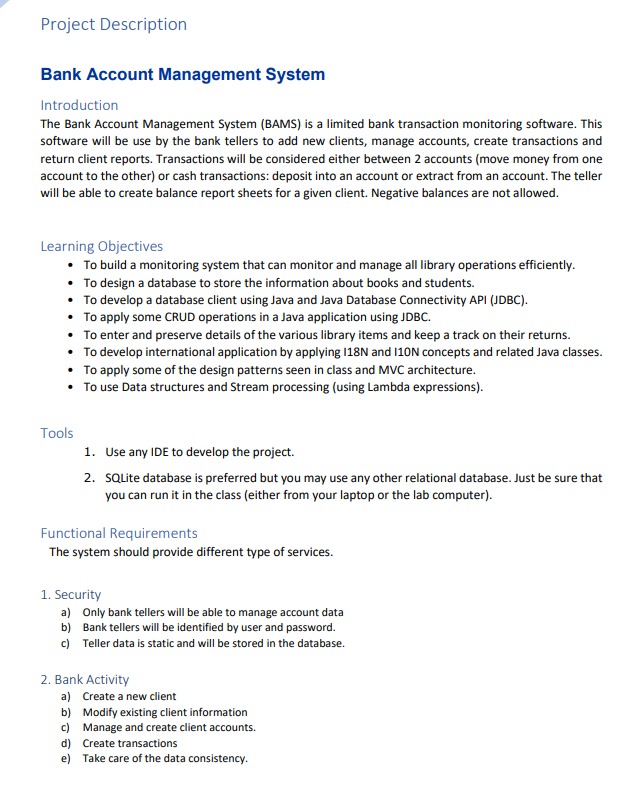
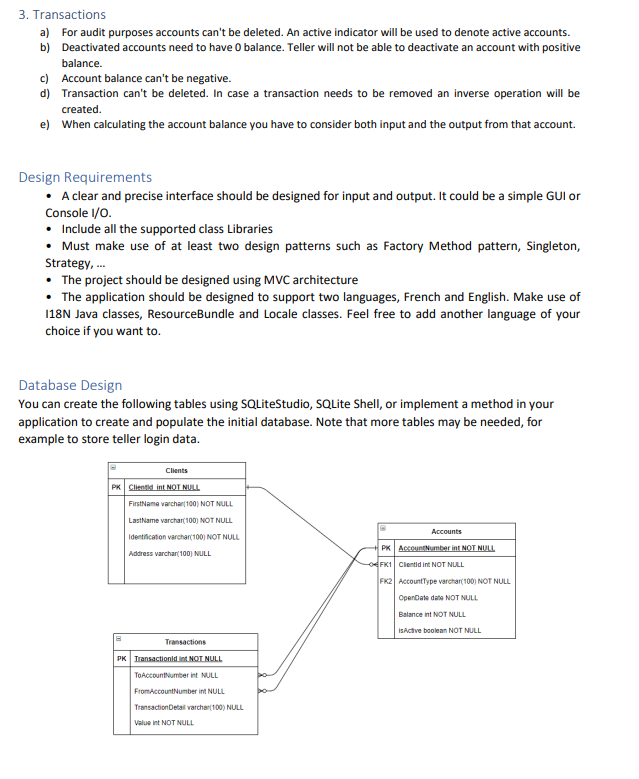
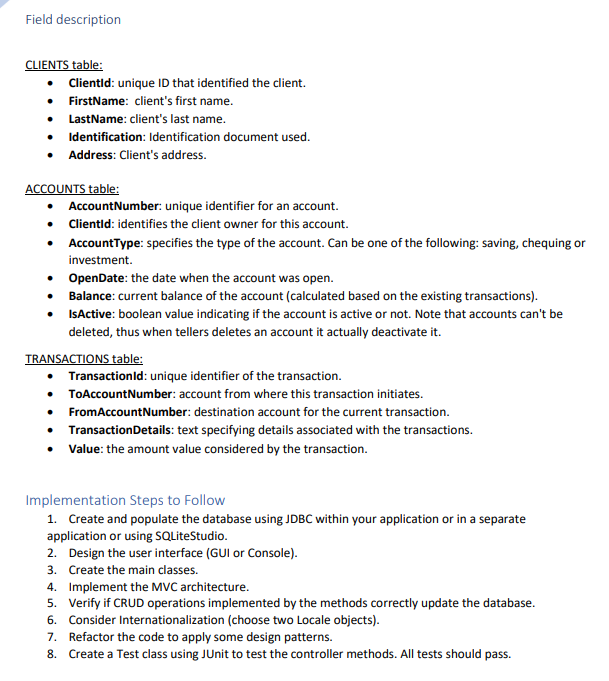
Project Description Bank Account Management System Introduction The Bank Account Management System (BAMS) is a limited bank transaction monitoring software. This software will be use by the bank tellers to add new clients, manage accounts, create transactions and return client reports. Transactions will be considered either between 2 accounts (move money from one account to the other) or cash transactions: deposit into an account or extract from an account. The teller will be able to create balance report sheets for a given client. Negative balances are not allowed. Learning Objectives To build a monitoring system that can monitor and manage all library operations efficiently. To design a database to store the information about books and students. To develop a database client using Java and Java Database Connectivity API (JDBC). To apply some CRUD operations in a Java application using JDBC. To enter and preserve details of the various library items and keep a track on their returns. To develop international application by applying 118N and 110N concepts and related Java classes. To apply some of the design patterns seen in class and MVC architecture. To use Data structures and Stream processing (using Lambda expressions). Tools 1. Use any IDE to develop the project. 2. SQLite database is preferred but you may use any other relational database. Just be sure that you can run it in the class (either from your laptop or the lab computer). Functional Requirements The system should provide different type of services. 1. Security a) Only bank tellers will be able to manage account data b) Bank tellers will be identified by user and password. c) Teller data is static and will be stored in the database. 2. Bank Activity a) Create a new client b) Modify existing client information c) Manage and create client accounts. d) Create transactions e) Take care of the data consistency. 3. Transactions a) For audit purposes accounts can't be deleted. An active indicator will be used to denote active accounts. b) Deactivated accounts need to have o balance. Teller will not be able to deactivate an account with positive balance. c) Account balance can't be negative. d) Transaction can't be deleted. In case a transaction needs to be removed an inverse operation will be created. e) When calculating the account balance you have to consider both input and the output from that account. Design Requirements A clear and precise interface should be designed for input and output. It could be a simple GUI or Console 1/0. Include all the supported class Libraries Must make use of at least two design patterns such as Factory Method pattern, Singleton, Strategy... The project should be designed using MVC architecture The application should be designed to support two languages, French and English. Make use of 118N Java classes, ResourceBundle and Locale classes. Feel free to add another language of your choice if you want to Database Design You can create the following tables using SQLite Studio, SQLite Shell, or implement a method in your application to create and populate the initial database. Note that more tables may be needed, for example to store teller login data. Clients PK Clientid int NOT NULL FirstName varchar(100) NOT NULL LastName varchar(100) NOT NULL Identification varchar(100) NOT NULL Address varchar(100) NULL Accounts + PK Account Number int NOT NULL 4FK1 Cientid int NOT NULL FX2 AccountType varchar(100) NOT NULL OpenDate de NOT NULL Balance int NOT NULL isActive boolean NOT NULL Transactions PK Transactionld in NOT NULL ToAccount Numberint NULL From Account Numberint NULL Transaction Detail varchar(100) NULL value in NOT NULL Field description CLIENTS table: Clientid: unique ID that identified the client. FirstName: client's first name. LastName: client's last name. Identification: Identification document used. Address: Client's address. . ACCOUNTS table: Account Number: unique identifier for an account. Clientid: identifies the client owner for this account. AccountType: specifies the type of the account. Can be one of the following: saving, chequing or investment. OpenDate: the date when the account was open. Balance: current balance of the account (calculated based on the existing transactions). IsActive: boolean value indicating if the account is active or not. Note that accounts can't be deleted, thus when tellers delete an account it actually deactivate it. TRANSACTIONS table: Transactionld: unique identifier of the transaction. ToAccount Number: account from where this transaction initiates. From Account Number: destination account for the current transaction. Transaction Details: text specifying details associated with the transactions. Value: the amount value considered by the transaction. Implementation Steps to Follow 1. Create and populate the database using JDBC within your application or in a separate application or using SQLite Studio. 2. Design the user interface (GUI or Console). 3. Create the main classes. 4. Implement the MVC architecture. 5. Verify if CRUD operations implemented by the methods correctly update the database. 6. Consider Internationalization (choose two Locale objects). 7. Refactor the code to apply some design patterns. 8. Create a Test class using JUnit to test the controller methods. All tests should pass
Step by Step Solution
There are 3 Steps involved in it

Get step-by-step solutions from verified subject matter experts
 Study Help