







Question: Hello help me with Bunco.java please and don't forget to print out the MINI-BUNCO! Thanks Overview Let's Play Buncol Write a program that will calculate
Hello help me with Bunco.java please and don't forget to print out the MINI-BUNCO! Thanks
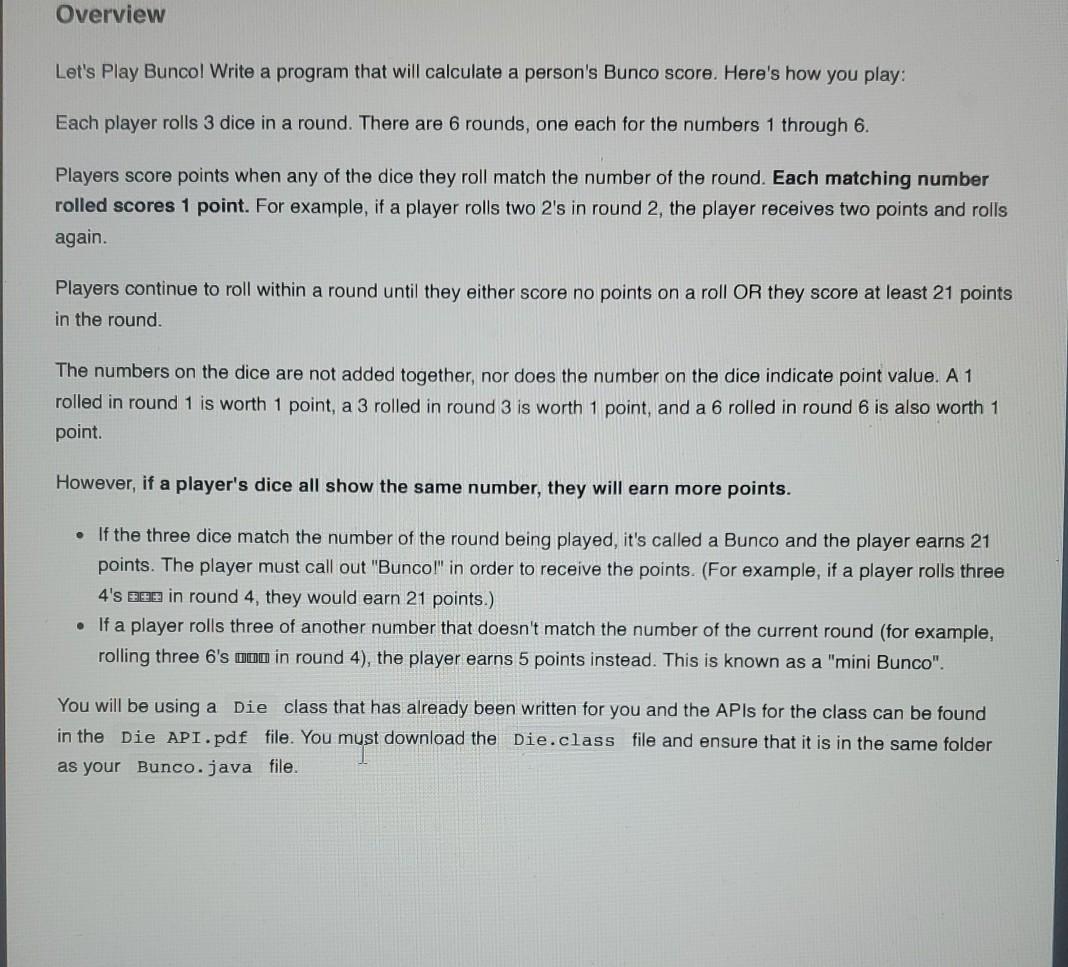
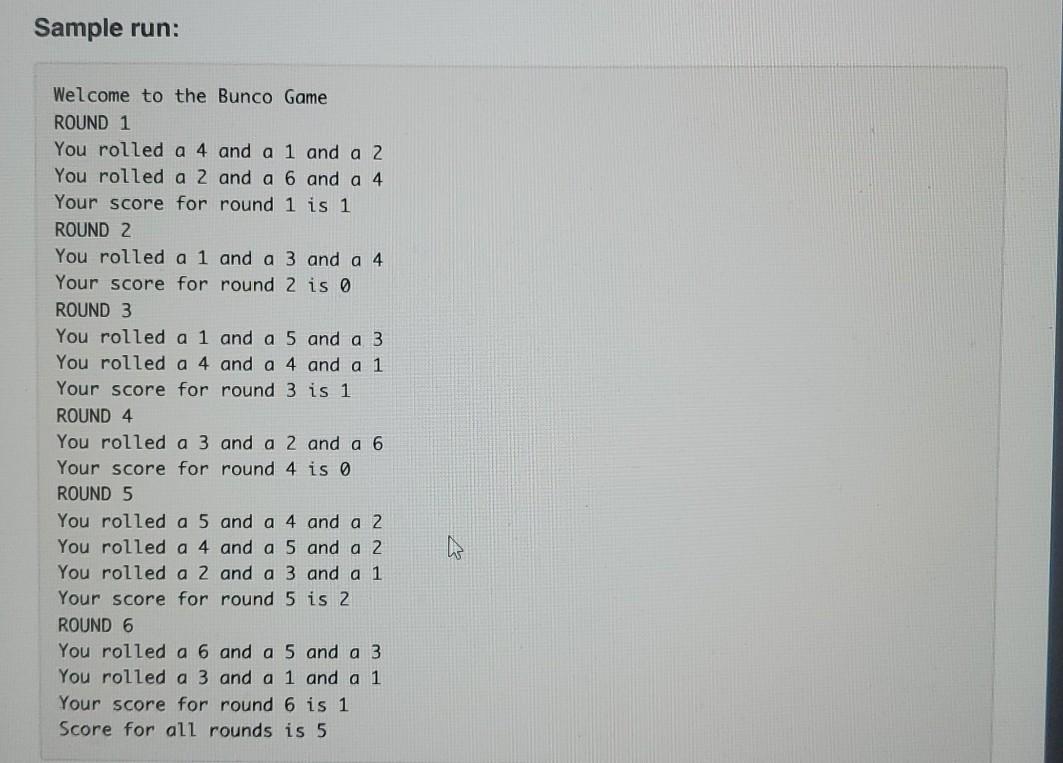
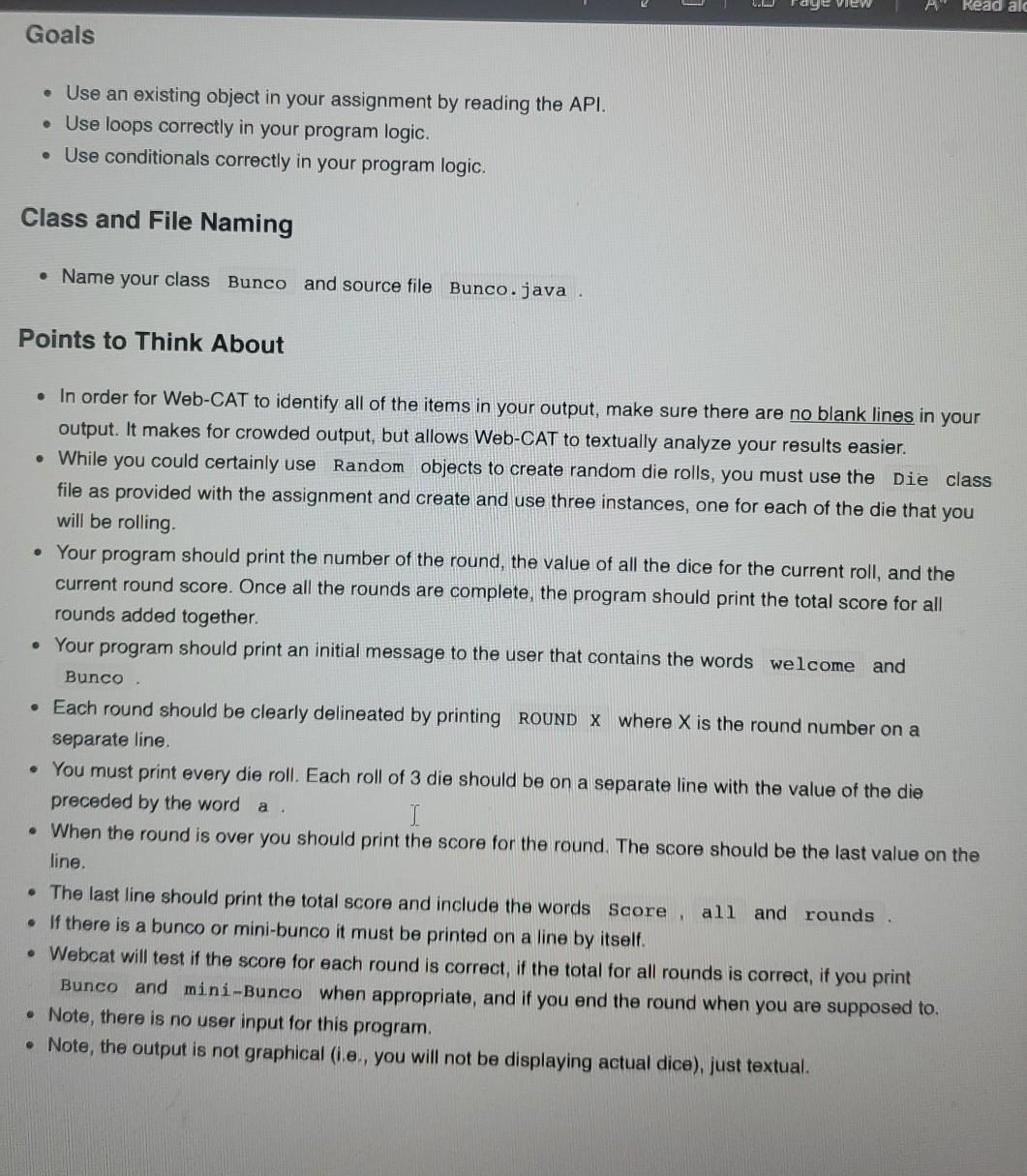
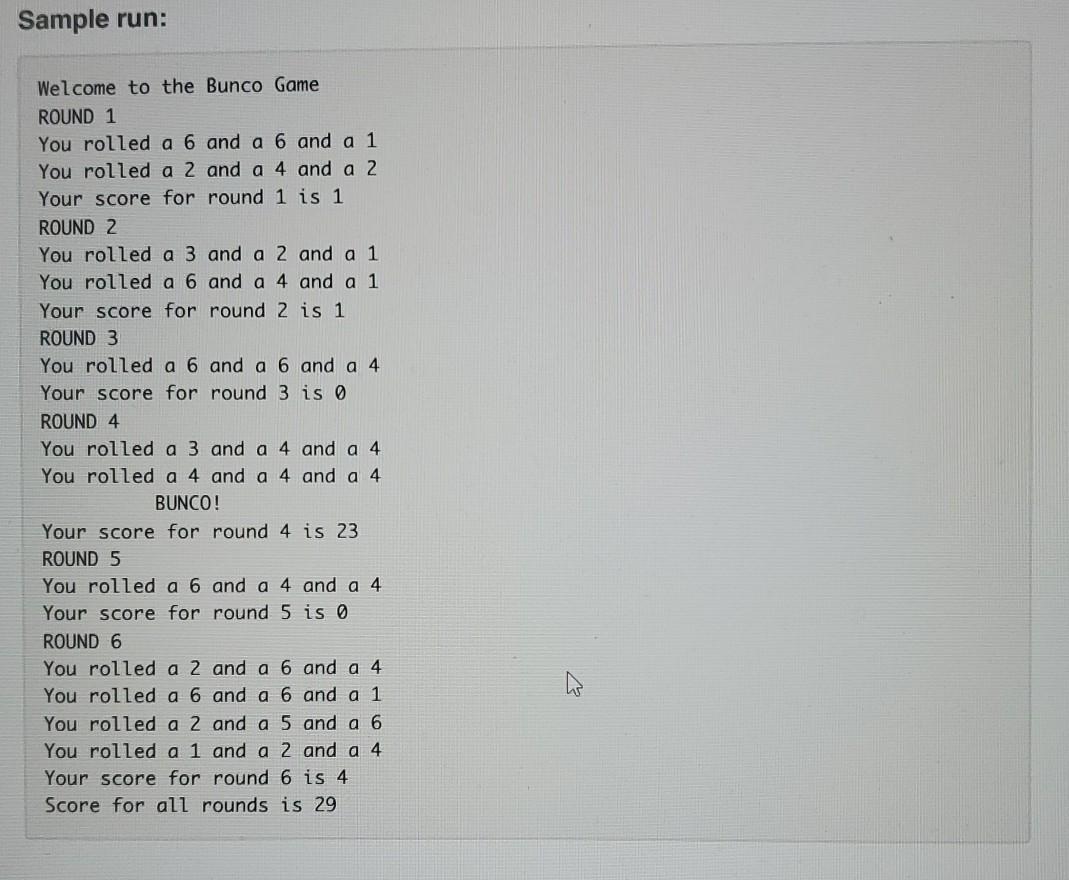
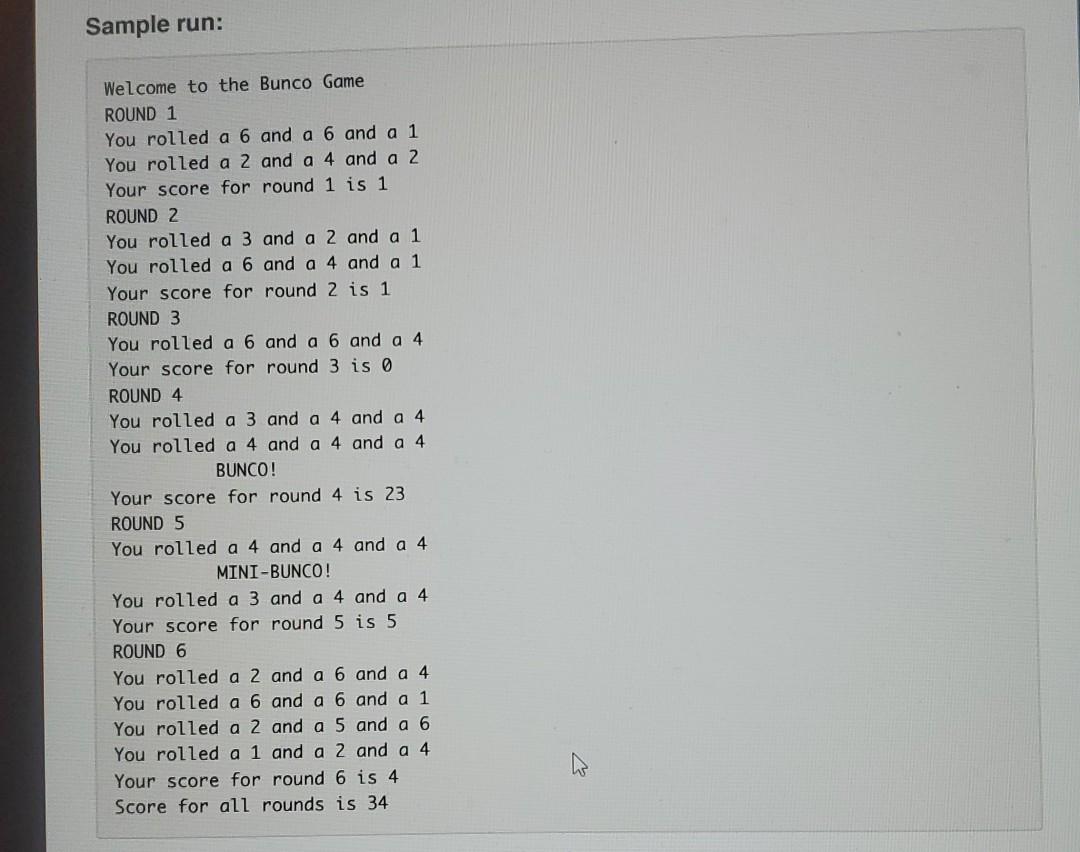
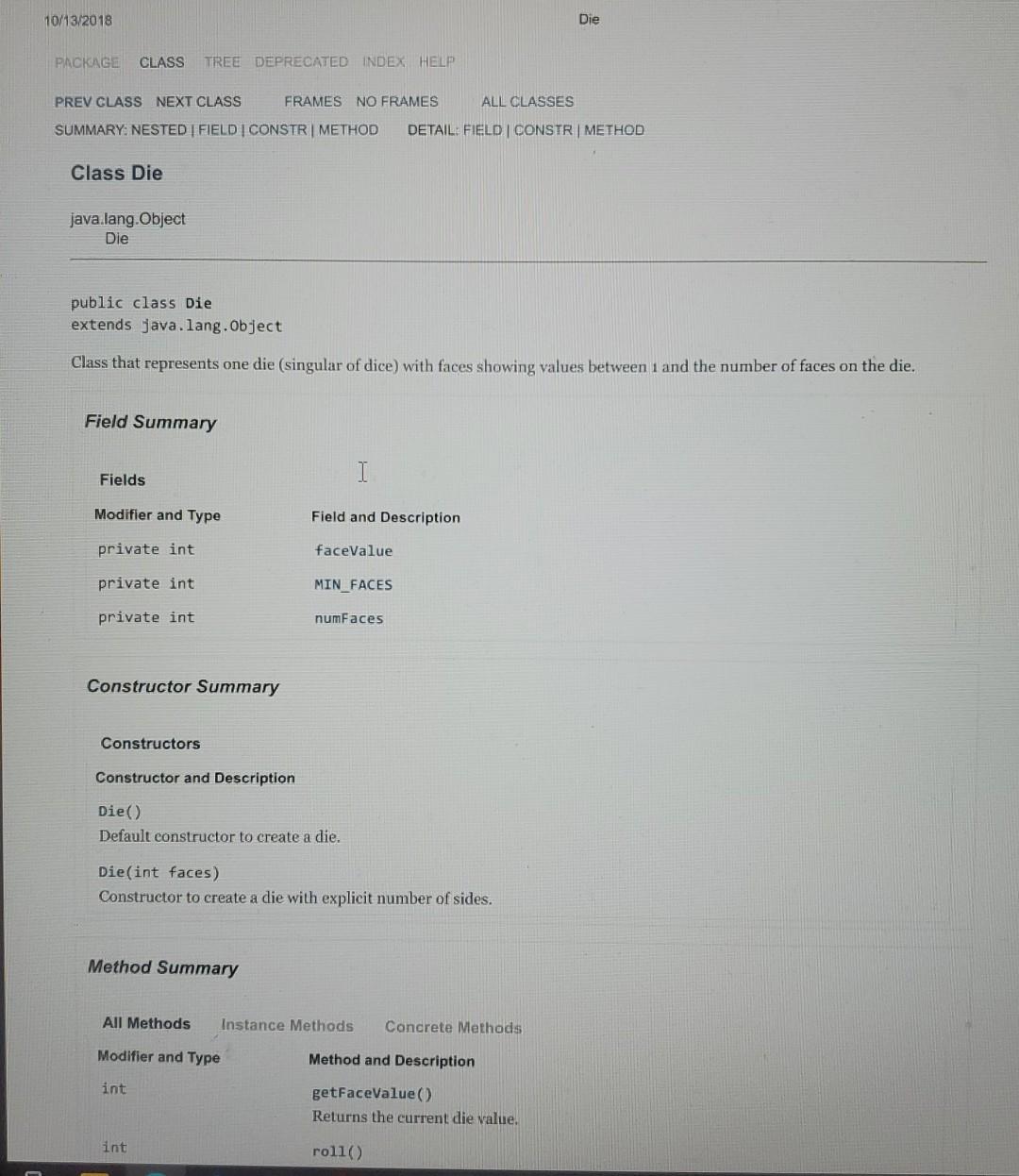
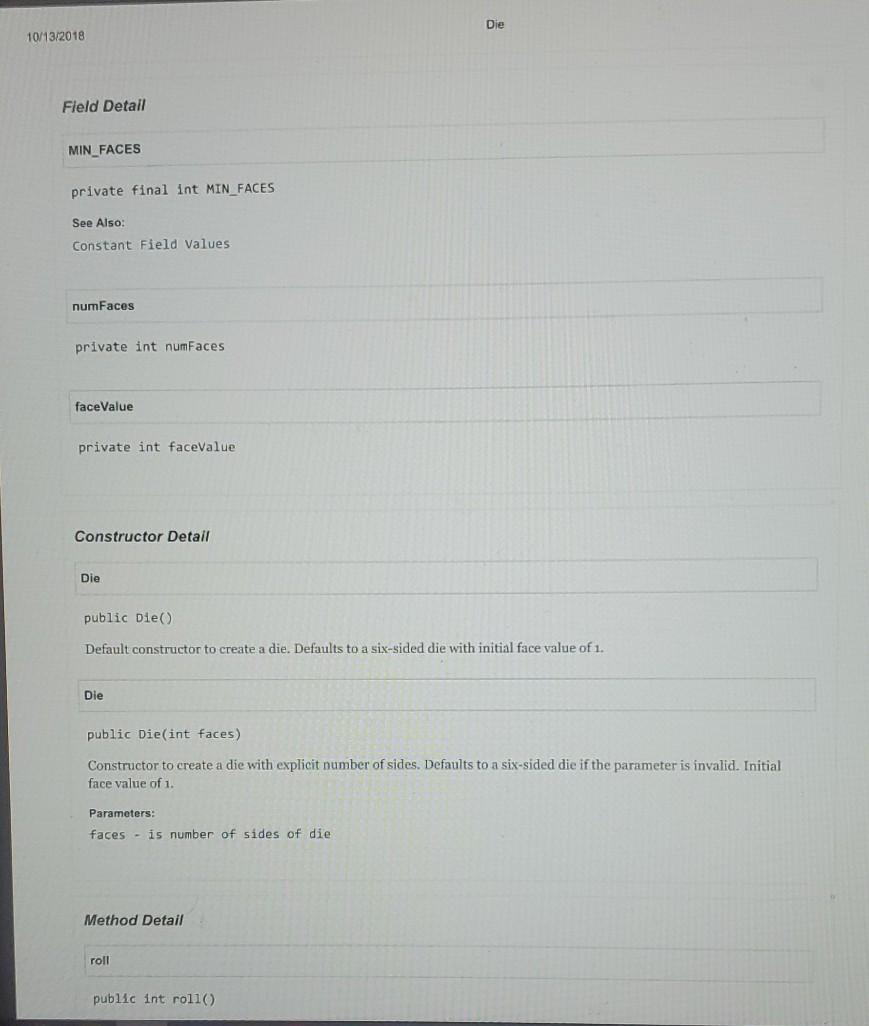
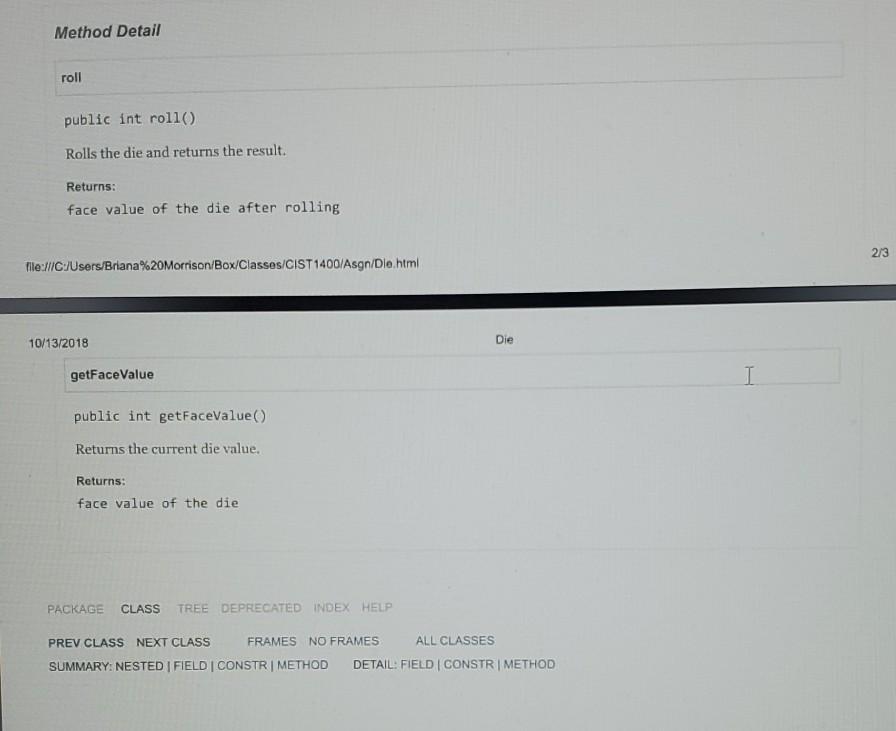
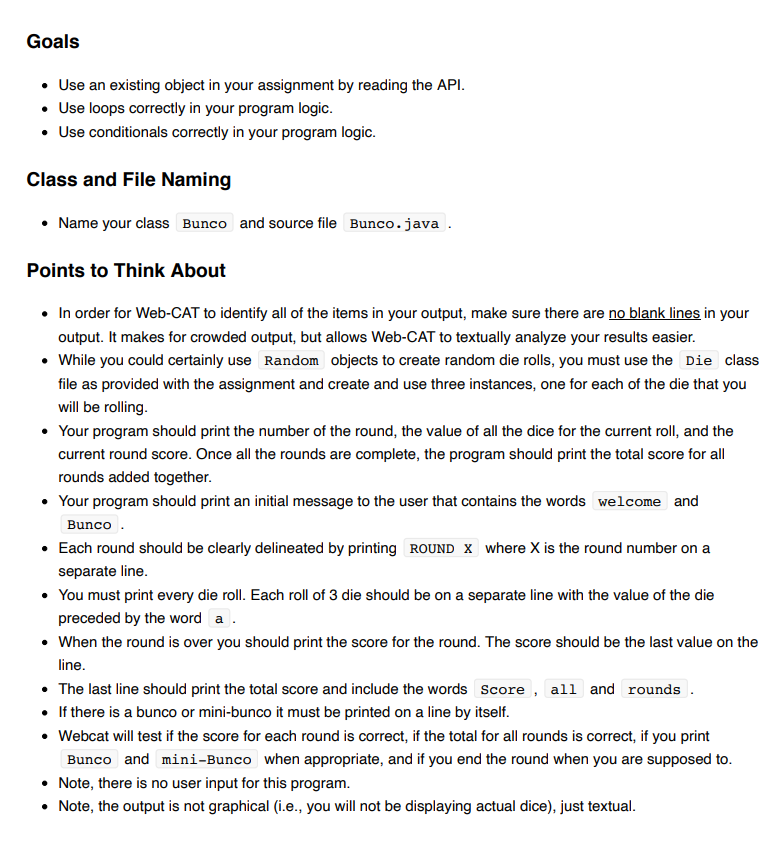
Overview Let's Play Buncol Write a program that will calculate a person's Bunco score. Here's how you play: Each player rolls 3 dice in a round. There are 6 rounds, one each for the numbers 1 through 6. Players score points when any of the dice they roll match the number of the round. Each matching number rolled scores 1 point. For example, if a player rolls two 2's in round 2, the player receives two points and rolls again Players continue to roll within a round until they either score no points on a roll OR they score at least 21 points in the round. The numbers on the dice are not added together, nor does the number on the dice indicate point value. A 1 rolled in round 1 is worth 1 point, a 3 rolled in round 3 is worth 1 point, and a 6 rolled in round 6 is also worth 1 point. However, if a player's dice all show the same number, they will earn more points. If the three dice match the number of the round being played, it's called a Bunco and the player earns 21 points. The player must call out "Bunco!" in order to receive the points. (For example, if a player rolls three 4's 200 in round 4, they would earn 21 points.) . If a player rolls three of another number that doesn't match the number of the current round (for example, rolling three 6's non in round 4), the player earns 5 points instead. This is known as a "mini Bunco". You will be using a Die class that has already been written for you and the APIs for the class can be found in the Die API.pdf file. You must download the Die.class file and ensure that it is in the same folder as your Bunco.java file. Sample run: Welcome to the Bunco Game ROUND 1 You rolled a 4 and a 1 and a 2 You rolled a 2 and a 6 and a 4 Your score for round 1 is 1 ROUND 2 You rolled a 1 and a 3 and a 4 Your score for round 2 is 0 ROUND 3 You rolled a 1 and a 5 and a 3 You rolled a 4 and a 4 and a 1 Your score for round 3 is 1 ROUND 4 You rolled a 3 and a 2 and a 6 Your score for round 4 is 0 ROUND 5 You rolled a 5 and a 4 and a 2 You rolled a 4 and a 5 and a 2 You rolled a 2 and a 3 and a 1 Your score for round 5 is 2 ROUND 6 You rolled a 6 and a 5 and a 3 You rolled a 3 and a 1 and a 1 Your score for round 6 is 1 Score for all rounds is 5 Read alc Goals Use an existing object in your assignment by reading the API. Use loops correctly in your program logic. Use conditionals correctly in your program logic. Class and File Naming Name your class Bunco and source file Bunco.java Points to Think About In order for Web-CAT to identify all of the items in your output, make sure there are no blank lines in your output. It makes for crowded output, but allows Web-CAT to textually analyze your results easier. While you could certainly use Random objects to create random die rolls, you must use the Die class file as provided with the assignment and create and use three instances, one for each of the die that you will be rolling Your program should print the number of the round, the value of all the dice for the current roll, and the current round score. Once all the rounds are complete, the program should print the total score for all rounds added together. Your program should print an initial message to the user that contains the words welcome and Bunco. Each round should be clearly delineated by printing ROUND X where X is the round number on a separate line. You must print every die roll. Each roll of 3 die should be on a separate line with the value of the die preceded by the word a I When the round is over you should print the score for the round. The score should be the last value on the line. The last line should print the total score and include the words Score , all and rounds If there is a bunco or mini-bunco it must be printed on a line by itself. Webcat will test if the score for each round is correct, if the total for all rounds is correct, if you print Bunco and mini-Bunco when appropriate, and if you end the round when you are supposed to. Note, there is no user input for this program, Note, the output is not graphical (ie., you will not be displaying actual dice), just textual. Sample run: Welcome to the Bunco Game ROUND 1 You rolled a 6 and a 6 and a 1 You rolled a 2 and a 4 and a 2 Your score for round 1 is 1 ROUND 2 You rolled a 3 and a 2 and a 1 You rolled a 6 and a 4 and a 1 Your score for round 2 is 1 ROUND 3 You rolled a 6 and a 6 and a 4 Your score for round 3 is o ROUND 4 You rolled a 3 and a 4 and a 4 You rolled a 4 and a 4 and a 4 BUNCO! Your score for round 4 is 23 ROUND 5 You rolled a 6 and a 4 and a 4 Your score for round 5 is 0 ROUND 6 You rolled a 2 and a 6 and a 4 You rolled a 6 and a 6 and a 1 You rolled a 2 and a 5 and a 6 You rolled a 1 and a 2 and a 4 Your score for round 6 is 4 Score for all rounds is 29 Sample run: Welcome to the Bunco Game ROUND 1 You rolled a 6 and a 6 and a 1 You rolled a 2 and a 4 and a 2 Your score for round 1 is 1 ROUND 2 You rolled a 3 and a 2 and a 1 You rolled a 6 and a 4 and a 1 Your score for round 2 is 1 ROUND 3 You rolled a 6 and a 6 and a 4 Your score for round 3 is 0 ROUND 4 You rolled a 3 and a 4 and a 4 You rolled a 4 and a 4 and a 4 BUNCO! Your score for round 4 is 23 ROUND 5 You rolled a 4 and a 4 and a 4 MINI-BUNCO! You rolled a 3 and a 4 and a 4 Your score for round 5 is 5 ROUND 6 You rolled a 2 and a 6 and a 4 You rolled a 6 and a 6 and a 1 You rolled a 2 and a 5 and a 6 You rolled a 1 and a 2 and a 4 Your score for round 6 is 4 Score for all rounds is 34 a 10/13/2018 Die PACKAGE CLASS TREE DEPRECATED INDEX HELP PREV CLASS NEXT CLASS FRAMES NO FRAMES ALL CLASSES SUMMARY: NESTED FIELD | CONSTR METHOD DETAIL: FIELD CONSTR | METHOD Class Die java.lang. Object Die public class Die extends java.lang.Object Class that represents one die (singular of dice) with faces showing values between 1 and the number of faces on the die. Field Summary Fields I Modifier and Type Field and Description private int faceValue private int MIN_FACES private int numFaces Constructor Summary Constructors Constructor and Description Die ) Default constructor to create a die. Die(int faces) Constructor to create a die with explicit number of sides. Method Summary All Methods Instance Methods Concrete Methods Modifier and Type Method and Description int getFaceValue Returns the current die value. int roll() Die 10/13/2018 Field Detail MIN FACES private final int MIN_FACES See Also: Constant Field Values numFaces private int numFaces faceValue private int faceValue Constructor Detail Die public Die Default constructor to create a die. Defaults to a six-sided die with initial face value of 1. Die public Die(int faces) Constructor to create a die with explicit number of sides. Defaults to a six-sided die if the parameter is invalid. Initial face value of 1. Parameters: faces - is number of sides of die Method Detail roll public int roll) Method Detail roll public int roll() Rolls the die and returns the result. Returns: face value of the die after rolling 2/3 file:///C:Users/Briana%20Morrison/Box/Classes/CIST1400/Asgn/Dle html 10/13/2018 Die getFaceValue I I public int getFaceValue() Returns the current die value. Returns: face value of the die PACKAGE CLASS TREE DEPRECATED INDEX HELP PREV CLASS NEXT CLASS FRAMES NO FRAMES ALL CLASSES SUMMARY: NESTED FIELD CONSTR | METHOD DETAIL: FIELD I CONSTR | METHOD Goals Use an existing object in your assignment by reading the API. Use loops correctly in your program logic. Use conditionals correctly in your program logic. Class and File Naming Name your class Bunco and source file Bunco.java Points to Think About In order for Web-CAT to identify all of the items in your output, make sure there are no blank lines in your output. It makes for crowded output, but allows Web-CAT to textually analyze your results easier. While you could certainly use Random objects to create random die rolls, you must use the die class file as provided with the assignment and create and use three instances, one for each of the die that you will be rolling. Your program should print the number of the round, the value of all the dice for the current roll, and the current round score. Once all the rounds are complete, the program should print the total score for all rounds added together. Your program should print an initial message to the user that contains the words welcome and Bunco Each round should be clearly delineated by printing ROUND X where X is the round number on a separate line. You must print every die roll. Each roll of 3 die should be on a separate line with the value of the die preceded by the word a. When the round is over you should print the score for the round. The score should be the last value on the line. The last line should print the total score and include the words Score, all and rounds If there is a bunco or mini-bunco it must be printed on a line by itself. Webcat will test if the score for each round is correct, if the total for all rounds is correct, if you print Bunco and mini-Bunco when appropriate, and if you end the round when you are supposed to. Note, there is no user input for this program. Note, the output is not graphical (i.e., you will not be displaying actual dice), just textual
Step by Step Solution
There are 3 Steps involved in it

Get step-by-step solutions from verified subject matter experts
 Study Help