







Question: Hello, how can I convert this to C code? Analyze the x86-64 assembly given below. For this question in particular, you'll want to look at
Hello, how can I convert this to C code?
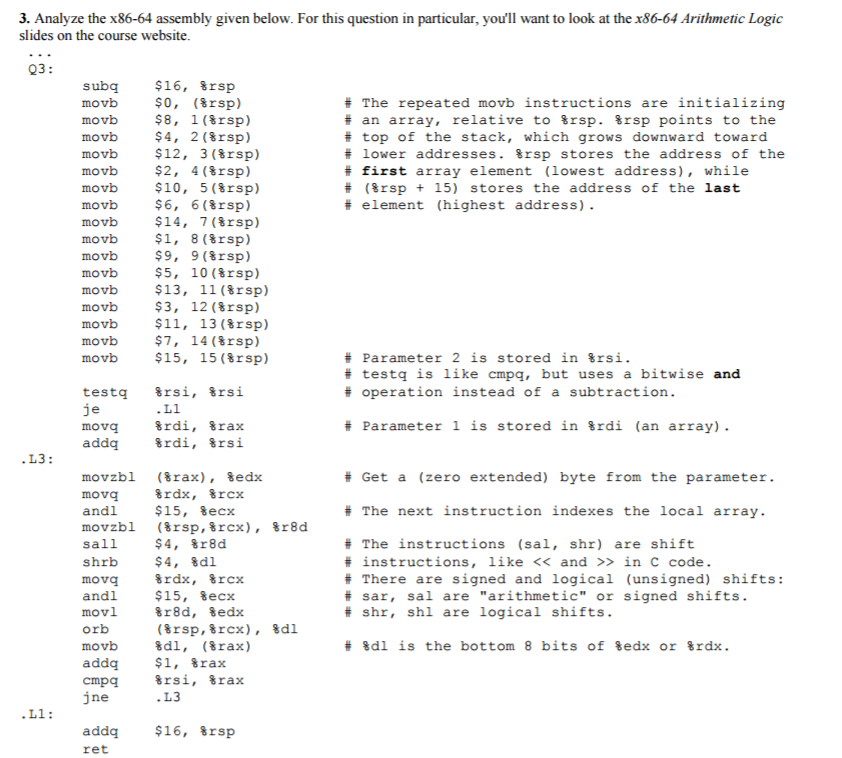
Analyze the x86-64 assembly given below. For this question in particular, you'll want to look at the x86-64 Arithmetic Logic slides on the course website. ... Q3: subq $16, %rsp movb $0, (%rsp) # The repeated movb instructions are initializing movb $8, 1(%rsp) #an array, relative to %rsp. %rsp points to the movb $4, 2(%rsp) # top of the stack, which grows downward toward movb $12, 3(%rsp) #lower addresses. %rsp stores the address of the movb $2, 4(%rsp) # first array element (lowest address), while movb $10, 5(%rsp) # (%rsp + 15) stores the address of the last movb $6, (%rsp) #element (highest address). movb $14, 7(%rsp) movb $1, 8(%rsp) movb $9, 9(%rsp) movb $5, 10(%rsp) movb $13, 11(%rsp) movb $3, 12(%rsp) movb $11, 13(%rsp) movb $7, 14(%rsp) movb $15, 15(%rsp) #parameter 2 is stored in %rsi. # testq is like cmpq, but uses a bitwise and testq %rsi, %rsi # operation instead of a subtraction. je .L1 movq %rdi, %rax # parameter 1 is stored %rdi (an array). addq %rdi, %rsi .L3: movzb1 (%rax), %edx # Get a (zero extended) byte from the parameter. movq %rdx, %rcx and1 $15, %ecx # The next instruction indexes the local array. movzbl (%rsp, %rcx), %r8d sall $4, %r8d # The instructions (sa1, shr) are shift shrb $4, %d1 # instructions, like > in C code. movq %rdx, %rcx # There are signed and logical (unsigned) shifts: and1 $15, %ecx #sar, sal are "arithmetic" or signed shifts. mov1 %r8d, %edx #shr, shl are logical shifts. orb (%rsp, %rcx), %d1 movb %dl, (%rax) # %dl is the bottom 8 bits of %edx for %rdx. addq $1, %rax cmpq %rsi, %rax jne .L3 .L1: addq $16, %rsp ret
Step by Step Solution
There are 3 Steps involved in it

Get step-by-step solutions from verified subject matter experts
 Study Help