







Question: Hello! I am a having issues getting my print statement to display the four words as instructed above. I manually looked through the list and
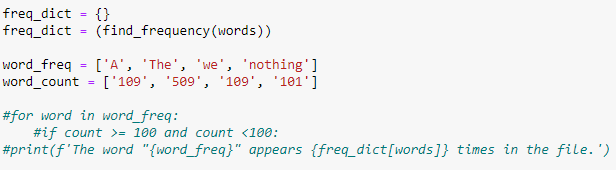
Hello! I am a having issues getting my print statement to display the four words as instructed above. I manually looked through the list and pulled the four words listed in word_freq. How would I write the program to display the four words and their counts? Any help would be appreciated.
Thank you!
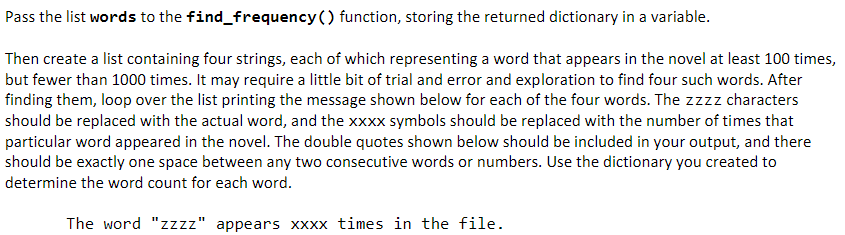
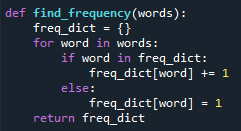
Pass the list words to the find_frequency() function, storing the returned dictionary in a variable. Then create a list containing four strings, each of which representing a word that appears in the novel at least 100 times, but fewer than 1000 times. It may require a little bit of trial and error and exploration to find four such words. After finding them, loop over the list printing the message shown below for each of the four words. The zzzz characters should be replaced with the actual word, and the xxXX symbols should be replaced with the number of times that particular word appeared in the novel. The double quotes shown below should be included in your output, and there should be exactly one space between any two consecutive words or numbers. Use the dictionary you created to determine the word count for each word. The word "zzzz" appears xxxx times in the file. def find_frequency(words): freq_dict ={} for word in words: if word in freq_dict: freq_dict[word] +=1 else: freq_dict[word] =1 return freq_dict freq_dict ={} freq_dict =(find_frequency(words)) word_freq =[ 'A', 'The', 'we ', 'nothing'] word_count =[109 ', '509', '109', '101'] \#for word in word_freq: \#if count >=100 and count } " appears \{freq_dict[words]\} times in the file.')
Step by Step Solution
There are 3 Steps involved in it

Get step-by-step solutions from verified subject matter experts
 Study Help