







Question: Hello! I am getting an error in Python in one spot, I'm going to upload my whole code but i'll space out what the problem
Hello! I am getting an error in Python in one spot, I'm going to upload my whole code but i'll space out what the problem text is
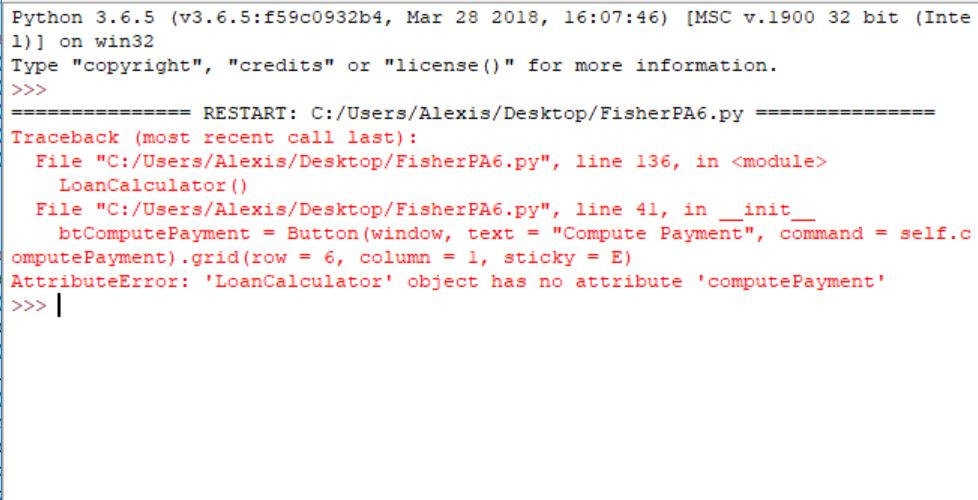
Here is the error I'm getting
 Here;s My code, I'll put big spaces and bold where the problem line is
from tkinter import * import tkinter.messagebox from tkinter import ttk import tkinter.simpledialog import tkinter as tk
#Classes and make window class LoanCalculator: def __init__(self): window = Tk() window.title("Loan Calculator")
#Gui stuff Label(window, text = "Annual Interest Rate").grid(row = 1, column = 1, sticky = W) Label(window, text = "Number of Years").grid(row = 2, column = 1, sticky = W) Label(window, text = "Loan value").grid(row = 3, column = 1, sticky = W) Label(window, text = "Monthly Payment value").grid(row = 4, column = 1, sticky = W) Label(window, text = "Total Payment value").grid(row = 5, column = 1, sticky = W)
#second part self.annualInterestRateVar = StringVar() Entry(window, textvariable = self.annualInterestRateVar, justify = RIGHT).grid(row = 1, column = 2) self.numberOfYearsVar = StringVar() Entry(window, textvariable = self.numberOfYearsVar, justify = RIGHT).grid(row = 2, column = 2) self.loanAmountVar = StringVar() Entry(window, textvariable = self.loanAmountVar, justify = RIGHT).grid(row = 3, column = 2) self.monthlyPaymentVar = StringVar() lblMonthlyPayment = Label(window, textvariable = self.monthlyPaymentVar).grid(row = 4, column = 2, sticky = E) self.totalPaymentVar = StringVar() lblTotalPayment = Label(window, textvariable = self.totalPaymentVar).grid(row = 5, column = 2, sticky = E)
#Payment and save buttons! btComputePayment = Button(window, text = "Compute Payment", command = self.computePayment).grid(row = 6, column = 1, sticky = E) btSaveLoantoFile = Button(window, text = "Save Loan to File", command = self.saveFile).grid(row = 6, column = 2, sticky = E)
#DOUBLE CHECK INDENTS!!!!!!!!!!!! self.twidget = Text(window, width=80, height=24, wrap='none') self.twidget.grid(column = 1, columnspan = 2) #loop it real good window.mainloop() #Part 3 def computePayment(self): try:
self.twidget.insert(1.0, "") monthlyPayment = self.getMonthlyPayment( float(self.loanAmountVar.get()), float(self.annualInterestRateVar.get()) / 1200, int(self.numberOfYearsVar.get())) self.monthlyPaymentVar.set(format(monthlyPayment, '10.2f')) totalPayment = float(monthlyPayment) * 12 \ * int(self.numberOfYearsVar.get()) self.totalPaymentVar.set(format(totalPayment, '10.2f'))
#amortization from accounting to each object loanAmount = int(self.loanAmountVar.get()) annualInterestRate = float(self.annualInterestRateVar.get()) numberOfYears = int(self.numberOfYearsVar.get()) monthlyPayment = float(self.monthlyPaymentVar.get()) totalPayment = float(self.totalPaymentVar.get()) monthlyInterestRate = annualInterestRate / 12 #COUBLE CHECK SPELLING BELOW textForWidget = "" s = "" begBal = loanAmount s = " Pmt# " "\t\t Interest" "\t\t Prin Pmt" "\t\t Remaining Prin" + " " textForWidget = textForWidget + s for i in range(1, numberOfYears * 12 + 1): interestAmount = round(begBal * (annualInterestRate / (12 * 100.0)), 2) principalAmount = round(monthlyPayment - interestAmount, 2) endingBalance = round(begBal - principalAmount, 2) begBal = endingBalance s = "{0:d}\t\t{1:>8} \t\t{2:>8}\t\t{3:>10} ".format(i, "$"+str(format(interestAmount, ",.2f")), "$"+str(format(principalAmount, ",.2f")), "$"+str(format(endingBalance,",.2f"))) textForWidget = textForWidget + s
self.twidget.insert(1.0, textForWidget) #if then error statement! except ValueError: tkinter.messagebox.showerror("Calculation Error", "Please make sure to enter numeric values for interest rate, years, and loan amount")
#Quad check with textbook! def getMonthlyPayment(self, loanAmount, monthlyInterestRate, numberOfYears): monthlyPayment = loanAmount * monthlyInterestRate / (1- 1 / (1 + monthlyInterestRate) ** (numberOfYears * 12)) return monthlyPayment;
def saveFile(self): loanAmount = int(self.loanAmountVar.get()) annualInterestRate = float(self.annualInterestRateVar.get()) numberOfYears = int(self.numberOfYearsVar.get()) monthlyPayment = float(self.monthlyPaymentVar.get()) totalPayment = float(self.totalPaymentVar.get()) monthlyInterestRate = annualInterestRate / 12 name = tkinter.simpledialog.askstring("Loan Recipient", "Enter the name of the loan recipient") #New file New name!! filename = name + "loan document.txt" outfile = open(filename, "w") #top name of file! header = "\t\t\t Loan Document for " + name outfile.write(header) #spacing for file line1 = " Loan Amount: ${0:,.2f}\t Interest Rate: {1:.2f}% \t\t Nbr Years: {2:d} " .format(loanAmount, annualInterestRate,numberOfYears) outfile.write(line1) line2 = "Monthly Payment: ${0:,.2f} \t\t Total Payment: ${1:,.2f} ".format(monthlyPayment, totalPayment) outfile.write(line2) line3 = " Amortization Schedule:" + " " outfile.write(line3) line4 = " Pmt# " "\t\t Interest" "\t\t Prin Pmt" "\t\t Remaining Prin" + " " outfile.write(line4) begBal = loanAmount
#Part DONEEEE for i in range(1, numberOfYears * 12 + 1): interestAmount = round(begBal * (annualInterestRate / (12 * 100.0)), 2) principalAmount = round(monthlyPayment - interestAmount, 2) endingBalance = round(begBal - principalAmount, 2) begBal = endingBalance s = "{0:d}\t\t{1:>15} \t\t{2:>15}\t\t{3:>10} ".format(i, "$"+str(format(interestAmount, ",.2f")), "$"+str(format(principalAmount, ",.2f")), "$"+str(format(endingBalance,",.2f"))) outfile.write(s) #Closing outfile.close() LoanCalculator()
Python 3.6.5 (v3.6.5:f59c0932b4, Mar 28 2018, 16:07:46) [MSC v.1900 32 bit (Inte 1) on win32 Type "copyright", "credits" or "license" for more information. RESTART : C:/Users/Alex? s/ Desktop/ FisherPA6 .py = Traceback (most recent call last) File "C:/Users/Alexis/Desktop/FisherPA6.py, line 136, in
Step by Step Solution
There are 3 Steps involved in it

Get step-by-step solutions from verified subject matter experts
 Study Help