







Question: Hello, I am having difficulty connecting CSS and HTML using notepad++. I have created the main.css file and the HTML file both of which are
Hello, I am having difficulty connecting CSS and HTML using notepad++. I have created the main.css file and the HTML file both of which are listed below, however the functionality works but the page is not styled. Please see the code below:
This is the main.css code
body { font: 15px arial, sans-serif; color: #808080; } input[type=text], select ,input[type=password],radio{ width: 100%; padding: 12px 20px; margin: 8px 0; display: inline-block; border: 1px solid #ccc; border-radius: 4px; box-sizing: border-box; } input[type=submit] { width: 100%; background-color: #800D1E; color: white; padding: 14px 20px; margin: 8px 0; border: none; border-radius: 4px; cursor: pointer; } input[type=submit]:hover { background-color: #802F1E; } section { border-radius: 5px; background-color: #f2f2f2; padding: 20px; } article { border-radius: 5px; background-color: #CCCCCC; padding: 20px; color: #222222; } ul.topnav { list-style-type: none; margin: 0; padding: 0; overflow: hidden; background-color: #333; } ul.topnav li { float: left; } ul.topnav li a { display: block; color: white; text-align: center; padding: 14px 16px; text-decoration: none; } ul.topnav li a:hover:not(.active) { background-color: #111; } ul.topnav li a.active { background-color: #CCCCCC; color: #333 } ul.topnav li.right { float: right; } @media screen and (max-width: 600px) { ul.topnav li.right, ul.topnav li { float: none; } } .top { position: relative; background-color: #ffffff; height: 68px; padding-top: 20px; line-height: 50px; overflow: hidden; z-index: 2; } .logo { font-family: arial; text-decoration: none; line-height: 1; -webkit-font-smoothing: antialiased; -moz-osx-font-smoothing: grayscale; font-size: 37px; letter-spacing: 3px; color: #555555; display: block; position: absolute; top: 17px; } .logo .dotcom { color: #800D1E } .topnav { position: relative; z-index: 2; font-size: 17px; background-color: #5f5f5f; color: #f1f1f1; width: 100%; padding: 0; letter-spacing: 1px; } .top .logo { position: relative; top: 0; width: 100%; text-align: left; margin: auto } footer { position: absolute; right: 0; bottom: 0; left: 0; padding: 1rem; background-color: #efefef; text-align: center; } div.gallery { margin: 5px; border: 1px solid #ccc; float: left; width: 180px; } div.gallery:hover { border: 1px solid #777; } div.gallery img { width: 100%; height: auto; } div.desc { padding: 15px; text-align: center; }
Below is the code of one of the HTML pages I need the above CSS file to connect to to correctly style the HTML page :
CapellaVolunteers.org
- Home
- Invitation
- Gallery
- Registration
Hello !
You have been invited to volunteer for an event held by on . Please come to the following website: to sign up as a volunteer.
Thanks!
// Get references to the form and the elements
const form = document.getElementById("invitationForm");
const recipientName = document.getElementById("recipientName");
const organizationName = document.getElementById("organizationName");
const eventDate = document.getElementById("eventDate");
const websiteURL = document.getElementById("websiteURL");
const hostName = document.getElementById("hostName");
// Add a listener to the form for when it is submitted
form.addEventListener("submit", function(event) {
// Prevent the form from submitting normally
event.preventDefault();
// Get the input values and store them in variables
const recipientNameValue = recipientNameInput.value;
const organizationNameValue = organizationNameInput.value;
const eventDateValue = eventDateInput.value;
const websiteURLValue = websiteURLInput.value;
const hostNameValue = hostNameInput.value;
// Update the HTML with the input values
recipientName.innerText = recipientNameValue;
organizationName.innerText = organizationNameValue;
eventDate.innerText = eventDateValue;
websiteURL.innerText = websiteURLValue;
hostName.innerText = hostNameValue;
// Hide the form and show the invitation content
form.style.display = "none";
placeholderContent.style.display = "block";
});
Below is the image of what I'm seeing from my screen:
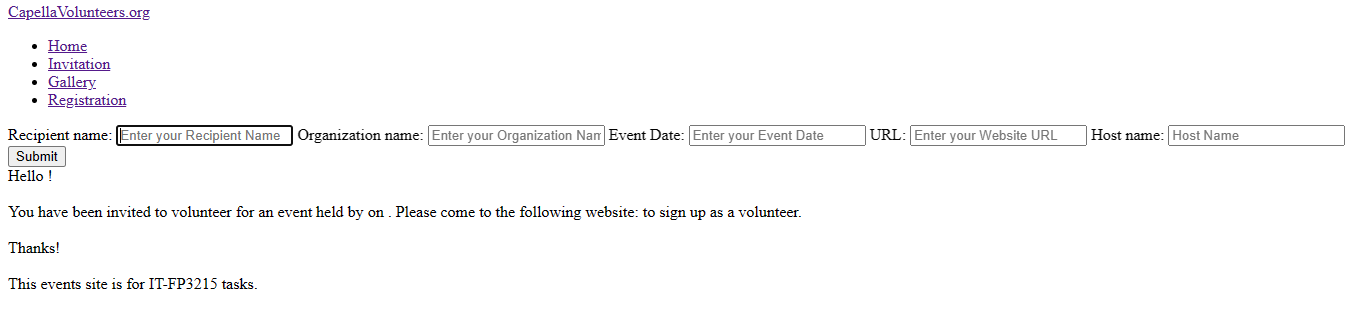
- Invitation - Gallery - Registration Recipient name: Organization name: Event Date: URL: Host name: Hello ! You have been invited to volunteer for an event held by on . Please come to the following website: to sign up as a volunteer. Thanks! This events site is for IT-FP3215 tasks
Step by Step Solution
There are 3 Steps involved in it

Get step-by-step solutions from verified subject matter experts
 Study Help