







Question: Hello, I am having some trouble creating a program that will create a food order consisting of food items displayed from a menu. Each item
Hello, I am having some trouble creating a program that will create a food order consisting of food items displayed from a menu. Each item is selected and given a certain quantity. The order and its total price are displayed. The classes used are:
Item.java (food item and its price)
Menu.java (list of food items)
ItemQty.java (a food item and quantity thereof)
Order.java (list of item/quantity choices)
CreateOrder.java (main class)
I have created every class, however I am having some trouble completing the Order class. Here is what I have so far
import java.util.ArrayList;
public class Order {
private final ArrayList order;
public Order() { order = new ArrayList(); }
public void addToOrder(ItemQty itemQty) { }
public double getTotalPrice() { }
@Override public String toString() { return String.format("%s", order.listIterator()); } }
Here is a UML Diagram and description of what each class should do.
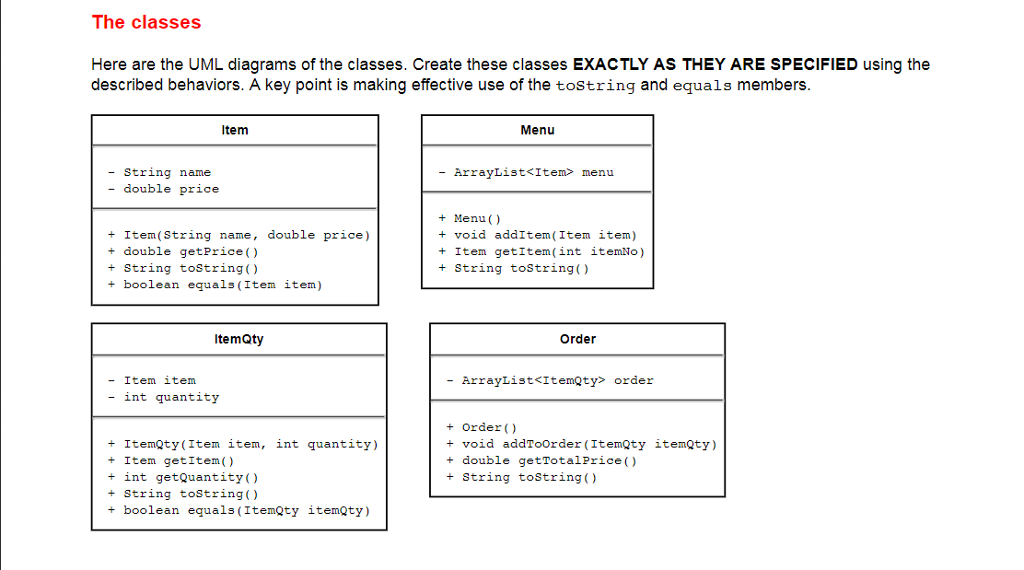
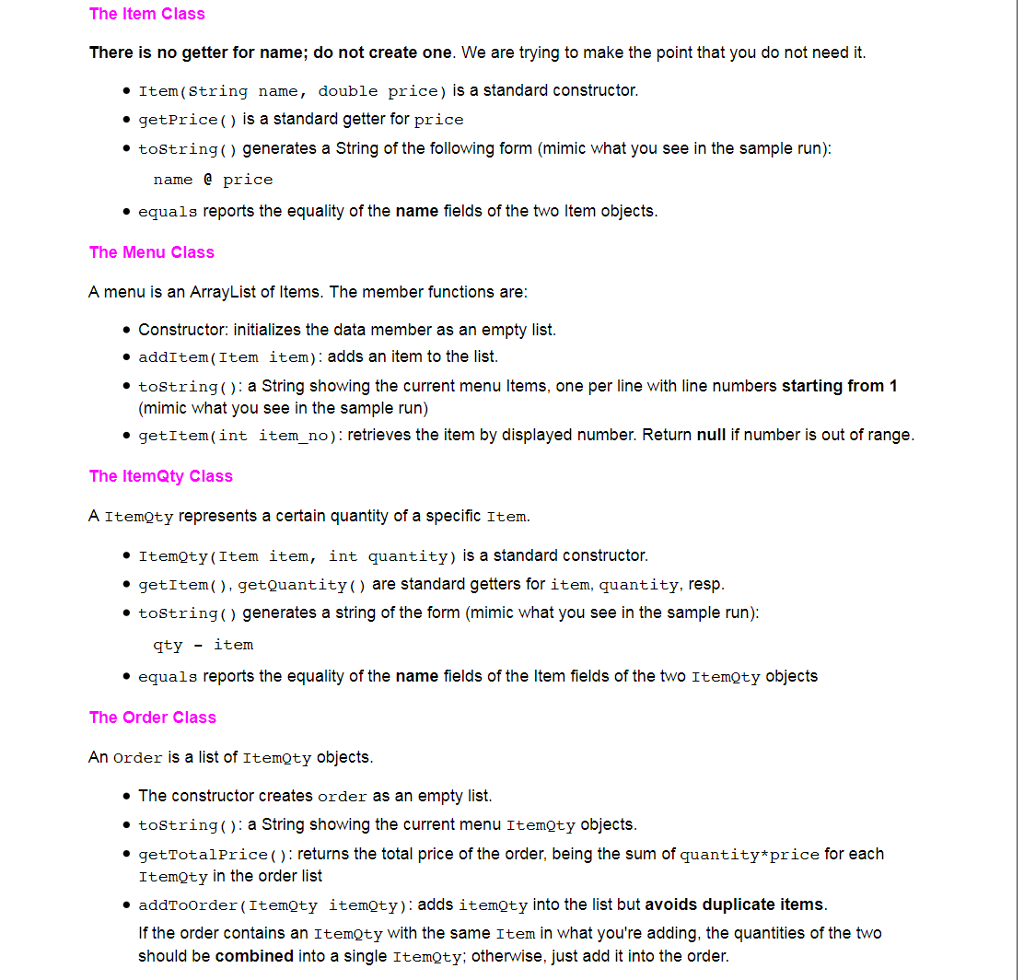
I am not sure if I made the toString method correctly, and I don't know how to get the item price/amount from the arraylist. Any help would be greatly appreciated.
I also can post my other classes if you wish to see them.
Thank You
EDIT: 11/11/2017
I have done everything up to but I'm having trouble with one method, AddToOrder. It is supposed to see if the object ItemQty in the arraylist already exists, and if so add the amount to that objects elements, otherwise add an entirely new object.
Here is the method,
public void addToOrder(ItemQty itemQty) { if (order.contains(itemQty)) { int index = order.indexOf(itemQty.getItem()); int quantity = order.get(index).getQuantity(); ItemQty newItem = new ItemQty(itemQty.getItem(), (quantity + itemQty.getQuantity())); order.set(index, newItem); System.out.println("Modified Item"); } else { order.add(itemQty); System.out.println("Added new item"); } }
Here is all of my classes.
CREATEORDER CLASS
import javax.swing.JOptionPane; import javax.swing.JTextField;
public class CreateOrder {
public static void main(String[] args) { Menu deli = new Menu();
deli.addItem(new Item("Nachos", 7.79)); deli.addItem(new Item("Buffalo Wings", 5.99)); deli.addItem(new Item("Egg Rolls", 4.99)); deli.addItem(new Item("Tostada Chips", 1.99)); deli.addItem(new Item("Chicken Fajita Salad", 6.89));
Order order = new Order();
JTextField itemIdField = new JTextField(); JTextField quantityField = new JTextField();
Object[] options = {"Add", "Stop"};
while (true) {
// the message "stack" used in the OptionDialog Object[] messages = { "----- DELI MENU ----", deli + " ", // toString needed "item num:", itemIdField, "quantity:", quantityField, "current order:", order, // toString needed String.format(" Total price: $%.2f ", order.getTotalPrice()) };
itemIdField.setText(""); quantityField.setText("");
int option = JOptionPane.showOptionDialog(null, messages, // the messages content "Create An Order", // dialog title JOptionPane.YES_NO_OPTION, // options available JOptionPane.QUESTION_MESSAGE, // determines the icon used null, // no custom Icon options, // the titles of buttons options[0] // default button title );
if (option == JOptionPane.YES_OPTION) { // "Add" selected
String itemIdText = itemIdField.getText().trim(); String quantityText = quantityField.getText().trim();
int selection = Integer.parseInt(itemIdText); int amount = Integer.parseInt(quantityText);
if (selection 5) { JOptionPane.showMessageDialog(null, "No such item"); }
Item item = deli.getItem(selection - 1);
ItemQty itemQty = new ItemQty(item, amount);
order.addToOrder(itemQty);
} else { break; } } } }
MENU CLASS
public class Menu {
private ArrayList
public Menu() { menu = new ArrayList(); }
public void addItem(Item item) { menu.add(item); }
public Item getItem(int itemNo) { if (menu.size() > itemNo) { return menu.get(itemNo); } return null; } @Override public String toString() { String str = ""; for (int i = 0; i
ITEM CLASS
public class Item {
private String name; private double price;
public Item(String name, double price) { this.name = name; this.price = price; }
public double getPrice() { return price; }
@Override public String toString() { return String.format("%s @ $%s", name, price); }
public boolean equals(Item item) { return item.name.equals(item.name); }
}
ORDER CLASS
public class Order {
private ArrayList
public Order() { order = new ArrayList(); }
public void addToOrder(ItemQty itemQty) { if (order.contains(itemQty)) { int index = order.indexOf(itemQty.getItem()); int quantity = order.get(index).getQuantity(); ItemQty newItem = new ItemQty(itemQty.getItem(), (quantity + itemQty.getQuantity())); order.set(index, newItem); System.out.println("Modified Item"); } else { order.add(itemQty); System.out.println("Added new item"); } }
public double getTotalPrice() { double sum = 0; for (int index = 0; index
@Override public String toString() { String str = ""; for (int index = 0; index
ITEMQTY CLASS
public class ItemQty {
private Item item; private int quantity;
public ItemQty(Item item, int quantity) { this.item = item; this.quantity = quantity; }
public Item getItem() { return item; }
public int getQuantity() { return quantity; }
@Override public String toString() { return String.format("%s - %s ", quantity, item); }
public boolean equals(ItemQty itemQty) { return itemQty.getItem().equals(itemQty.getItem()); } }
The classes Here are the UML diagrams of the classes. Create these classes EXACTLY AS THEY ARE SPECIFIED using the described behaviors. A key point is making effective use of the tostring and equals members Item Menu - String name - double price - ArrayList
Step by Step Solution
There are 3 Steps involved in it

Get step-by-step solutions from verified subject matter experts
 Study Help