







Question: Hello I am having trouble coding this problem if anyone could help it would be a lifesaver thanks In this exercise, you modify one of
Hello I am having trouble coding this problem if anyone could help it would be a lifesaver
thanks
In this exercise, you modify one of the Projected Sales applications from this chapters Apply lesson. Use Windows to make a copy of the Projected Sales Solution folder. Rename the copy Modified Projected Sales Solution. Open the Projected Sales Solution.sln file contained in the Modified Projected Sales Solution folder. Rather than using $150,000 as the sales goal, the user should be able to enter any sales goal. Modify the interface (using a text box for entering the sales goal) and code as needed. Be sure to reset the tab order. Also be sure to code the new text boxs KeyPress, Enter, and TextChanged event procedures. Save the solution and then start and test the application. (If the current sales and sales goal are 50000 and 125000, respectively, it will take the company 31 years to reach $125,004 in sales.)
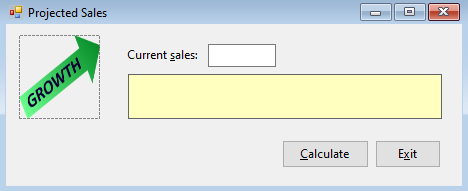
Code given:
' Name: Projected Sales Project ' Purpose: Display the number of years required for a company's projected sales ' to reach a specific amount and the projected sales at that time. ' Programmer:
Option Explicit On Option Strict On Option Infer Off Public Class frmMain Private Sub btnCalc_Click(sender As Object, e As EventArgs) Handles btnCalc.Click ' Calculate and display the number of years ' and the projected sales.
Const dblGROWTH_RATE As Double = 0.03 Dim dblSales As Double ' Used as an accumulator. Dim dblIncrease As Double Dim intYears As Integer ' Used as a counter. Dim dblGoalSales As Double Double.TryParse(txtCurrentSales.Text, dblSales) Double.TryParse(lblProjSales.Text, dblGoalSales) Do While dblSales > 0 AndAlso dblSales
End Sub
Private Sub btnExit_Click(sender As Object, e As EventArgs) Handles btnExit.Click Me.Close() End Sub
Private Sub txtCurrentSales_Enter(sender As Object, e As EventArgs) Handles txtCurrentSales.Enter txtCurrentSales.SelectAll() End Sub
Private Sub txtCurrentSales_KeyPress(sender As Object, e As KeyPressEventArgs) Handles txtCurrentSales.KeyPress ' Accept only numbers and the Backspace key.
If (e.KeyChar "9'") AndAlso e.KeyChar ControlChars.Back Then e.Handled = True End If End Sub
Private Sub txtCurrentSales_TextChanged(sender As Object, e As EventArgs) Handles txtCurrentSales.TextChanged lblProjSales.Text = String.Empty End Sub
Private Sub txtGoalSales_TextChanged(sender As Object, e As EventArgs) Handles lblProjSales.TextChanged lblProjSales.Text = String.Empty End Sub
Private Sub txtGoalSales_KeyPress(sender As Object, e As KeyPressEventArgs) Handles lblProjSales.KeyPress If (e.KeyChar "9'") AndAlso e.KeyChar ControlChars.Back Then e.Handled = True End If End Sub End Class
Projected Sales x Current sales: GROWTH Calculate Exit Projected Sales x Current sales: GROWTH Calculate Exit
Step by Step Solution
There are 3 Steps involved in it

Get step-by-step solutions from verified subject matter experts
 Study Help