







Question: hello I am making a snake game using python and turtle module the game works perfectly but my splash screen doesn't when I press s
hello I am making a snake game using python and turtle module the game works perfectly but my splash screen doesn't when I press s to start the game I want the splash screen to disappear and the main screen for the game to appear but i don't know how to do so and another thing is that when the splash screen appears it shows also the main game background and characters which i don't want that to appear can you tell me how to fix this problem ?
code:
# !/usr/bin/env python3
# created by: Ahmad El-khawaldeh # created on: dec 2020 # This program is the "snake game" program
import turtle import time import random
# constants delay = 0.1 level = 1 score = 0 high_score = 0 game_state = "splash" start_game = "game"
# Set up the screen window = turtle.Screen() window.title("Snake Game by @Ahmad") window.bgcolor("green") window.setup(width=600, height=600) window.tracer(0) # Turns off the screen updates
# Snake head/apple head = turtle.Turtle() head.speed(0) head.shape("square") head.color("black") head.penup() head.goto(0,0) head.direction = "stop"
# Snake food food = turtle.Turtle() food.speed(0) food.shape("circle") food.color("red") food.penup() food.goto(0,100)
segments = []
# Pen pen = turtle.Turtle() pen.speed(0) pen.shape("square") pen.color("white") pen.penup() pen.hideturtle() pen.goto(0, 260) pen.write("Score: 0 High Score: 0 Level: 1", align="center", font=("Courier", 16, "normal"))
# Functions def go_up(): if head.direction != "down": head.direction = "up"
def go_down(): if head.direction != "up": head.direction = "down"
def go_left(): if head.direction != "right": head.direction = "left"
def go_right(): if head.direction != "left": head.direction = "right"
def move(): if head.direction == "up": y = head.ycor() head.sety(y + 20)
if head.direction == "down": y = head.ycor() head.sety(y - 20)
if head.direction == "left": x = head.xcor() head.setx(x - 20)
if head.direction == "right": x = head.xcor() head.setx(x + 20)
# splash screen def start_game(): global game_state game_state = "game"
# Keyboard bindings window.listen() window.onkeypress(go_up, "w") window.onkeypress(go_down, "s") window.onkeypress(go_left, "a") window.onkeypress(go_right, "d")
window.onkeypress(start_game, "s")
# Main game loop while True: window.update()
# Check for a collision with the border if head.xcor()>290 or head.xcor()290 or head.ycor()
# Hide the segments for segment in segments: segment.goto(1000, 1000) # Clear the segments list segments.clear()
# Reset the score score = 0
# Reset the delay delay = 0.1 # Reset level level = 1
pen.clear() pen.write("Score: {} High Score: {} Level: {}".format(score, high_score, level), align="center", font=("Courier", 16, "normal"))
# Check for a collision with the food if head.distance(food)
# Add a segment new_segment = turtle.Turtle() new_segment.speed(0) new_segment.shape("square") new_segment.color("grey") new_segment.penup() segments.append(new_segment)
# Shorten the delay delay -= 0.001
# Increase the score score += 10
if score > high_score: high_score = score pen.clear() pen.write("Score: {} High Score: {} Level: {}".format(score, high_score, level), align="center", font=("Courier", 16, "normal"))
# Move the end segments first in reverse order for index in range(len(segments)-1, 0, -1): x = segments[index-1].xcor() y = segments[index-1].ycor() segments[index].goto(x, y)
# Move segment 0 to where the head is if len(segments) > 0: x = head.xcor() y = head.ycor() segments[0].goto(x,y)
move()
# Check for head collision with the body segments for segment in segments: if segment.distance(head)
# Reset the score score = 0
# Reset the delay delay = 0.1 # Reset the level level = 1 # Update the score display pen.clear() pen.write("Score: {} High Score: {} Level: {}".format(score, high_score, level), align="center", font=("Courier", 16, "normal"))
# Levels if level == 1 and score == 50: level += 1 delay *= 0.9 if level == 2 and score == 100: level += 1 delay *= 0.9 if level == 3 and score == 150: level += 1 delay *= 0.9
if game_state == "splash": window.bgpic("snake3.gif")
elif window.onkeypress( "s") window.show(turtle.Screen) # this function doesnot work
time.sleep(delay)
window.mainloop()
picture: the main background id behind it
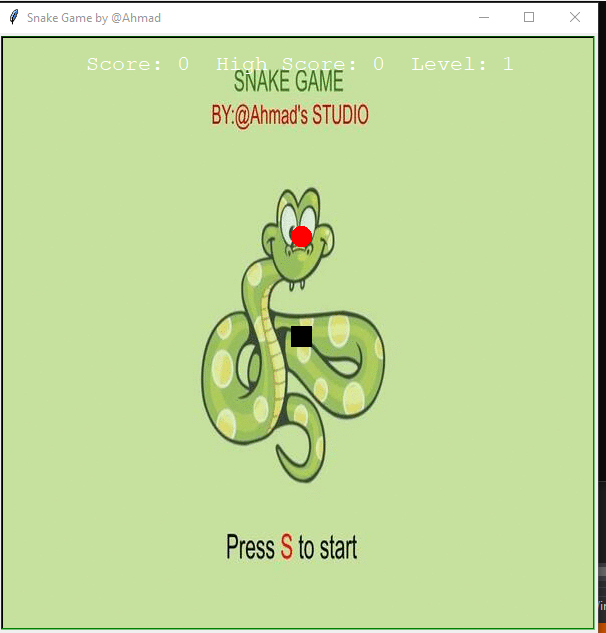
Snake Game by @Ahmad x Level: 1 Score: 0 HighScore: 0 SNAKE GAME BY:@Ahmad's STUDIO Press Sto start
Step by Step Solution
There are 3 Steps involved in it

Get step-by-step solutions from verified subject matter experts
 Study Help