



Question: Hello I am really confused on the project below. I have the code made for the NumbersToWordConverter (which I will paste below) but I am
Hello I am really confused on the project below. I have the code made for the NumbersToWordConverter (which I will paste below) but I am having trouble figuring out how to make it compatible to creating a client for it and having the client post it to a server, I will also provide examples of that.
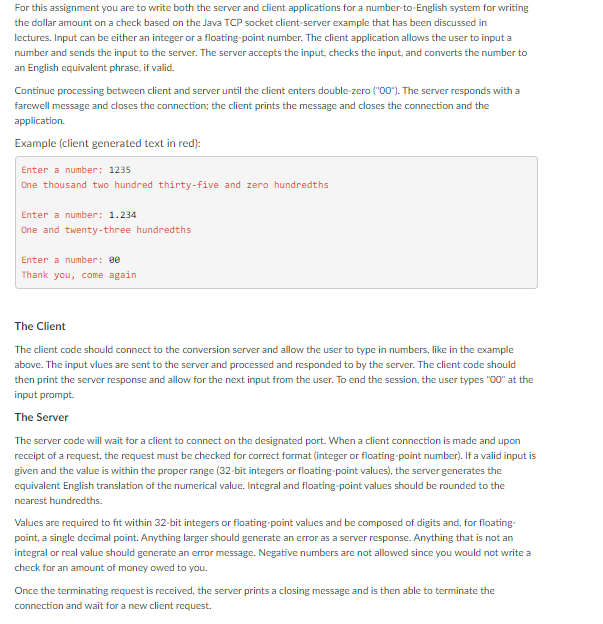
Project working on
Here is the code for the NumbersToWords
public class NumberToWords { private static final String[] tens = { "", " ten", " twenty", " thirty", " forty", " fifty", " sixty", " seventy", " eighty", " ninety" }; private static final String[] numbers = { "", "one", "two", "three", "four", "five", "six", "seven", "eight", "nine", " ten", " eleven", " twelve", " thirteen", " fourteen", " fifteen", " sixteen", " seventeen", " eighteen", " nineteen" }; /** * This method converts number which is less than thousands into word */ private static String lessThanThousand(int number) { String inWords; if (number % 100 And here is the client code that gets posted to the server and the server comes back with it..
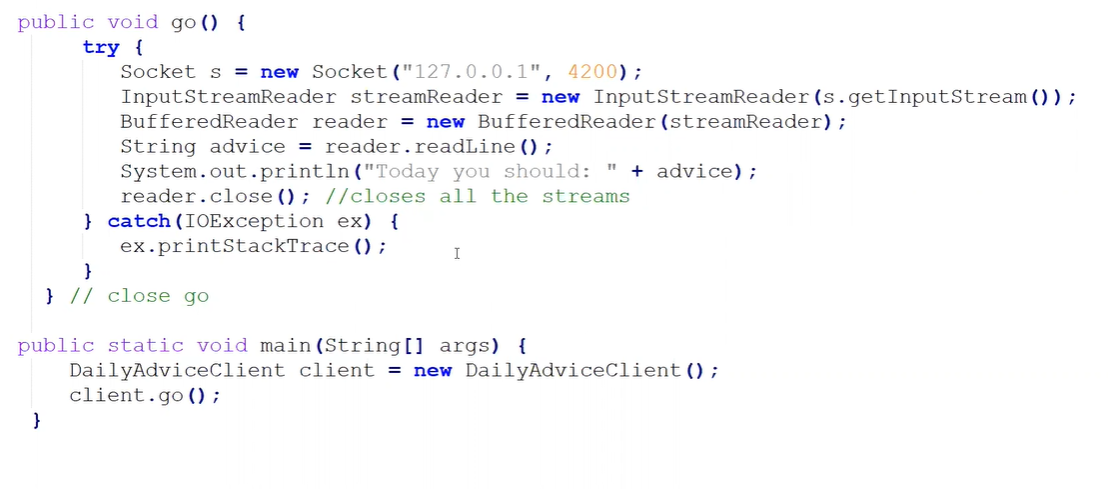 This is an example code but somehow I have to make what I have turn into that, and I am really confused on it, if you can help explain that would be great. Thank you!
For this assignment you are to write both the server and client applications for a number-to-English system for writing the dollar amount on a check based on the Java TCP socket client-server example that has been discussed in lectures. Input can be either an integer or a floating point number. The client application allows the user to input a number and sends the input to the server. The server accepts the input, checks the input, and converts the number to an English equivalent phrase, if valid. Continue processing between client and server until the client enters double-zero ("00"). The server responds with a farewell message and closes the connection, the client prints the message and closes the connection and the application Example (client generated text in red): Enter a number: 1235 One thousand two hundred thirty-five and zero hundredths Enter a number: 1.234 One and twenty-three hundredths Enter a number: 0 Thank you, come again The Client The client code should connect to the conversion server and allow the user to type in numbers, like in the example above. The input vlues are sent to the server and processed and responded to by the server. The client code should then print the server response and allow for the next input from the user. To end the session, the user types "00" at the input prompt. The Server The server code will wait for a client to connect on the designated port. When a client connection is made and upon receipt of a request, the request must be checked for correct format (integer or floating point number). If a valid input is given and the value is within the proper range (32-bit integers or floating point values), the server generates the equivalent English translation of the numerical value. Integral and floating point values should be rounded to the nearest hundredths. Values are required to fit within 32-bit integers or floating point values and be composed of digits and, for floating- point, a single decimal point. Anything larger should generate an error as a server response. Anything that is not an integral or real value should generate an error message. Negative numbers are not allowed since you would not write a check for an amount of money owed to you. Once the terminating request is received, the server prints a closing message and is then able to terminate the connection and wait for a new client request. public void go() { try { Socket s = new Socket ("127.0.0.1", 4200); InputStreamReader streamReader = new InputStreamReader (s.getInputStream()); BufferedReader reader = new BufferedReader (streamReader); String advice = reader.readLine(); System.out.println("Today you should: " + advice); reader.close(); //closes all the streams } catch (IOException ex) { ex.printStackTrace(); I } } // close go public static void main(String[] args) { DailyAdviceClient client = new DailyAdviceClient(); client.go(); } For this assignment you are to write both the server and client applications for a number-to-English system for writing the dollar amount on a check based on the Java TCP socket client-server example that has been discussed in lectures. Input can be either an integer or a floating point number. The client application allows the user to input a number and sends the input to the server. The server accepts the input, checks the input, and converts the number to an English equivalent phrase, if valid. Continue processing between client and server until the client enters double-zero ("00"). The server responds with a farewell message and closes the connection, the client prints the message and closes the connection and the application Example (client generated text in red): Enter a number: 1235 One thousand two hundred thirty-five and zero hundredths Enter a number: 1.234 One and twenty-three hundredths Enter a number: 0 Thank you, come again The Client The client code should connect to the conversion server and allow the user to type in numbers, like in the example above. The input vlues are sent to the server and processed and responded to by the server. The client code should then print the server response and allow for the next input from the user. To end the session, the user types "00" at the input prompt. The Server The server code will wait for a client to connect on the designated port. When a client connection is made and upon receipt of a request, the request must be checked for correct format (integer or floating point number). If a valid input is given and the value is within the proper range (32-bit integers or floating point values), the server generates the equivalent English translation of the numerical value. Integral and floating point values should be rounded to the nearest hundredths. Values are required to fit within 32-bit integers or floating point values and be composed of digits and, for floating- point, a single decimal point. Anything larger should generate an error as a server response. Anything that is not an integral or real value should generate an error message. Negative numbers are not allowed since you would not write a check for an amount of money owed to you. Once the terminating request is received, the server prints a closing message and is then able to terminate the connection and wait for a new client request. public void go() { try { Socket s = new Socket ("127.0.0.1", 4200); InputStreamReader streamReader = new InputStreamReader (s.getInputStream()); BufferedReader reader = new BufferedReader (streamReader); String advice = reader.readLine(); System.out.println("Today you should: " + advice); reader.close(); //closes all the streams } catch (IOException ex) { ex.printStackTrace(); I } } // close go public static void main(String[] args) { DailyAdviceClient client = new DailyAdviceClient(); client.go(); }
Step by Step Solution
There are 3 Steps involved in it

Get step-by-step solutions from verified subject matter experts