







Question: Hello, I have a python3 assignment using the command line and I really would like to get this solved. The answer should be the expected
Hello, I have a python3 assignment using the command line and I really would like to get this solved. The answer should be the "expected output"
Consider the following list of student grades. Write a script that will open the file and calculate the average for each student and the grade that the student would receive based on the grade scale for this course found in the syllabus. It should save the output to a file named out604.txt
| Input file (lab0604.csv) | Expected output file (out604.txt) |
| name,hw1,h2,h3,lb1,lb2,lb3,ec,fn Andrew,69,52,32,83,22,33,77,34 Brandon,87,80,79,85,99,92,77,80 Chelsey,98,97,91,92,93,99,91,94 Deborah,51,61,28,58,34,53,74,39 Erik,80,88,97,88,102,106,86,94 Arielle,73,73,88,79,73,80,90,82 Shaun,61,76,77,69,71,80,74,67 Ninette,88,67,28,42,51,66,57,43 Nguyen,5,23,93,60,31,25,65,23 | Name grade letter Andrew 50.25 E Brandon 84.88 B Chelsey 94.38 A Deborah 49.75 E Erik 92.62 A- Arielle 79.75 C+ Shaun 71.88 C- Ninette 55.25 E Nguyen 40.62 E |
Please and thanks!
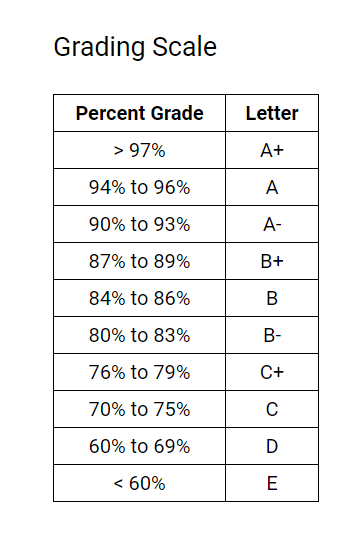
Grade Scale for the course:
I used this code but it did not work. I'd really appreciate your help in getting the expected output. Thanks again.
Code that didn't work:
import csv
# This function will return the letter for the incoming Grade
def calculate_letter(grade):
if grade>=97 and grade
return 'A+'
if grade >= 93 and grade
return 'A'
if grade >= 90 and grade
return 'A-'
if grade >= 87 and grade
return 'B+'
if grade >= 83 and grade
return 'B'
if grade >= 80 and grade
return 'B-'
if grade >= 77 and grade
return 'C+'
if grade >= 73 and grade
return 'C'
if grade >= 70 and grade
return 'C-'
if grade >= 67 and grade
return 'D+'
if grade >= 63 and grade
return 'D'
if grade >= 60 and grade
return 'D-'
if grade >= 0 and grade
return 'E'
return 'Wrong Grade'
output_list=[['Name','grade','letter']]
# Opening file to read data
with open('C:\\Users\\EKXXAKA\\Desktop\\lab0604.csv','r') as file:
file_reader=csv.reader(file)
i=1
# traversing row by row and skipping header row
for row in file_reader:
if i!=1:
name=row[0] # Getting Name from the row
marks=row[1::] # Getting Marks from the Row
sum=0
for each_mark in marks: # Getting total Sum of the Marks
sum=sum+int(each_mark)
average=float(sum/len(marks)) # Calculating Average
average="{:.2f}".format(average) # Rounding Average value to 2 decimal places
letter=calculate_letter(float(average)) # Getting the Letter for the grade from calculate_letter() function
output_list.append([name,average,letter]) # Adding the result row in the output_list
i=0
# Writing the Output into the out604.csv
with open('C:\\Users\\EKXXAKA\\Desktop\\out604.csv', 'w', newline='') as file:
writer = csv.writer(file)
writer.writerows(output_list)
file.close()
print(" Date Stored in Output File Successfully !!!")
Grading Scale Percent Grade Letter > 97% A+ 94% to 96% A 90% to 93% A- 87% to 89% B+ 84% to 86% B 80% to 83% B- 76% to 79% C+ 70% to 75% C 60% to 69% D
Step by Step Solution
There are 3 Steps involved in it

Get step-by-step solutions from verified subject matter experts
 Study Help