







Question: Hello. I have a quesiton about implementing a clock in java. I have the following code: (The 30 here represents 30 minutes) double minuteHand =
Hello. I have a quesiton about implementing a clock in java.
I have the following code:
(The 30 here represents 30 minutes)
double minuteHand = 30/60.0*2.0*Math.PI; double minute = Math.PI/2.0-minuteHand; GeneralPath minutePath = new GeneralPath(); minutePath.moveTo(r, r); minutePath.lineTo((float)cX+Math.cos(minute)*450,(float) (cY+Math.sin(minute)*450)); g2.draw(minutePath);
This works except that it draws the clock upside down. Setting it to 30 places trhe minute hand at 12 o'clock. Setting it to 60 points to 6 o'clock. What do I need to do to reverse this.
I have included a picture:
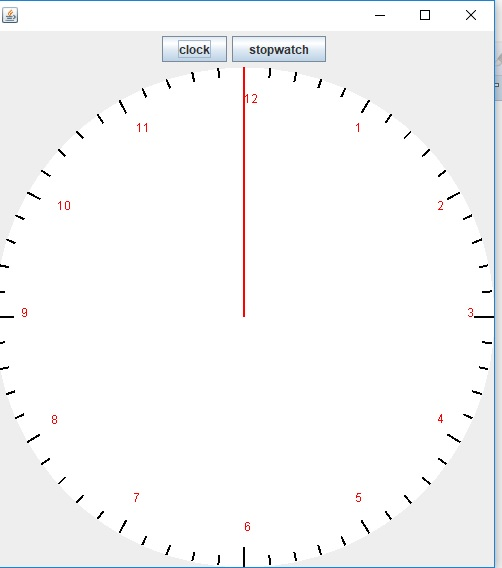
import java.awt.*; import java.awt.geom.*; import javax.swing.*; import java.util.*; /** A Clock face */ public class ClockFace extends JPanel { /** Constructs a Clock @param x the left of the bounding rectangle @param y the top of the bounding rectangle @param width the width of the bounding rectangle */
public ClockFace(int x, int y, int width) { this.x = x; this.y = y; this.width = width; this.setOpaque(false); this.setPreferredSize(new Dimension(width, width)); } public void translate(int dx, int dy) { x += dx; y += dy; }
public void paintComponent(Graphics g) { Graphics2D g2 = (Graphics2D) g; super.paintComponent(g2); // draw the ticks int tickLen = 10; int medTickLen = 15; int longTickLen = 20; int r = width/2; //radius of clock int cX = x+(width)/2; int cY = y+(width)/2; Stroke tickStroke = new BasicStroke(2f, BasicStroke.CAP_BUTT, BasicStroke.JOIN_ROUND, 1f); GeneralPath ticksPath = new GeneralPath(); Ellipse2D.Double clockFace = new Ellipse2D.Double(this.x,this.y,width, width); g2.setColor(Color.WHITE); g2.fill(clockFace); for ( int i=1; i
} // Draw the full shape onto the graphics context. g2.setColor(Color.BLACK); g2.setStroke(tickStroke); g2.draw(ticksPath); g2.setColor(Color.RED); for ( int i=1; i cloc stopwatch
Step by Step Solution
There are 3 Steps involved in it

Get step-by-step solutions from verified subject matter experts
 Study Help