







Question: Hello. I have to create a website in the test where I have to create navigation between the pages. Interested in how to create the
Hello. I have to create a website in the test where I have to create navigation between the pages.
Interested in how to create the appropriate code to meet the requirements below. On the home page, clicking on the "Blog" section takes the user to the "Blog List" page. 2. On the "Blog post list" page, clicking on the title of a specific blog post takes the user to the "Blog post page" page, where he sees the full details of that blog. 3. Clicking on the "Add new" option in the options section takes the user to the "Blog post form" page, where the user can fill in the data for a new blog post. 4. Clicking on the "Review Entries" option in the options section takes the user to the "Blog entries table" page, which shows all entries in tabular form. 5. On the "Blog post table" page, when the user clicks on the "Edit" option of a specific post, the user is taken to the "Blog post form" page, where the data of the specific blog post is filled in and the user has the opportunity to edit and save them. 6. The Blog section of the navigation panel should be colored as active on all pages (except the home page). 7. On the pages Blog entry page and Blog entry form page in the link it is necessary to pass the parameter id with a value that corresponds to the identifier of the particular record in the database.
Also interested in how to create such a form, as shown in the figure
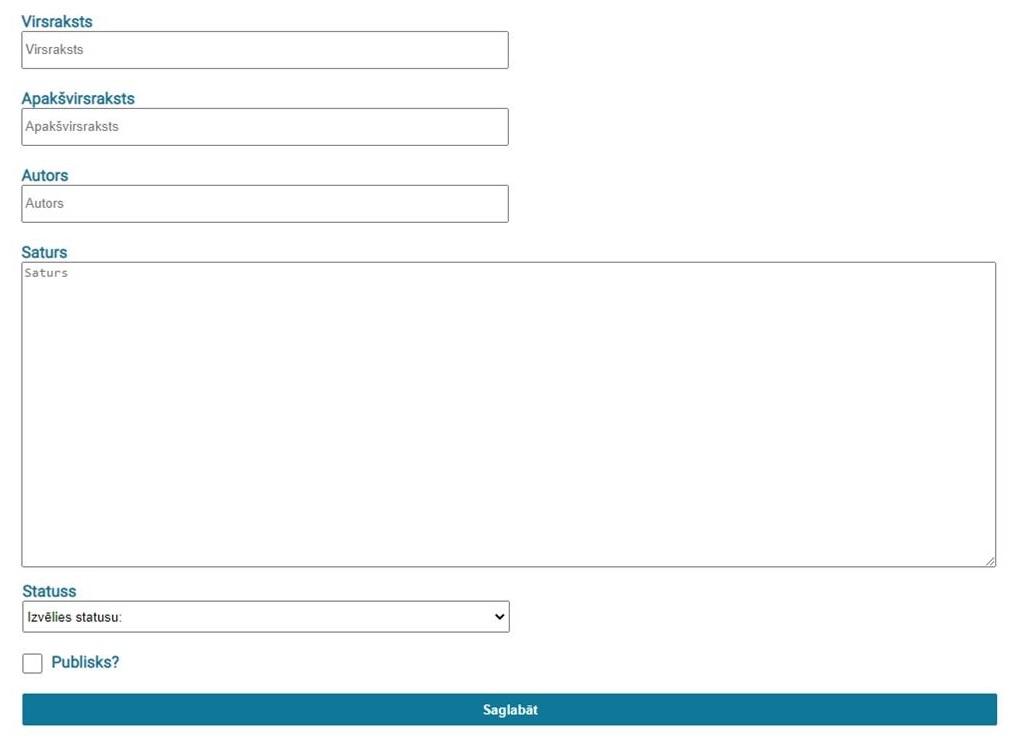
Virsraksts Virsraksts Apakvirsraksts Apakvirsraksts Autors Autors Saturs Saturs Statuss Izvlies statusu: Publisks? Saglabt
Step by Step Solution
There are 3 Steps involved in it

Get step-by-step solutions from verified subject matter experts
 Study Help