







Question: Hello! I need help figuring out where I went wrong with this assignment. I uploaded the steps to complete the project along with a screenshot
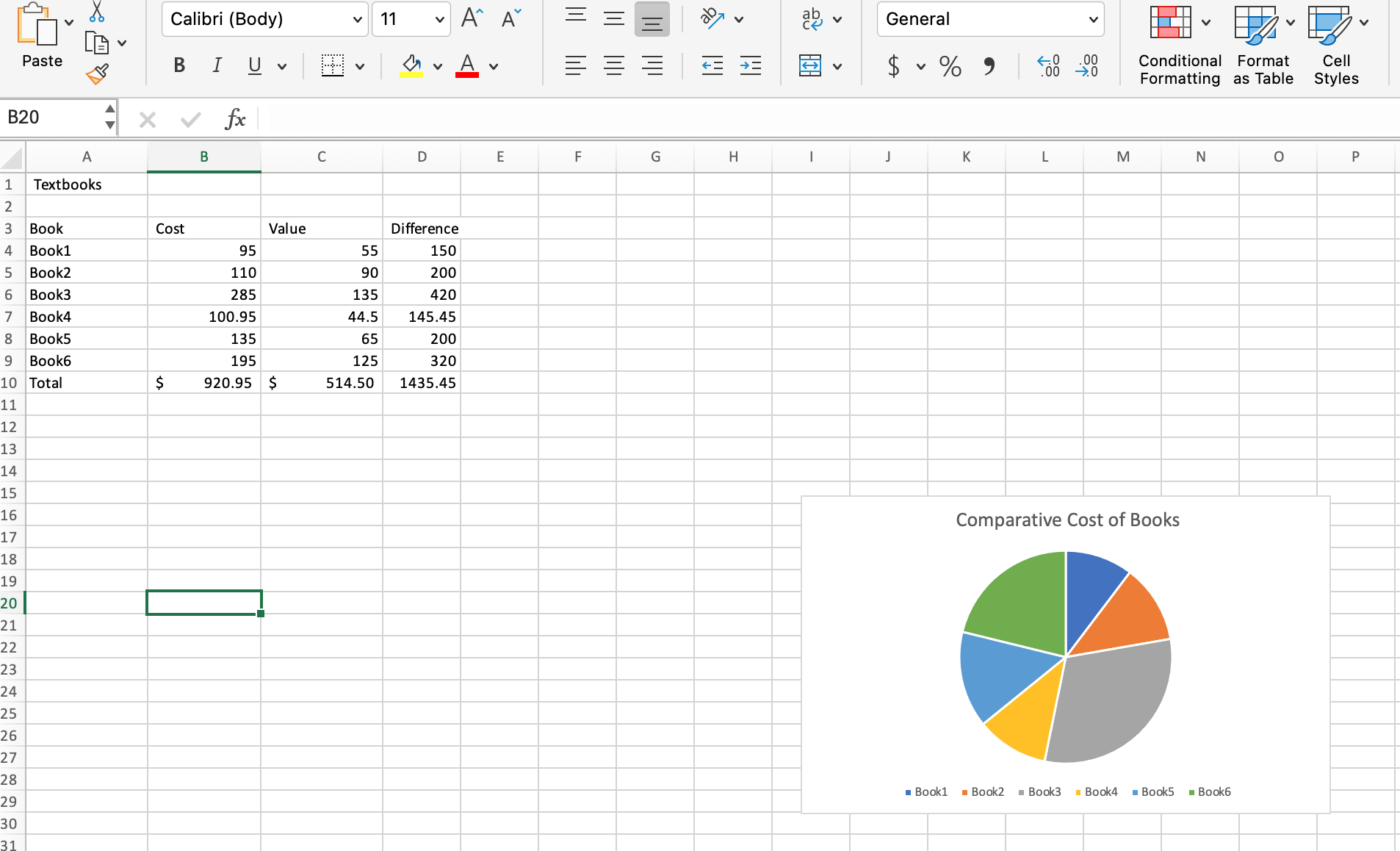
Hello! I need help figuring out where I went wrong with this assignment. I uploaded the steps to complete the project along with a screenshot of the excel file I uploaded. It's just telling me the sheet is blank, but I definitely have data entered.
Here are the steps:
Mark the steps as checked when you complete them.
Open the start file EXSkillReview The start file will be renamed automatically to include your name. Change the file name if directed to do so by your instructor and save it
The new workbook opens with one sheet Sheet Cell A is selected.
In cell A type the title for the worksheet: Textbooks
Enter data in the worksheet as follows:
Table EX displays different textbooks and their corresponding costs, values, and the difference for each book.
Table EX :
A B C D
Book Cost Value Difference
Book
Book
Book
Book
Use AutoFill to add two additional books to the list.
Click cell A hold down the left mouse button and drag the mouse to cell A Release the mouse button. The cell range A through A should now appear selected.
Click the Fill Handle located at the lower right corner of the selected cell range
Drag down to cell A and release the mouse button.
Excel adds Book and Book to the list.
Book cost $ and can be sold for $ Book cost $ and can be sold for $ Add these data to the worksheet.
Click cell B and type:
Press Tab and type:
Click cell B and type:
Press Tab and type:
Press Enter.
Modify the status bar to display the minimum value.
Rightclick anywhere on the status bar.
Click Minimum to add a checkmark.Hint: You may need to click the arrow at the bottom of the status bar menu to scroll through the list.
Click anywhere to dismiss the menu.
Use the status bar to check the total value of the books and the minimum value.
Click cell C Press and hold Shift and click cell C Release the Shift key.
Look at the status bar and find the Sum value
Look at the status bar and find the Min value
Use AutoSum to calculate total cost and total value. The totals should be placed in cells B and C
Click cell A and type: Total
Press Tab.
Cell B should be selected. Press and hold Shift and click cell C Release the Shift key.
On the Home tab, in the Editing group, click the AutoSum button.
Change the number format for the cost and value numbers to the Accounting Number Format.
Click cell B Press and hold Shift. Click cell C Release Shift.
On the Home tab, in the Number group, click the Accounting Number Format button.
Enter a formula in cell D to calculate the difference between the cost and the value for Book The formula will use only relative references because in the next step, you will use AutoFill to copy the formula down the column.
Click cell D
Type:
Click cell B
Type:
Click cell C
Press Enter.
Use AutoFill to copy the formula to calculate the difference for books through and the total.
Click cell D
Click the AutoFill handle. Hold down the left mouse button and drag to cell D Release the mouse button.
Insert a pie chart representing the cost of books.
Select cells A:B Click cell A hold down the left mouse button, and drag the mouse to cell B Release the mouse button. The cell range A through B should now appear selected.
The cell range A through B should now appear selected.
Click the Recommended Charts button on the Insert tab.
Scroll down the menu and click Pie to insert a pie chart.
Observe how each book is assigned a color in the chart legend.
The size of each pie piece represents the cost of each book relative to the total cost of all the books. Book is the most expensive book and is represented by the largest piece of the pie.
Change the chart title.
Click the Cost chart title once to select it
Type: Comparative Cost of Books
Press Enter.
Save the workbook. Do not close it or exit Excel.
Comparative Cost of Books
Step by Step Solution
There are 3 Steps involved in it
1 Expert Approved Answer
Step: 1 Unlock

Question Has Been Solved by an Expert!
Get step-by-step solutions from verified subject matter experts
Step: 2 Unlock
Step: 3 Unlock
 Study Help