







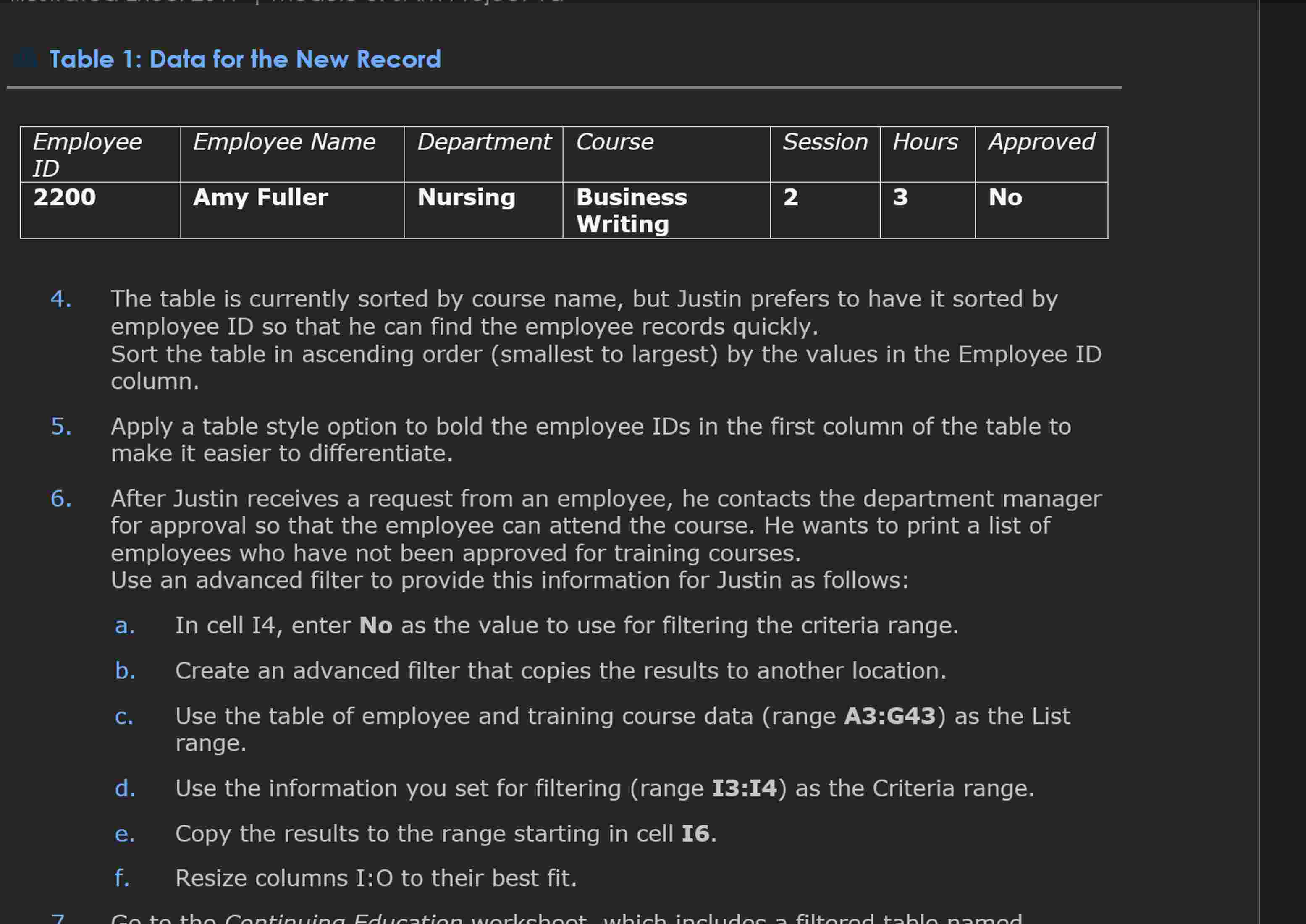
Question: Hello I need help with clear instructions on 4 and 5 Table 1 : Data for the New Record The table is currently sorted by
Hello I need help with clear instructions on and Table : Data for the New Record
The table is currently sorted by course name, but Justin prefers to have it sorted by
employee ID so that he can find the employee records quickly.
Sort the table in ascending order smallest to largest by the values in the Employee ID
column.
Apply a table style option to bold the employee IDs in the first column of the table to
make it easier to differentiate.
After Justin receives a request from an employee, he contacts the department manager
for approval so that the employee can attend the course. He wants to print a list of
employees who have not been approved for training courses.
Use an advanced filter to provide this information for Justin as follows:
a In cell I enter No as the value to use for filtering the criteria range.
b Create an advanced filter that copies the results to another location.
C Use the table of employee and training course data range A:G as the List
range.
d Use the information you set for filtering range I:I as the Criteria range.
e Copy the results to the range starting in cell
f Resize columns I:O to their best fit.
Step by Step Solution
There are 3 Steps involved in it
1 Expert Approved Answer
Step: 1 Unlock

Question Has Been Solved by an Expert!
Get step-by-step solutions from verified subject matter experts
Step: 2 Unlock
Step: 3 Unlock
 Study Help