







Question: Hello I need help with this project //Please note I cant use any global variables or std:: libraries //I've posted my code from my last
Hello I need help with this project
//Please note I cant use any global variables or std:: libraries
//I've posted my code from my last project under the this project description if that helps for any reference
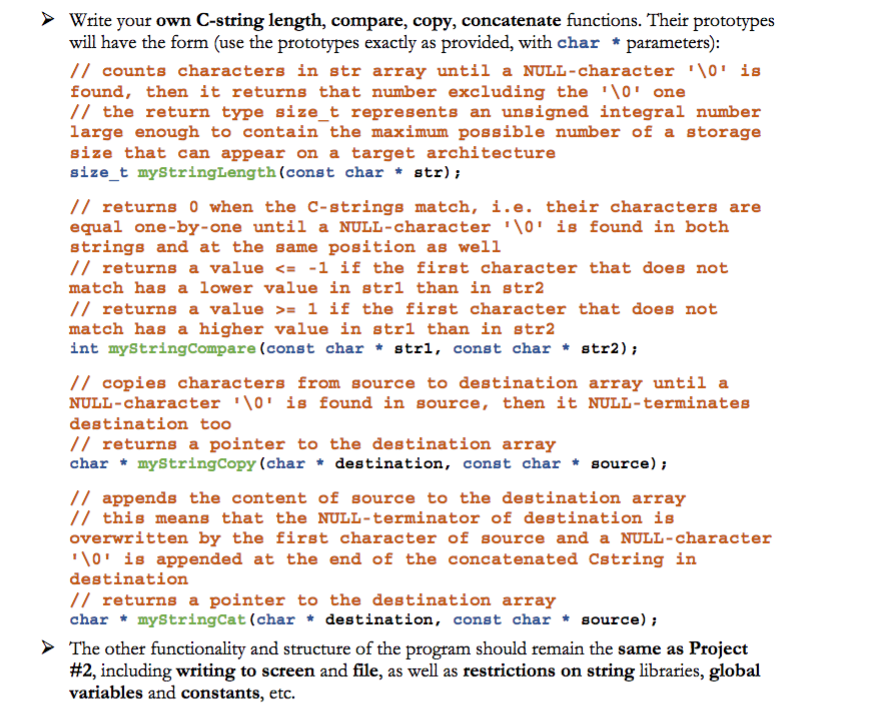
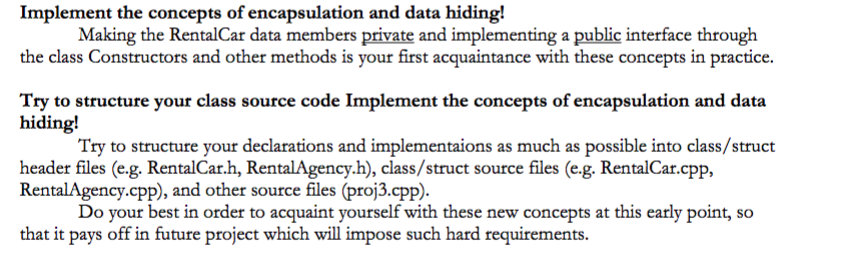
![int year; char make[MAXCHAR]; char model[MAXCHAR]; float price; bool available; };// End](https://dsd5zvtm8ll6.cloudfront.net/si.experts.images/questions/2024/09/66f113b4e10d2_25266f113b43ed60.jpg)
//THIS IS MY CODE FROM LAST PROJECT
#include#include #define MAX 50 #define MAXCHAR 10 using namespace std; // Defines a structure to store car information struct RentalCar { // Data member to store data int year; char make[MAXCHAR]; char model[MAXCHAR]; float price; bool available; };// End of structure // Function to return the length of a string size_t myStringLength(const char *str) { // Initializes length to zero int len = 0; // Loops till end of the string for(; str[len] != '\0'; len++) ; // Null statement // Returns length return len; }// End of function int myStringCompare(const char *str1, const char *str2) { // Calls the function to check the length of the two strings // If first string length is greater than the second string length then return -1 if(myStringLength(str1) > myStringLength(str2)) return -1; // Loops till end of the first string for(int x = 0; str1[x] != '\0'; x++) { // Checks if current character of the first string is greater than the second string // Return one if(str1[x] > str2[x]) return 1; // Otherwise checks if current character of the first string is less than the second string // Return minus one else if(str1[x] >fileName; // Open file for reading inFile.open(fileName); // Checks whether file can be opened or not if(inFile.fail()) { cout >rc[counter].year) { // Reads make inFile>>rc[counter].make; // Reads model inFile>>rc[counter].model; // Reads price inFile>>rc[counter].price; // Reads availability inFile>>ava; // Calls the function to check if it is true if(myStringCompare(ava, "true") == 0) // Stores one rc[counter].available = 1; // Otherwise stores zero else rc[counter].available = 0; // Increase the record counter by one counter++; }// End of while loop // Returns number of records return counter; }// End of function // Function to write records to file void writeData(RentalCar rc[], int counter) { // Declares an object of class ofstream ofstream outFile; // To store file name char fileName[MAXCHAR]; // Accepts the file name cout>fileName; // Open file for writing outFile.open(fileName); // Checks whether file can be opened or not if(outFile.fail()) { cout rc[c + 1].price) { // Swapping process temp = rc[c]; rc[c] = rc[c + 1]; rc[c + 1] = temp; }// End of if condition }// End of inner for loop }// End of outer for loop }// End of function // Function to check the availability of the car void available(RentalCar rc[], int len) { int no, p = 0; // Creates an array of objects to store available cars RentalCar temp[MAX]; // Accepts number of days to rent cout>no; // Loops number of records for (int x = 0; x >index; // Accepts number of days to rent cout>no; // Checks if the car is not available display error message if(rc[index].available == false) { cout>ch; // Returns user choice return ch; }// End of function // main function definition int main() { // Creates an array of object of RentalCar of size MAX RentalCar rc[MAX]; int len; // Loops till user choice is not 7 do { // Calls the function to receive user choice and calls the appropriate function based on user choice switch(menu()) { case 1: len = readData(rc); break; case 2: display(rc, len); break; case 3: writeData(rc, len); break; case 4: mySort(rc, len); cout /*Content of cars.txt before reading*/
2014 Toyota Tacoma 115.12 false 2015 Ford Fusion 90.89 true 2009 Dodge Neon 45.25 false 2015 Ford F150 112.83 true 2016 Subaru Outback 71.27 true
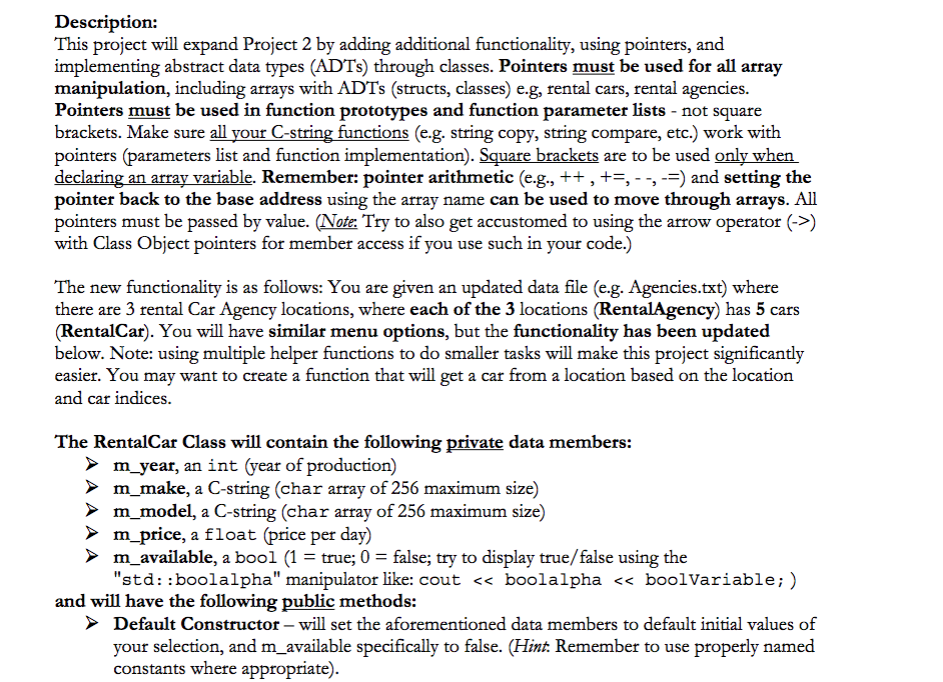
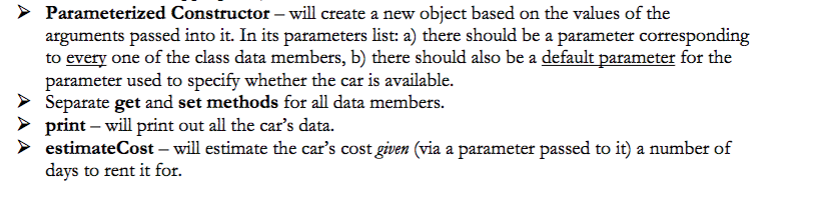
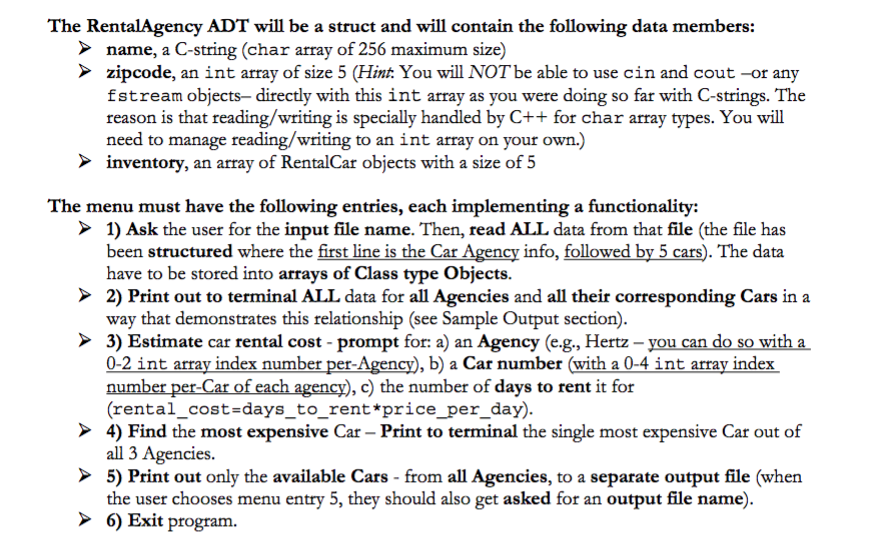
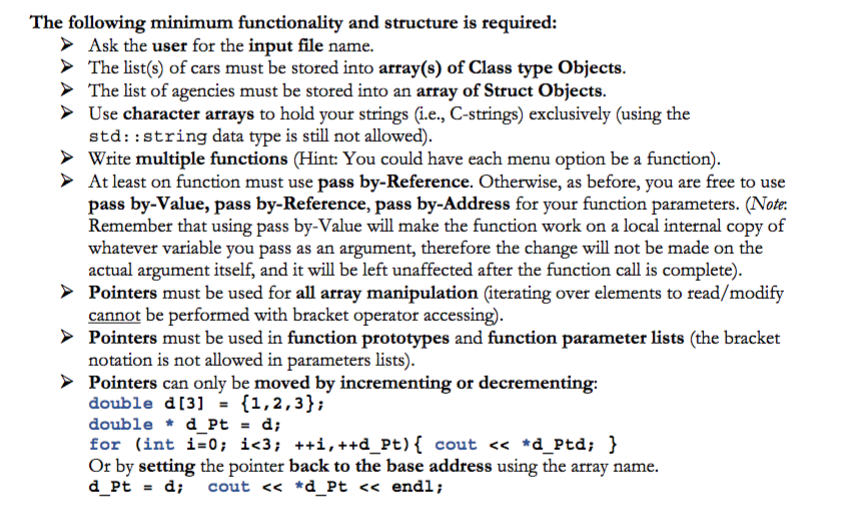
Description: This project will expand Project 2 by adding additional functionality, using pointers, and implementing abstract data types (ADTs) through classes. Pointers must be used for all array manipulation, including arrays with ADTs (structs, classes) e.g, rental cars, rental agencies. Pointers must be used in function prototypes and function parameter lists - not square brackets. Make sure all your C-string functions (e.g. string copy, string compare, etc.) work with pointers (parameters list and function implementation). Sauare brackets are to be used only when larin pointer back to the base address using the array name can be used to move through arrays. All pointers must be passed by value. (Note: Try to also get accustomed to using the arrow operator (->) with Class Object pointers for member access if you use such in your code.) ble. Remember: pointer arithmetic (e.g., ++ , +-, - -, --) and setting the The new functionality is as follows: You are given an updated data file (e.g. Agencies.txt) where there are 3 rental Car Agency locations, where each of the 3 locations (RentalAgency) has 5 cars (RentalCar). You will have similar menu options, but the functionality has been updated below. Note: using multiple helper functions to do smaller tasks will make this project significantly easier. You may want to create a function that will get a car from a location based on the location and car indices The RentalCar Class will contain the following private data members: m year, an int (year of production) m_make, a C-string (char array of 256 maximum size) m model, a C-string (char array of 256 maximum size) m_price, a float (price per day) m_available, a bool (1true; 0false; try to display true/false using the "std: :boolalpha" manipulator like: cout
Step by Step Solution
There are 3 Steps involved in it
1 Expert Approved Answer
Step: 1 Unlock

Question Has Been Solved by an Expert!
Get step-by-step solutions from verified subject matter experts
Step: 2 Unlock
Step: 3 Unlock
 Study Help