







Question: Hello, I need your help with my C++ program to find the Average Computation values and symbol for each coordinate from the txt files and
Hello, I need your help with my C++ program to find the Average Computation values and symbol for each coordinate from the txt files and display them in the output. I have tried to simplified my codes with comments and managed to read in the txt file called "readfile.txt".
You are not allowed to hard code as the coordinates and values can be changed. You are also not allowed to use vector for this.
I have included the txt files and my codes below, you can implement this in function2(). Refer to below for explanation.
-----------------------------------------------------------------------------------------------------------------------------
readfile.txt
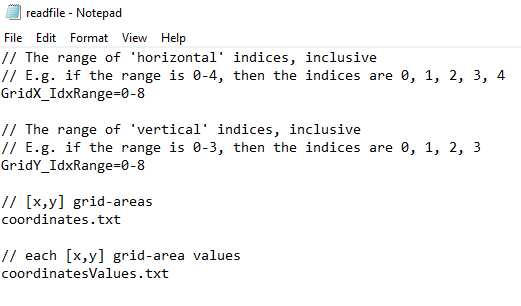
// The range of 'horizontal' indices, inclusive
// E.g. if the range is 0-4, then the indices are 0, 1, 2, 3, 4
GridX_IdxRange=0-8
// The range of 'vertical' indices, inclusive
// E.g. if the range is 0-3, then the indices are 0, 1, 2, 3
GridY_IdxRange=0-8
// [x,y] grid-areas
coordinates.txt
// each [x,y] grid-area values
coordinatesValues.txt
----------------------------------------------------------------------
coordinates.txt
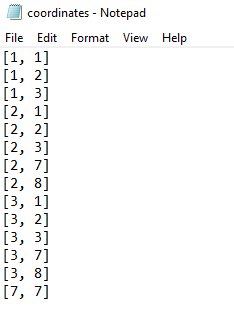
[1, 1]
[1, 2]
[1, 3]
[2, 1]
[2, 2]
[2, 3]
[2, 7]
[2, 8]
[3, 1]
[3, 2]
[3, 3]
[3, 7]
[3, 8]
[7, 7]
-------------------------------------------------------------------
coordinatesValues.txt
[0, 0]-41
[0, 1]-93
[0, 2]-90
[0, 3]-24
[0, 4]-70
[0, 5]-39
[0, 6]-47
[0, 7]-35
[0, 8]-83
[1, 0]-38
[1, 1]-66
[1, 2]-45
[1, 3]-11
[1, 4]-53
[1, 5]-35
[1, 6]-88
[1, 7]-75
[1, 8]-21
[2, 0]-56
[2, 1]-81
[2, 2]-34
[2, 3]-76
[2, 4]-53
[2, 5]-44
[2, 6]-70
[2, 7]-38
[2, 8]-32
[3, 0]-86
[3, 1]-13
[3, 2]-23
[3, 3]-93
[3, 4]-68
[3, 5]-26
[3, 6]-53
[3, 7]-52
[3, 8]-29
[4, 0]-76
[4, 1]-60
[4, 2]-43
[4, 3]-82
[4, 4]-40
[4, 5]-72
[4, 6]-48
[4, 7]-29
[4, 8]-75
[5, 0]-16
[5, 1]-49
[5, 2]-36
[5, 3]-53
[5, 4]-18
[5, 5]-47
[5, 6]-27
[5, 7]-98
[5, 8]-78
[6, 0]-68
[6, 1]-63
[6, 2]-33
[6, 3]-92
[6, 4]-27
[6, 5]-48
[6, 6]-13
[6, 7]-15
[6, 8]-37
[7, 0]-47
[7, 1]-3
[7, 2]-8
[7, 3]-17
[7, 4]-62
[7, 5]-62
[7, 6]-14
[7, 7]-35
[7, 8]-84
[8, 0]-7
[8, 1]-23
[8, 2]-63
[8, 3]-24
[8, 4]-37
[8, 5]-18
[8, 6]-44
[8, 7]-6
[8, 8]-18
----------------------------------------------------------------------------
Below is the diagram to aid your understanding.
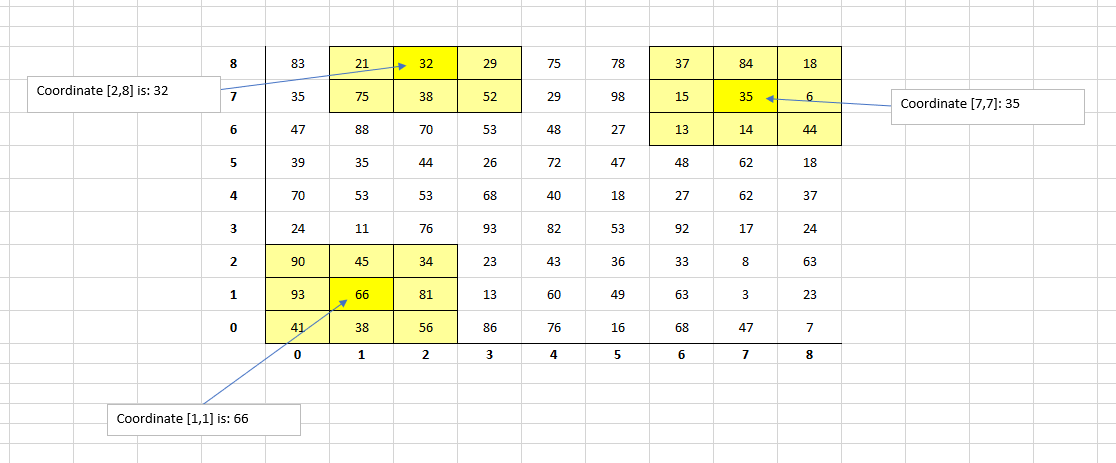
Bright Yellow grid areas indicate the actual grid area.(e.g. [1,1])
Light Yellow grid areas indicate the grid areas surrounding the occupied grid area.
For example above, the coordinate[2,8] has following grid areas surrounding its perimeter:
[1,7],[1,8],[2,7],[3,7],[3,8].
The grid areas [1,9],[2,9],[3,9] are not shown as they are beyond the upper limits of the
vertical grid range. As a result, they are not included in the Average computation.
Refer to below for calculation.
For each coordinate listed in the coordinates.txt file, the Average computation value is derived by the following:
AC = SUM(coordinate value + surrounding grid areas)/Total no of grid areas
For example, for the coordinate [2,8]:
AC = (32 + (21+75+38+52+29))/6
= 41.17
------------------------------------------------------------------------------------------------------------------------------------------------------------------
The L, M or H symbol for the Average Computation as below:

------------------------------------------------------------------------------------------------------------------------------------------------
Desired output when user enter option 2: (Repeat this for the rest of the coordinates in the coordinates.txt file)
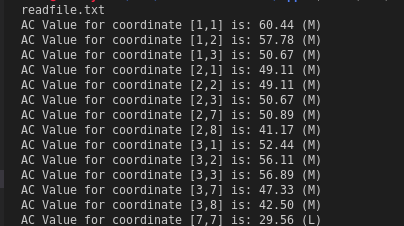
----------------------------------------------------------------------------------------------------------
Below are my codes:
#include
#include
#include
#include
#include
using namespace std;
//function delcarations
void function1();
void function2();
void function3();
void mainMenu();
//global variables
string GridXRange;
string GridYRange;
int GridXRangeValue;
int GridYRangeValue;
string coordinatesFile; //coordinates
string coordinatesValuesFile; //coordinatesValues
ifstream inData;
vector
//String tokenization function
vector
{
size_t pos = 0;
string token;
vector
while((pos = input.find(delimiter)) != string::npos)
{
token = input.substr(0, pos);
result.push_back (token);
input.erase(0, pos + delimiter.length());
}
result.push_back (input);
return (result);
}
//main
int main()
{
mainMenu();
return 0;
}
//function 1
void function1()
{
string readFile;
cout
cout
cout
cout
cout
cin>>readFile;
//open input file
inData.open(readFile);
while (!inData) //while filename does not exist
{
cout
cin >> readFile;
inData.open(readFile);
}
string line;
vector
while (getline(inData, line))
{
if(line[0] == '/' && line[1] == '/') continue; // Ignore comment lines
if(line.size()
result.push_back(line); // Push all other lines to the vector
}
// Now we extract the values from the result array
GridXRange = result[0] ;
GridYRange = result[1];
coordinatesFile = result[2];
coordinatesValuesFile = result[3];
inData.close();
//tokenize the line of strings in the text file to get only the specific data
tokenStringVector = tokenizeString (GridXRange, "=");//GridX_IdxRange=0-8
GridXRange = tokenStringVector[1];//0-8
cout
tokenStringVector = tokenizeString (GridXRange, "-");
GridXRangeValue = stoi(tokenStringVector[1]);//8
cout
tokenStringVector = tokenizeString (GridYRange, "=");//GridY_IdxRange=0-8
GridYRange = tokenStringVector[1];//0-8
cout
tokenStringVector = tokenizeString (GridYRange, "-");
GridYRangeValue = stoi(tokenStringVector[1]);//8
cout
cout
cout
mainMenu();
}
void function2() //to implement the AC value and symbol here
{
cout
}
void function3()
{
cout
}
void mainMenu()
{
int num_choice;
cout
cout
cout
cout
cout
cin>>num_choice;
switch(num_choice)
{
case 1:
function1();
break;
case 2:
function2();
break;
case 3:
function3();
break;
default:
cout
cout
cout
}
}
readfile - Notepad File Edit Format View Help // The range of 'horizontal' indices, inclusive // E.g. if the range is 0-4, then the indices are 0, 1, 2, 3, 4 GridX_IdxRange=0-8 // The range of 'vertical' indices, inclusive // E.g. if the range is 0-3, then the indices are 0, 1, 2, 3 GridY_IdxRange=0-8 // [x,y] grid-areas coordinates.txt // each [x,y] grid-area values coordinatesValues.txt coordinates - Notepad File Edit Format View Help [1, 1] [1, 2] [1, 3] [2, 1] [2, 2] [2, 3] [2, 7] [2, 8] [3, 1] [3, 2] [3, 3] [3, 7] [3, 8] [7, 7] 8 83 21 132 29 75 78 37 84 18 Coordinate (2,8] is: 32 7 35 75 38 52 29 98 15 35 6 Coordinate (7,7]: 35 6 47 88 70 53 48 27 13 14 44 5 39 35 44 26 72 47 48 62 18 4 70 53 53 68 40 18 27 62 37 3 24 11 76 93 82 53 92 17 24 2 90 45 34 23 43 36 33 8 63 1 93 66 81 13 60 49 63 3 23 0 41 38 56 86 76 16 68 47 7 0 1 2 3 4 5 6 7 8 Coordinate [1,1] is: 66 0
Step by Step Solution
There are 3 Steps involved in it

Get step-by-step solutions from verified subject matter experts
 Study Help