







Question: Hello, I'm working on a python coding project where I am working on a text-based game and move room to room collecting items. The player
Hello,
I'm working on a python coding project where I am working on a text-based game and move room to room collecting items. The player must collect all six items before reaching the Alien in the command deck or they lose the game. For some reason, though if a player reaches the command deck before getting all six items it does not properly tell the player they lost, in fact, it asks if they want to collect it as if the alien was an item. Below is my code/layout for the game, how do I fix it so it properly triggers a win/lose when the player arrives at the command deck based on having 6 items in the inventory or not? Help or guidance is appreciated!
# A dictionary for a simplified moving between rooms game # The dictionary links a room to other rooms. rooms = { 'Hangar': {'East': 'Main Hall'}, 'Main Hall': {'West': 'Hangar', 'North': 'Crew Quarters', 'South': 'Kitchen', 'East': 'Maintenance Room'}, 'Crew Quarters': {'South': 'Main Hall', 'East': 'Armory'}, 'Armory': {'West': 'Crew Quarters'}, 'Kitchen': {'North': 'Main Hall', 'East': 'Cargo Bay'}, 'Cargo Bay': {'West': 'Kitchen'}, 'Maintenance Room': {'West': 'Main Hall', 'North': 'Command Deck'}, 'Command Deck': {'South': 'Maintenance Room'}, } items = { 'Main Hall': 'Backpack', 'Crew Quarters': 'Pistol Ammo', 'Armory': 'Pistol', 'Kitchen': 'Flashlight', 'Cargo Bay': 'Armor', 'Maintenance Room': 'Wrench', 'Command Deck': 'Alien', } # Alien is the villain # Main Title/Menu and Move Commands print('Spaceship Exploration Text Adventure Game') print("Collect 6 items to win the game, or be eaten by the alien.") print('Move Commands: East, West, North, South, Exit') print("Add to Inventory: get 'item name'") # Start the player in the Great Hall state = 'Hangar' # store the items collected so far inventory = [] # function def get_new_statement(state, direction): new_statement = state # declaring for i in rooms: # loop if i == state: # if if direction in rooms[i]: # if new_statement = rooms[i][direction] # assigning new_statement return new_statement # return while (True): # loop print('----------------------------------------------') print('You are in the', state) # printing state # dispplay inventory print('Current inventory: ', inventory) direction = input('Enter which direction you want to go or enter exit: ') # asking user for input direction = direction.capitalize() # making first character capital remaining lower if (direction == 'Exit'): # if print('----------------------------------------------') print('Thanks for playing my game. I hope you enjoyed it!') exit(0) # exit function if (direction == 'East' or direction == 'West' or direction == 'North' or direction == 'South'): # if new_statement = get_new_statement(state, direction) # calling function if new_statement == state: # if print('The room your in does not have a pathway in that direction, try a different direction!') # print else: state = new_statement # changing state value to new_statement else: print('Invalid Command!') # print # ask to collect item in current room if state in items.keys() and items[state] != None and items[state] != 'Command Deck': print('This room has ', items[state]) option = input('Do you want to collect it (y): ') if option[0] == 'y' or option == 'Y': inventory.append(items[state]) items[state] = None else: print('Invalid Command!') # print # if we have reached a room then we either win or loose the game if state in items.keys() and items[state] == 'Alien': if len(inventory) == 6: print('Congratulations you have won!!') else: print("Game Lost") print('try again') break 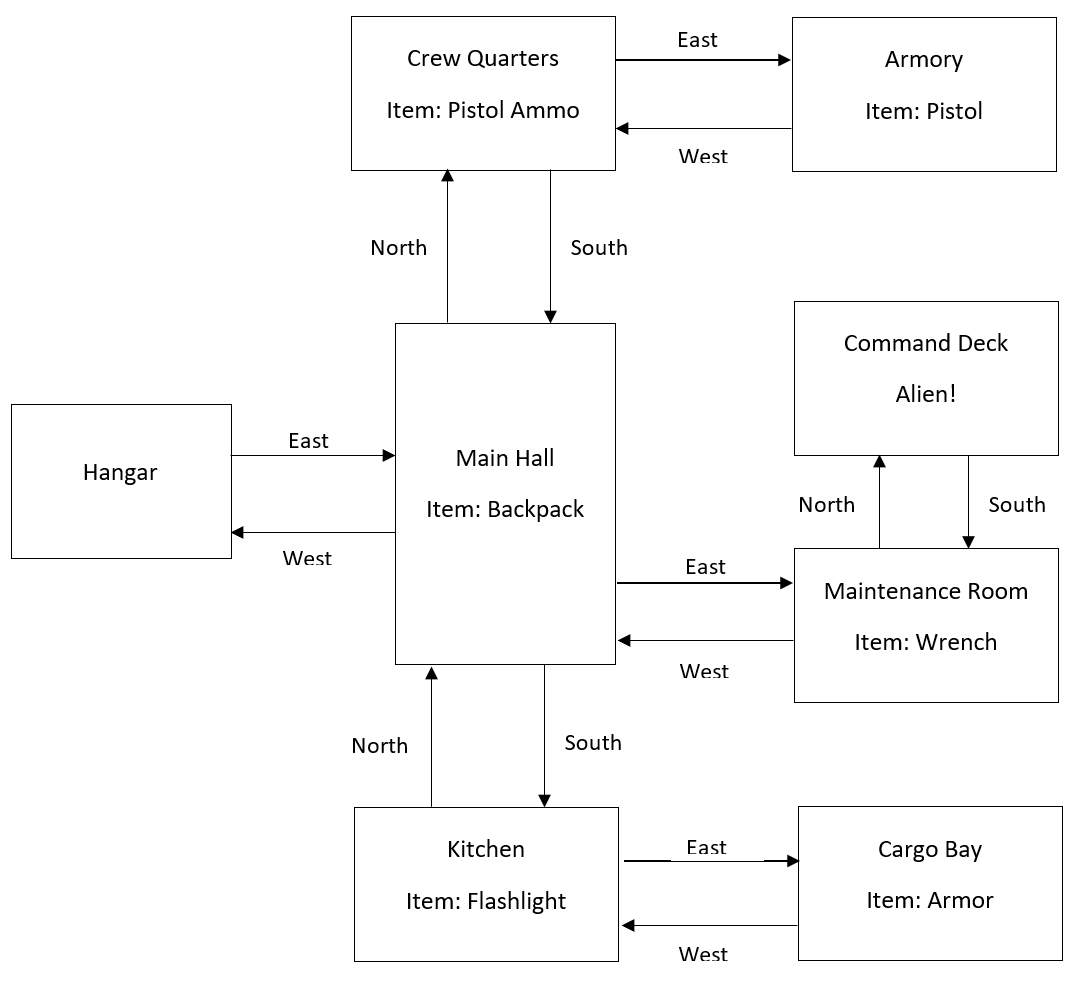
East Crew Quarters Armory Item: Pistol Ammo Item: Pistol West North South Command Deck Alien! East Main Hall Hangar Item: Backpack North South West East Maintenance Room Item: Wrench West North South Kitchen East Cargo Bay Item: Flashlight Item: Armor West
Step by Step Solution
There are 3 Steps involved in it

Get step-by-step solutions from verified subject matter experts
 Study Help