







Question: Hello, I'm working on an assignment and I'm currently trying to optimize my code. I cannot use any other languages other than bash shell scripting:
Hello,
I'm working on an assignment and I'm currently trying to optimize my code. I cannot use any other languages other than bash shell scripting: this means that, among others, awk, sed, tcl, bc, perl, & the python languages and tools are off-limits. Currently, my multiplication function works correctly. However, it is far too slow. Could anyone help me make it faster? I've included some screenshots of the relevant code below.
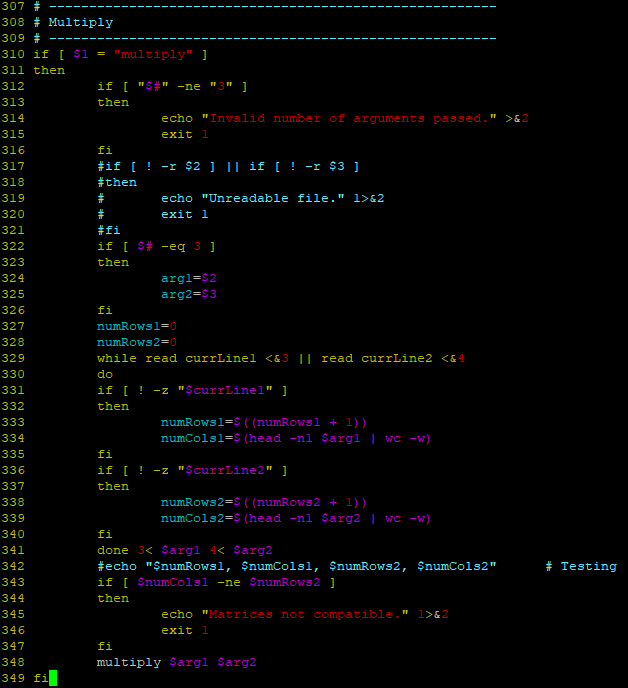
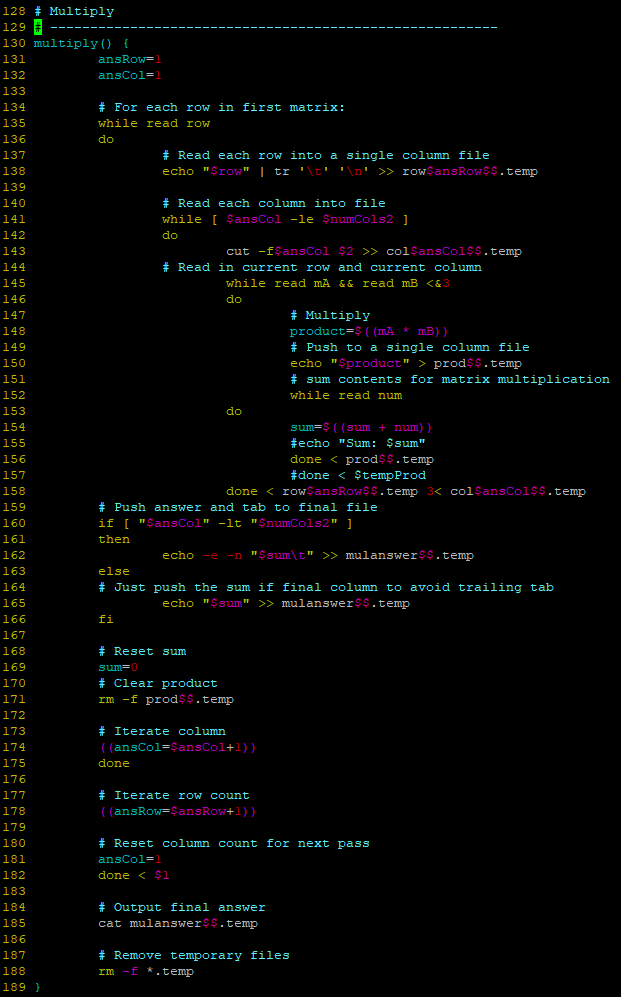
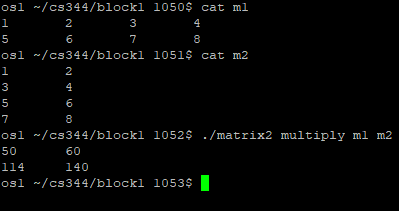
We've been given a grading script to use with our code but when I execute it on my code, it takes too long and times out.
307 # 308 # Multiply 309 # 310 if [ $"mltiply" 311 then 312 313 314 315 316 317 318 319 320 321 322 323 324 325 326 327 328 329 330 331 332 "$#" ] if [ then -ne "3" echo " Invalid number of arguments passed." >&2 exit 1 fi #then echo "Unreadable file." 1>&2 exit 1 #fi if[$#-eq 3 ] then argl-$2 arg2-$3 fi numRows 1-0 numRows 2 while read currLinel &2 exit 1 fi multiply $argl Sarg2 128 # Multiply 130 multiply) ansRow 132 133 134 135 136 ansCol-1 # For each row in first matrix : while read row dlo # Read each row into a single column file echo "$row"I tr't' 'n' >> rowSansRow$.temp 138 139 140 # Read each column into file while [ SansCol -le SnumCols2 142 143 144 cut -f$ansCol $2 > colSansCol$$.temp # Read in current row and current column while read mA && read mB prodss.temp # sum contents for matrix multiplication while read num 148 149 150 151 152 153 154 155 156 157 158 159 160 dlo sum=$ ( (sum num) ) #echo "Sum : $sum" done > mulanswer$$.temp 163 164 else # Just push the sum if final column to avoid trailing tab echo "$sum" >mulanswer$$.temp 166 167 168 169 170 # Reset sum sum # Clear product rm -f prodss.temp 172 173 174 175 176 # Iterate column (ansCol-SansCol+1)) done # Iterate row count (ansRow SansRow+1)) 178 179 180 # Reset column count for next pass ansCol-1 done$1 183 # Output final answer cat mulanswer$$.temp 186 # Remove temporary files rm -f *.temp 188 189 osl/cs344/blockl 1050$ cat ml osl/cs344/blockl 1051s cat m2 2 osl/cs344/blockl 1052$ ./matrix2 multiply ml m2 50 114 60 140 os1 /cs344/blockl 1053s 307 # 308 # Multiply 309 # 310 if [ $"mltiply" 311 then 312 313 314 315 316 317 318 319 320 321 322 323 324 325 326 327 328 329 330 331 332 "$#" ] if [ then -ne "3" echo " Invalid number of arguments passed." >&2 exit 1 fi #then echo "Unreadable file." 1>&2 exit 1 #fi if[$#-eq 3 ] then argl-$2 arg2-$3 fi numRows 1-0 numRows 2 while read currLinel &2 exit 1 fi multiply $argl Sarg2 128 # Multiply 130 multiply) ansRow 132 133 134 135 136 ansCol-1 # For each row in first matrix : while read row dlo # Read each row into a single column file echo "$row"I tr't' 'n' >> rowSansRow$.temp 138 139 140 # Read each column into file while [ SansCol -le SnumCols2 142 143 144 cut -f$ansCol $2 > colSansCol$$.temp # Read in current row and current column while read mA && read mB prodss.temp # sum contents for matrix multiplication while read num 148 149 150 151 152 153 154 155 156 157 158 159 160 dlo sum=$ ( (sum num) ) #echo "Sum : $sum" done > mulanswer$$.temp 163 164 else # Just push the sum if final column to avoid trailing tab echo "$sum" >mulanswer$$.temp 166 167 168 169 170 # Reset sum sum # Clear product rm -f prodss.temp 172 173 174 175 176 # Iterate column (ansCol-SansCol+1)) done # Iterate row count (ansRow SansRow+1)) 178 179 180 # Reset column count for next pass ansCol-1 done$1 183 # Output final answer cat mulanswer$$.temp 186 # Remove temporary files rm -f *.temp 188 189 osl/cs344/blockl 1050$ cat ml osl/cs344/blockl 1051s cat m2 2 osl/cs344/blockl 1052$ ./matrix2 multiply ml m2 50 114 60 140 os1 /cs344/blockl 1053s
Step by Step Solution
There are 3 Steps involved in it

Get step-by-step solutions from verified subject matter experts
 Study Help