







Question: Hello, I'm writing a Bash Script on the shell for matrix operations and I'm currently struggling with my multiply function. I had a working version
Hello,
I'm writing a Bash Script on the shell for matrix operations and I'm currently struggling with my multiply function. I had a working version of the function but it used a lot of temporary files, which was really slowing down on larger inputs. Therefore, I've decided to try and replace all the temporary files with variables in an effort to speed up calculation. So far, I'm only getting half of the correct answer and could really use some help figuring out what I'm doing wrong in my code.
Currently my output looks like this:
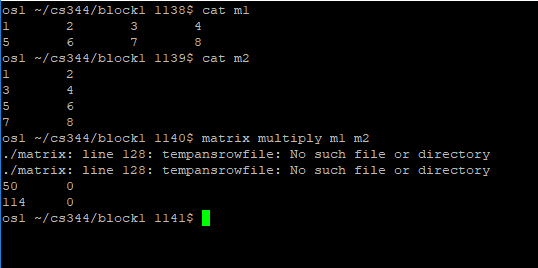
The correct output looks like this:
50 60
114 160
As you can see, it's not calculating the second half of the matrix. For some reason, I'm not multiplying the values in the second column of the second matrix.
My source code looks like this:
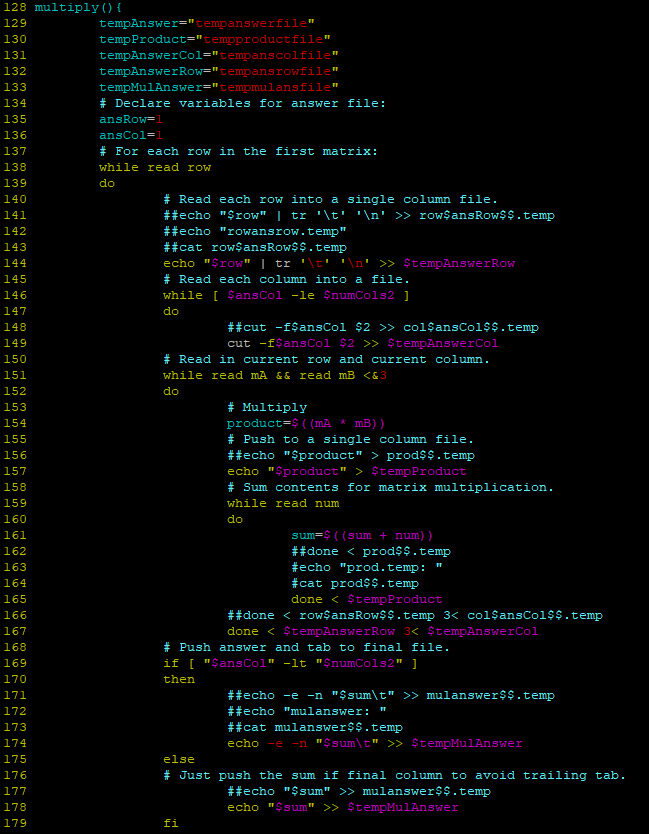
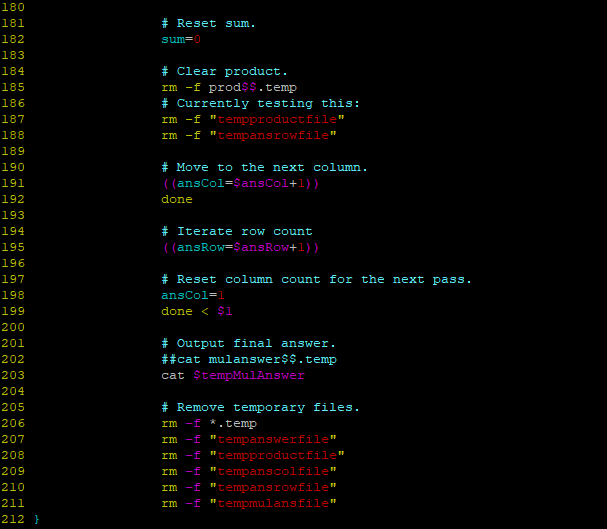
Any help would be appreciated! Thanks!
osl /cs344/blockl 1138S cat ml osl /cs344/blockl 1139s cat m2 os1/cs344/blockl 1140$ matrix multiply ml m2 /matrix: line 128: tempansrowfile: No such file or directory /matrix: line 128: tempansrowfile: No such file or directory 50 114 osl /cs344/blockl 1141S 128 multiplyO 129 130 131 132 133 134 tempAnswer-"tempanswerfile tempProduct=" tempproduct file" tempAnswerCol-tempanscolfile" tempAnswerRow-tempansrowfile" tempMulAnswer-"tempmulansfile" # Declare variables for answer file: ansRow- ansCol-1 # For each row in the first matrix : while read row dlo 136 137 138 139 140 # Read each row into a single column file ##echo "$row" I tr '\t' ' ' >> row$ansRow$$ . temp ##echo "rowans row . temp" ##cat row$ansRow$$.temp 142 143 144 o "$row" # Read each column into a file. while [ SansCol -le SnumCols2 dlo 146 147 148 149 150 151 152 153 154 ##cut -fSansCol $2 >> colSansCol$$.temp cut -f$ansCol $2 > $tempAnswerCol # Read in current row and current column. while read mA && read mB prod$$.temp echo "Sproduct" >$tempProduct # Sum contents for matrix multiplication. while read num dlo sum- (sum num)) ##done > mulanswer$$.temp ##echo "mu!answer: " ##cat mul answer$$. temp echo -e -n "$sum\t">$tempMulAnswer else # Just push the sum if final column to avoid trailing tab . ##echo "$sum" >> mulanswe r $$.temp echo "$sum" >$tempMulAnswer 178 179 fi 180 181 182 183 184 185 186 187 188 189 190 191 192 193 194 195 196 197 198 199 200 201 202 203 204 205 206 207 208 # Reset sum . sum # Clear product. rm -f prodss.temp # Currently testing this: rm -f "tempproductfile rm -f "tempansrowfile # Move to the next column . (ansCol-SansCol+1)) done # Iterate row count (ansRow SansRow+1)) # Reset column count for the next pass. ansCol-1 done
Step by Step Solution
There are 3 Steps involved in it

Get step-by-step solutions from verified subject matter experts
 Study Help