







Question: Hello, In the Java class I am in, we are currently learning how to do JUnit testing in Eclipse and I am kinda struggling with
Hello,
In the Java class I am in, we are currently learning how to do JUnit testing in Eclipse and I am kinda struggling with it.
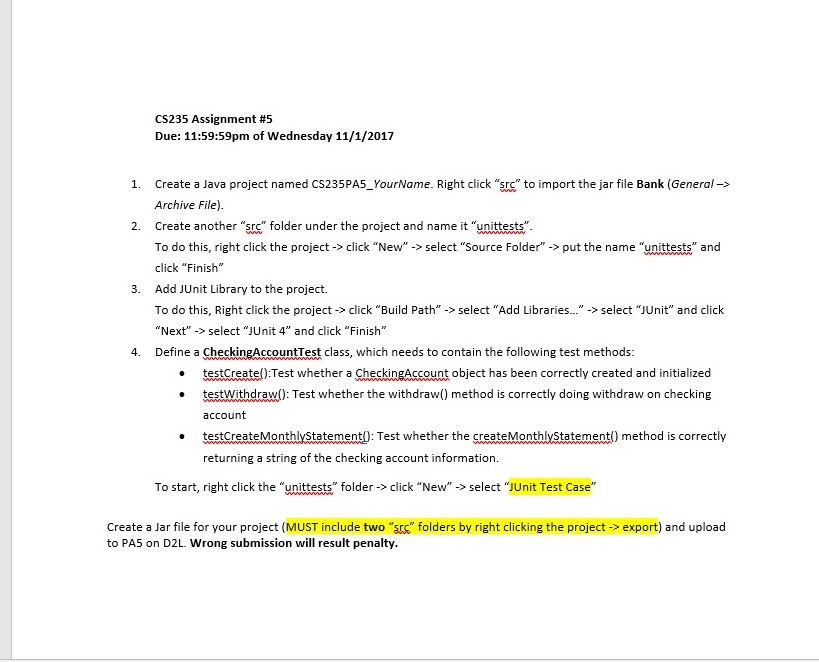
Below is what the assignment is all about (with a comment from the professor on how the testWithdraw method should be tested) and the code for Bank. The JUnit class will need to include the setUp and tearDown methods and be defined.
Thank you!
From the professor regarding the testWithdraw() method:
"In order to test withdraw method completely, you should test two situations: (1) balance = minimumBalance && amount > balance (3) balance >= minimumBalance && amount
Therefore, you need two CheckingAccount objects, one with balance =minimumBalance. Since you have created one in setUp method, you just need to declare and create another one (as a local variable) in testWithdraw method. You need to call withdraw method using these two CheckingAccount objects separately. Use assertFalse and assertTrue to check the return value of calling. For the case (3), you should also use assertEquals to check the balance after withdraw. "
Bank code
abstract public class BankAccount {
private int accountNumber;
private double balance;
public BankAccount(int number, double bal)
{
accountNumber = number;
balance = bal;
}
public int getAccountNumber()
{
return accountNumber;
}
public double getBalance()
{
return balance;
}
public boolean withdraw(double amount)
{
if(balance - amount
return false;
else
{
balance = balance - amount;
return true;
}
}
public void deposit(double amount)
{
balance = balance + amount;
}
}
public class CheckingAccount extends BankAccount{
private double minimumBalance;
public CheckingAccount(int acctNum, double balc, double minBalc)
{
super (acctNum, balc);
minimumBalance = minBalc;
}
public boolean withdraw(double amount)
{
if (getBalance()
return false;
else
return super.withdraw(amount);
}
public String createMonthlyStatement()
{
String statement = "Account number: " + getAccountNumber()
+ " Account balance: " + getBalance()
+ " Minimum balance: " + minimumBalance;
return statement;
}
}
CS235 Assignment #5 Due: 11:59:59pm of Wednesday 11/1/2017 Create a Java project named CS235 PA5-YourName. Right click "src" to import the jar file Bank (General-> Archive File). 1. 2. Create another "srs" folder under the project and name it "unittests" To do this, right click the project-> click "New">select "Source Folder"->put the name "unittests" and click "Finish" Add JUnit Library to the project. To do this, Right click the project->click "Build Path" -> select "Add Libraries... -select "JUnit" and click "Next" -> select "JUnit 4" and click "Finish" Define a CheckingAccountTest class, which needs to contain the following test methods: 3. 4. .testCreate():Test whether a CheckingAccount object has been correctly created and initialized . testWithdraw(): Test whether the withdraw) method is correctly doing withdraw on checking account testCreateMonthlyStatement): Test whether the createMonthlyStatement) method is correctly returning a string of the checking account information. To start, right click the "unittests" folder-> click "New"-> select "JUnit Test Case Create a Jar file for your project (MUST include two "" folders by right clicking the project - export) and upload to PA5 on D2L. Wrong submission will result penalty
Step by Step Solution
There are 3 Steps involved in it

Get step-by-step solutions from verified subject matter experts
 Study Help