







Question: Hello Java experts. I need help creating a web application that follows the guidelines outlined below, but I already have the code for the program
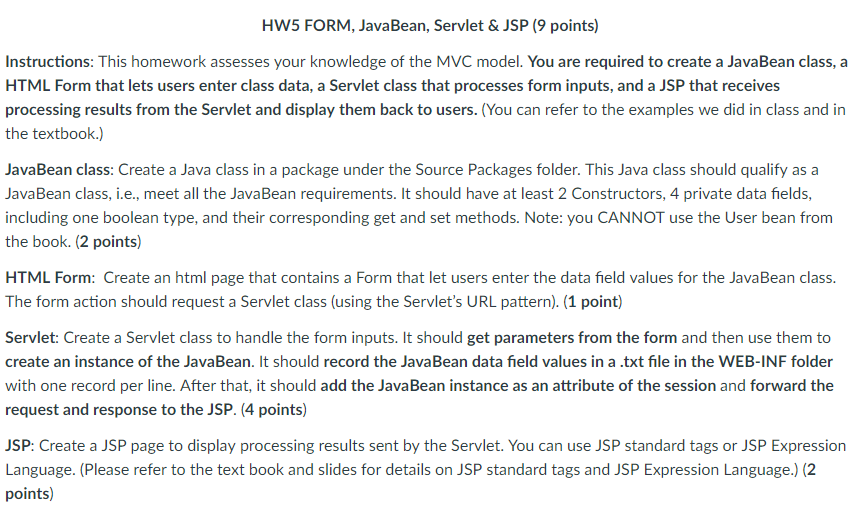
Hello Java experts. I need help creating a web application that follows the guidelines outlined below, but I already have the code for the program completed, the issue is that I do not know how to implement it properly in NetBeans:
Actual Code:
web.xml
xmlns="http://java.sun.com/xmls/javaee" xsi:schemaLocation="http://java.sun.com/xmls/javaee http://java.sun.com/xmls/javaee/web-app_3_0.xsd" id="WebApp_ID" version="3.0">
StudentServlet.java
package com.chegg.servlet;
import java.io.BufferedWriter;
import java.io.File;
import java.io.FileWriter;
import java.io.IOException;
import javax.servlet.ServletException;
import javax.servlet.http.HttpServlet;
import javax.servlet.http.HttpServletRequest;
import javax.servlet.http.HttpServletResponse;
import javax.servlet.http.HttpSession;
import com.chegg.bean.Student;
public class StudentServlet extends HttpServlet {
private static final long serialVersionUID = 5089403085651819196L;
@Override
public void init() throws ServletException {
System.out.println("Student Servlet loaded...");
// overloaded init method contains Servlet Config
// Servlet Config are one per Servlet
// it also has params
}
@Override
public void service(HttpServletRequest request, HttpServletResponse response) throws ServletException, IOException {
response.setContentType("text/html");
String fName = request.getParameter("firstname");
String lName = request.getParameter("lastname");
String ageInString = request.getParameter("age");
String isGraduatedInString = request.getParameter("graduated");
int age = Integer.parseInt(ageInString);
boolean isGraduated = false;
if (isGraduatedInString.equals("true"))
isGraduated = true;
Student student = new Student(fName, lName, age, isGraduated);
saveToFile(student);
// when getSession() is called a session object is created and put into
// container having key value pair, with key as sessionKey and value as
// sessionValue, in this way session can be tracked
// bcos session remains same for a series of request via browser
// There can be many Session object, but once set if the request comes
// with same
// sessionId, it won't create another session object, and we may track
// session
HttpSession session = request.getSession();
session.setAttribute("student", student); // setting the value in
// session object
request.getRequestDispatcher("/WEB-INF/view/display.jsp").forward(request, response);
}
private void saveToFile(Student student) {
System.out.println(getServletContext().getRealPath("/WEB-INF")); // will
// store
// file
// in
// this
// path
// of
// server
try (BufferedWriter br = new BufferedWriter(
new FileWriter(new File(getServletContext().getRealPath("/WEB-INF") + "\\data.txt"), true))) {
br.write(student.getfName() + " " + student.getlName() + " " + student.getAge() + " "
+ student.getIsGraduated() + " ");
} catch (IOException e) {
// TODO Auto-generated catch block
e.printStackTrace();
}
}
@Override
public void destroy() {
System.out.println("destroy called");
}
}
Student.java
package com.chegg.bean;
public class Student {
private String fName;
private String lName;
private int age;
private Boolean isGraduated;
public Student(String fName, String lName) {
this.fName = fName;
this.lName = lName;
}
public Student(String fName, String lName, int age, Boolean isGraduated) {
this.fName = fName;
this.lName = lName;
this.age = age;
this.isGraduated = isGraduated;
}
public String getfName() {
return fName;
}
public void setfName(String fName) {
this.fName = fName;
}
public String getlName() {
return lName;
}
public void setlName(String lName) {
this.lName = lName;
}
public int getAge() {
return age;
}
public void setAge(int age) {
this.age = age;
}
public Boolean getIsGraduated() {
return isGraduated;
}
public void setIsGraduated(Boolean isGraduated) {
this.isGraduated = isGraduated;
}
@Override
public String toString() {
return "Student [fName=" + fName + ", lName=" + lName + ", age=" + age + ", isGraduated=" + isGraduated + "]";
}
}
index.html
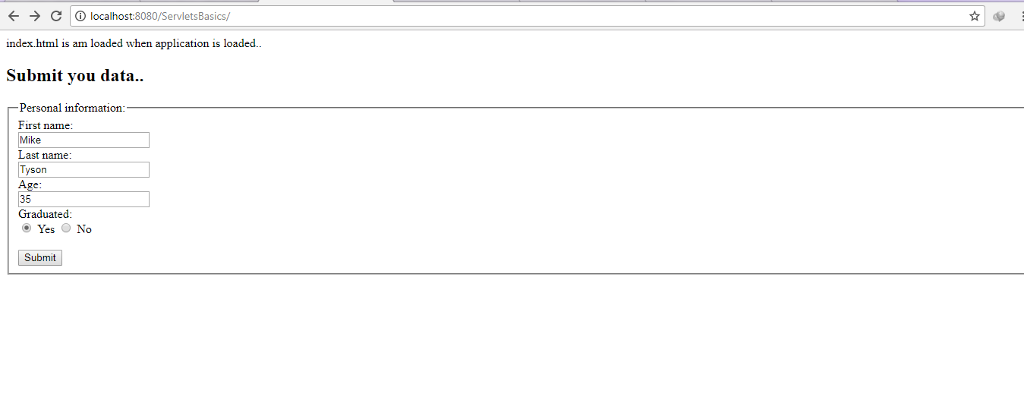
index.html is am loaded when application is loaded..
Submit you data..
display.jsp
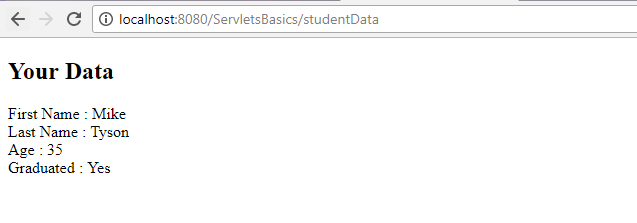
Your Data
First Name : ${student.fName}
Last Name : ${student.lName}
Age : ${student.age}
Graduated : ${student.isGraduated ? "Yes":"No" }
All I need is for this code to be properly copy and pasted into NetBeans so that it produces a correct output. So if you could please upload the finished NetBeans project to a site I could download it from and like it as an answer, I would greatly appreciate it.
Output:
HW5 FORM, JavaBean, Servlet & JSP (9 points) Instructions: This homework assesses your knowledge of the MVC model. You are required to create a JavaBean class, a HTML Form that lets users enter class data, a Servlet class that processes form inputs, and a JSP that receives processing results from the Servlet and display them back to users. (You can refer to the examples we did in class and in the textbook.) JavaBean class: Create a Java class in a package under the Source Packages folder. This Java class should qualify as a Java Bean class, i.?., meet all the JavaBean requirements. It should have at least 2 Constructors, 4 private data fields, including one boolean type, and their corresponding get and set methods. Note: you CANNOT use the User bean from the book. (2 points) HTML Form: Create an html page that contains a Form that let users enter the data field values for the JavaBean class. The form action should request a Servlet class (using the Servlet's URL pattern). (1 point) Servlet: Create a Servlet class to handle the form inputs. It should get parameters from the form and then use them to create an instance of the JavaBean. It should record the JavaBean data field values in a .txt file in the WEB-INF folder with one record per line. After that, it should add the JavaBean instance as an attribute of the session and forward the request and response to the JSP. (4 points) JSP: Create a JSP page to display processing results sent by the Servlet. You can use JSP standard tags or JSP Expression Language. (Please refer to the text book and slides for details on JSP standard tags and JSP Expression Language.)(2 points) HW5 FORM, JavaBean, Servlet & JSP (9 points) Instructions: This homework assesses your knowledge of the MVC model. You are required to create a JavaBean class, a HTML Form that lets users enter class data, a Servlet class that processes form inputs, and a JSP that receives processing results from the Servlet and display them back to users. (You can refer to the examples we did in class and in the textbook.) JavaBean class: Create a Java class in a package under the Source Packages folder. This Java class should qualify as a Java Bean class, i.?., meet all the JavaBean requirements. It should have at least 2 Constructors, 4 private data fields, including one boolean type, and their corresponding get and set methods. Note: you CANNOT use the User bean from the book. (2 points) HTML Form: Create an html page that contains a Form that let users enter the data field values for the JavaBean class. The form action should request a Servlet class (using the Servlet's URL pattern). (1 point) Servlet: Create a Servlet class to handle the form inputs. It should get parameters from the form and then use them to create an instance of the JavaBean. It should record the JavaBean data field values in a .txt file in the WEB-INF folder with one record per line. After that, it should add the JavaBean instance as an attribute of the session and forward the request and response to the JSP. (4 points) JSP: Create a JSP page to display processing results sent by the Servlet. You can use JSP standard tags or JSP Expression Language. (Please refer to the text book and slides for details on JSP standard tags and JSP Expression Language.)(2 points)
Step by Step Solution
There are 3 Steps involved in it

Get step-by-step solutions from verified subject matter experts
 Study Help