







Question: Hello, please help me repair the search and delete method for recognizing the food that has been chosen by the user. You can see that
Hello, please help me repair the search and delete method for recognizing the food that has been chosen by the user. You can see that in the sample output, when the user searches for or deletes the food that they add, the output stated that the food is not found even though the food has been added by the user. So it should be found unless the user enters the wrong food while searching or deleting it.
This is my code in Java:
import java.util.Scanner;
public class TestKerja2 {
static String[] food;
static double[] price;
static int[] selectedfood = new int[10];
public static void main(String[] args) {
Scanner sc = new Scanner(System.in);
food = new String[4];
food[0] = "Nasi Ayam";
food[1] = "Nasi Lemak";
food[2] = "Nasi Kukus";
food[3] = "Nasi Kandar";
price = new double[4];
price[0] = 5.00;
price[1] = 4.00;
price[2] = 5.00;
price[3] = 5.00;
System.out.println(" Welcome to MyCafe ");
System.out.println(" ----------------Menu----------------");
System.out.println(" 0." + food[0] + " RM5.00");
System.out.println(" 1." + food[1] + " RM4.00");
System.out.println(" 2." + food[2] + " RM5.00");
System.out.println(" 3." + food[3] + " RM5.00");
System.out.println(" 4.Cancel");
int menu;
boolean found = false;
ch();
}
public static void ch() {
Scanner sc = new Scanner(System.in);
int option = 0;
System.out.println("MENU*");
System.out.println("1. Choose Menu ");
System.out.println("2. Search a particular Data ");
System.out.println("3. Delete a particulatr Data ");
System.out.println("4. Exit");
System.out.print("Enter the option : [1 - 4] : ");
option = sc.nextInt();
switch (option) {
case 1:
chooseMenu(selectedfood, food, price);
break;
case 2:
search(selectedfood, food);
break;
case 3:
delete(selectedfood, food);
break;
case 4:
System.out.print("invalid");
break;
}
if (option 4)
System.out.println(" Invalid option ! Enter again..");
}
public static void chooseMenu(int[] selectedfood, String[] food, double[] price) {
Scanner sc = new Scanner(System.in);
System.out.println("Enter the number for the corresponding food : [0 - 4] : & 5 to return
back to menu");
int fs = sc.nextInt();
if (fs == 5) {
ch();
} else {
System.out.println("You have selected: " + food[fs] + " for RM " + price[fs]);
double sum = 0;
System.out.println(selectedfood[fs] + ": RM " + price[fs]);
sum = sum + price[fs];
System.out.print("sum= RM " + sum);
}
chooseMenu(selectedfood,food, price);
}
public static void search(int[] selectedfood, String[] food) {
Scanner sc = new Scanner(System.in);
System.out.println(" Enter the item name to search : & Enter 5 to return back to
menu");
String menu = sc.nextLine();
if (Integer.parseInt(menu) == 5) {
ch();
} else {
boolean found = false;
for (int x = 0; x
if (food[x] == (menu)) {
for (int i = 0; i
if (selectedfood[i] == x)
System.out.println("The item is present in the users menu .");
found = true;
break;
}
}
if (found == false) {
System.out.println("Food not found ");
}
}
}
}
public static void delete(int[] selectedfood, String[] food) {
Scanner sc = new Scanner(System.in);
System.out.print(" Enter the item name to delete : && Enter 5 to return back to menu
");
String del = sc.next();
if (Integer.parseInt(del) == 5) {
ch();
} else {
boolean found = false;
for (int i = 0; i
if (food[i] == del) {
for (int z = 0; z
System.out.println("Deleting the food.");
found = true;
break;
}
}
if (found == false) {
System.out.println("Food not found. Invalid entry .");
}
break;
}
}
}
}
Sample Output:
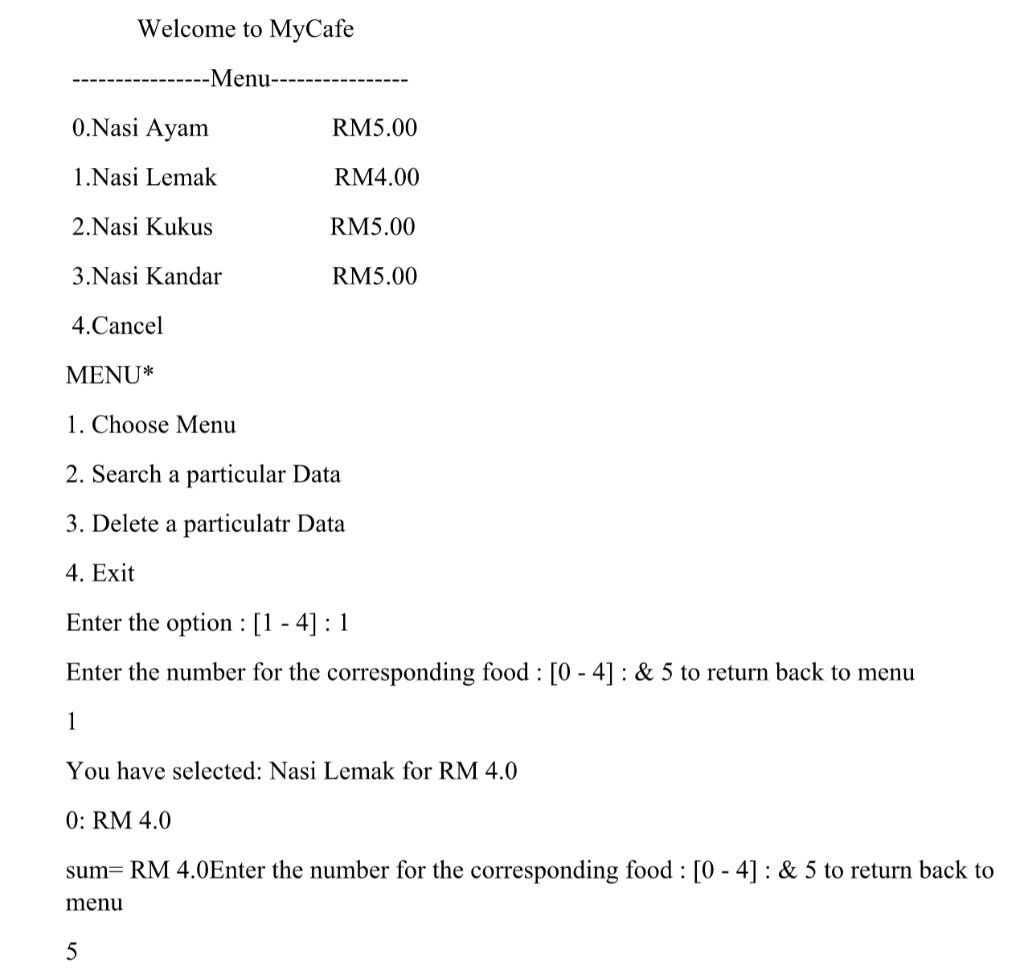
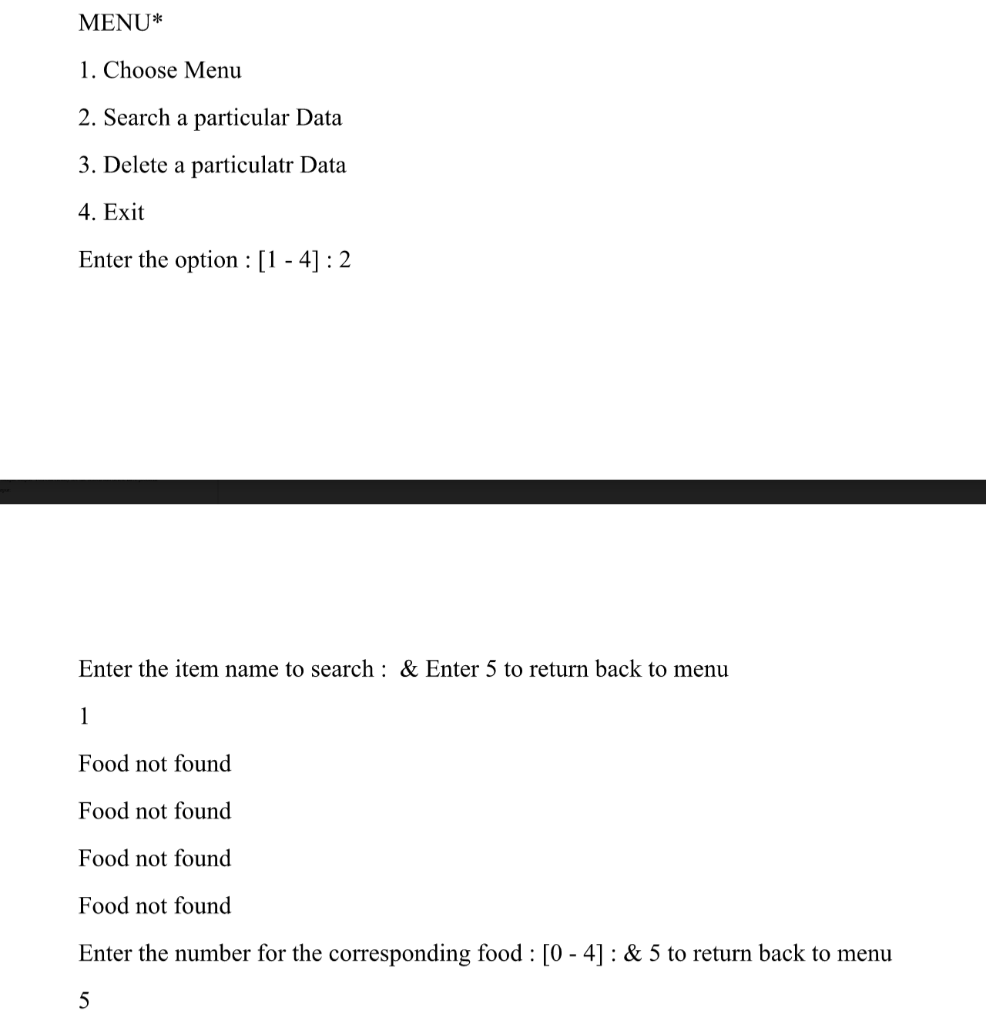
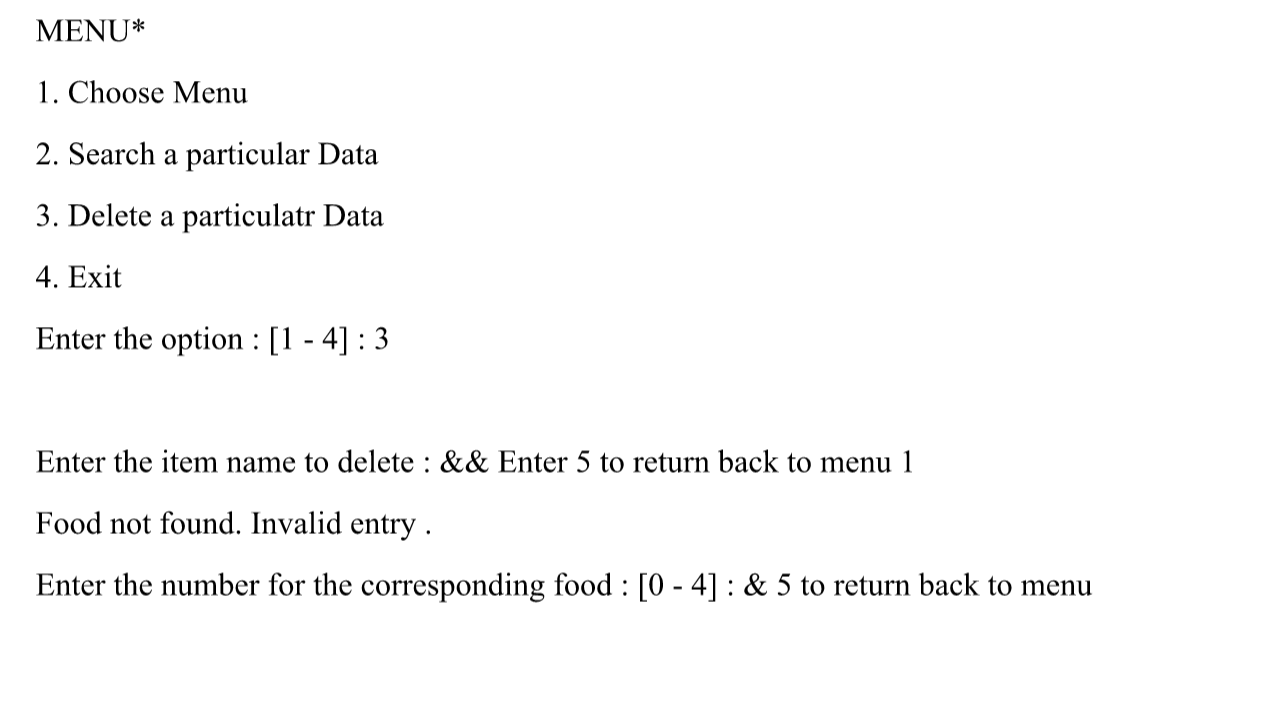 You can see that in the sample output, when the user searches for or deletes the food that they add, the output stated that the food is not found even though the food has been added by the user. So it should be found unless the user enters the wrong food while searching or deleting it.
Welcome to MyCafe -Menu-- 0.Nasi Ayam RM5.00 1. Nasi Lemak RM4.00 2.Nasi Kukus RM5.00 3.Nasi Kandar RM5.00 4.Cancel MENU* 1. Choose Menu 2. Search a particular Data 3. Delete a particulatr Data 4. Exit Enter the option : [1 - 4] : 1 Enter the number for the corresponding food : [0 - 4] : & 5 to return back to menu 1 You have selected: Nasi Lemak for RM 4.0 0: RM 4.0 sum=RM 4.0Enter the number for the corresponding food : [0 - 4] : & 5 to return back to menu 5 MENU* 1. Choose Menu 2. Search a particular Data 3. Delete a particulatr Data 4. Exit Enter the option : [1 - 4] : 2 Enter the item name to search : & Enter 5 to return back to menu 1 Food not found Food not found Food not found Food not found Enter the number for the corresponding food : [0 - 4] : & 5 to return back to menu 5 MENU* 1. Choose Menu 2. Search a particular Data 3. Delete a particulatr Data 4. Exit Enter the option : [1 - 4] : 3 Enter the item name to delete : && Enter 5 return back menu 1 Food not found. Invalid entry . Enter the number for the corresponding food : [0 - 4] : & 5 to return back to menu
Step by Step Solution
There are 3 Steps involved in it

Get step-by-step solutions from verified subject matter experts
 Study Help