







Question: HELLO PLEASE HELP ME WITH THIS, I PICKED LABOR FORCE STATISTICS Databases, Tables & Calculators by Subject Change Output Options: From: 2014 V To: 2024
HELLO PLEASE HELP ME WITH THIS, I PICKED LABOR FORCE STATISTICS
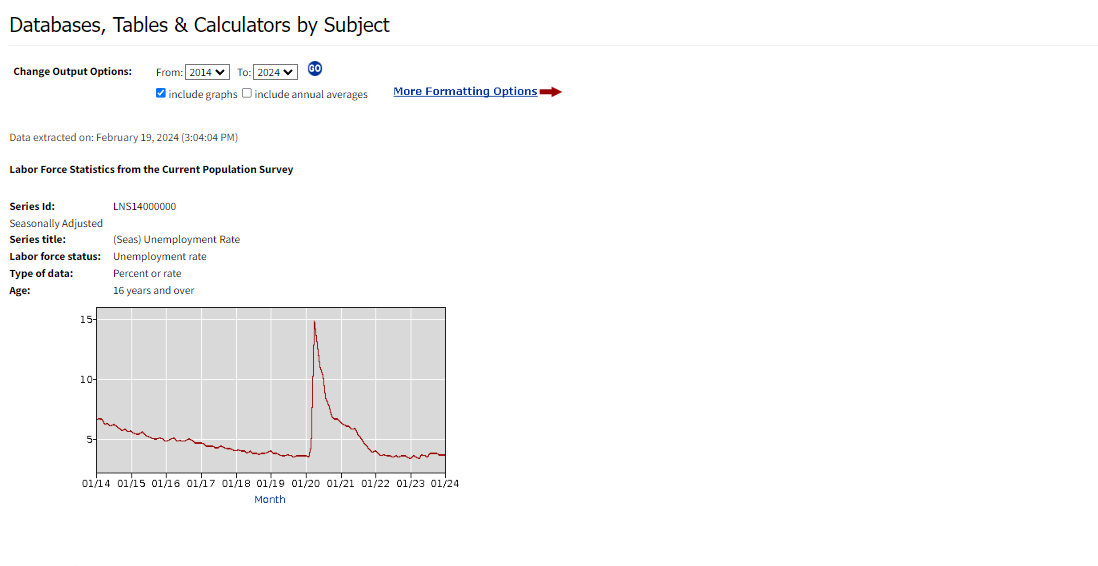
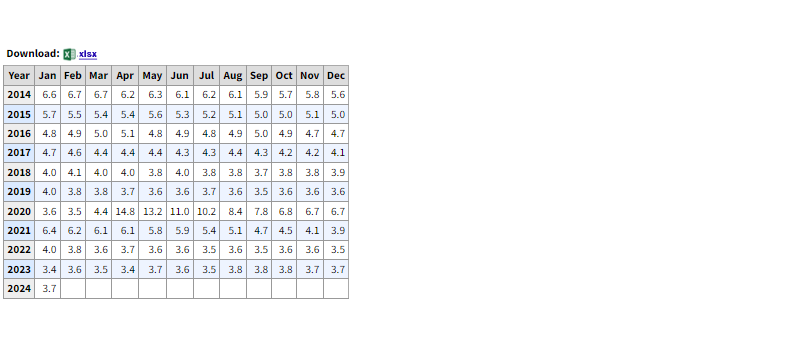
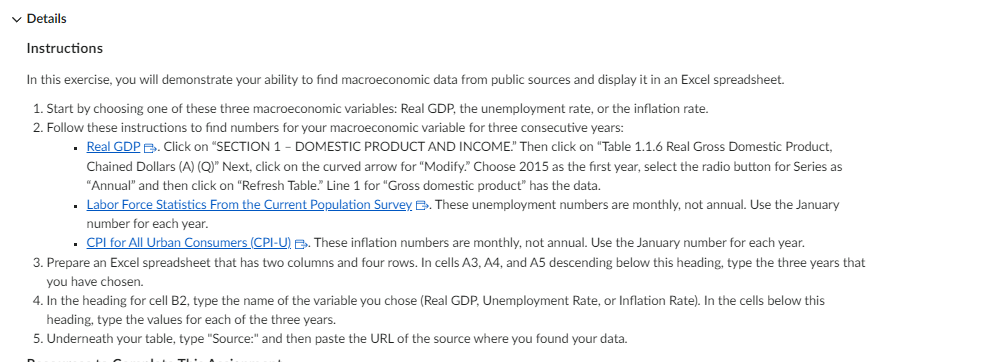
Databases, Tables & Calculators by Subject Change Output Options: From: 2014 V To: 2024 V GO include graphs U include annual averages More Formatting Options Data extracted on: February 19, 2024 (3:04:04 PM) Labor Force Statistics from the Current Population Survey Series Id: LNS14000000 Seasonally Adjusted Series title: (Seas) Unemployment Rate Labor force status: Unemployment rate Type of data: Percent or rate Age: 16 years and over 15. 10- 5. 01/14 01/15 01/16 01/17 01/18 01/19 01/20 01/21 01/22 01/23 01/24 Month\f~ Details Instructions In this exercise, you will demonstrate your ability to find macroeconomic data from public sources and display it in an Excel spreadsheet. 1. Start by choosing one of these three macroeconomic variables: Real GDP, the unemployment rate, or the inflation rate. 2. Follow these instructions to find numbers for your macroeconomic variable for three consecutive years: Real GDP . Click on *SECTION 1 - DOMESTIC PRODUCT AND INCOME. Then click on \"Table 1.1.6 Real Gross Domestic Product, Chained Dollars (A) (Q)" Next, click on the curved arrow for "Modify\" Choose 2015 as the first year, select the radio button for Series as \"Annual\" and then click on "Refresh Table\" Line 1 for "Gross domestic product\" has the data. Labor Force Statistics From the Current Population Survey Bs. These unemployment numbers are monthly, not annual. Use the January number for each year. CPI for All Urban Consumers (CPI-U) Bs. These inflation numbers are monthly, not annual. Use the January number for each year. 3. Prepare an Excel spreadsheet that has two columns and four rows. In cells A3, A4, and A5 descending below this heading, type the three years that you have chosen. 4. In the heading for cell B2, type the name of the variable you chose (Real GDP, Unemployment Rate, or Inflation Rate). In the cells below this heading, type the values for each of the three years. 5. Underneath your table, type "Source:" and then paste the URL of the source where you found vour data. ~ e e e oa
Step by Step Solution
There are 3 Steps involved in it

Get step-by-step solutions from verified subject matter experts
 Study Help