







Question: hello, pls help me to create a website using html, pls include the codes and the styling codes too! thank you so much! b) You
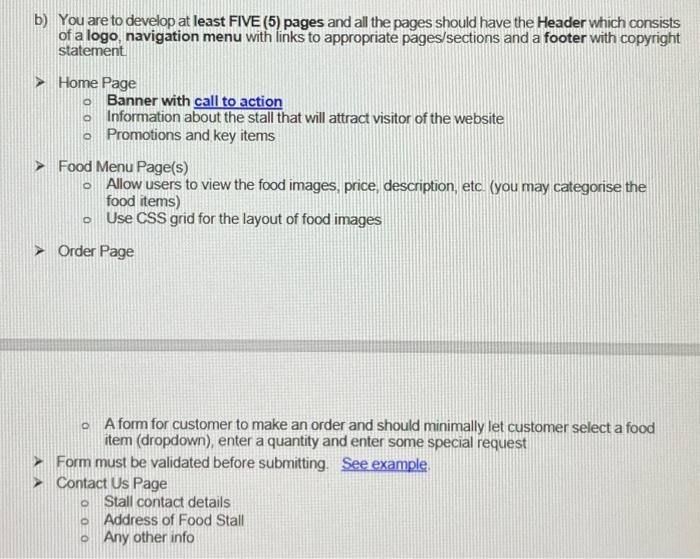
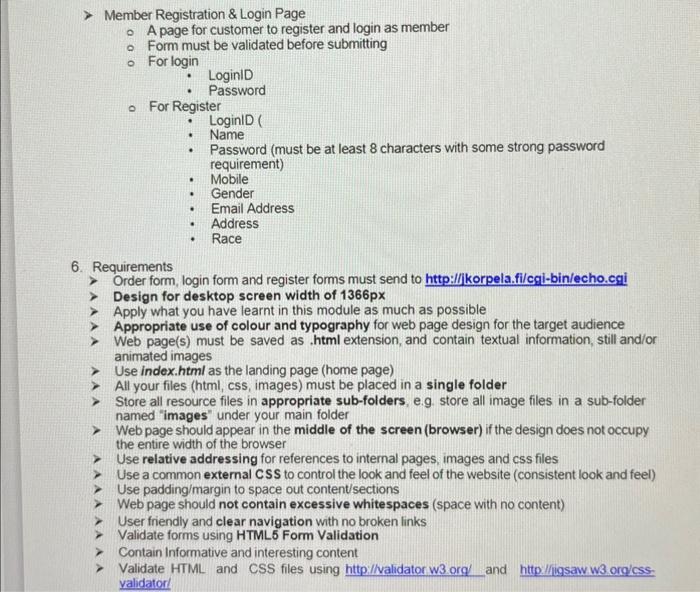
b) You are to develop at least FIVE (5) pages and all the pages should have the Header which consists of a logo, navigation menu with links to appropriate pages/sections and a footer with copyright statement. Home Page Banner with call to action Information about the stall that will attract visitor of the website Promotions and key items Food Menu Page(s) Allow users to view the food images, price, description, eto. (you may categorise the food items) Use CSS grid for the layout of food images Order Page - A form for customer to make an order and should minimally let customer select a food item (dropdown), enter a quantity and enter some special request Form must be validated before submitting. See example. Contact Us Page Stall contact details Address of Food Stall Any other info Member Registration \& Login Page A page for customer to register and login as member - Form must be validated before submitting For login - LoginlD - Passwora - For Register - LoginlD( - Name - Password (must be at least 8 characters with some strong password requirement) - Mobile - Gender - Email Address - Address - Race 6. Requirements Order form, login form and register forms must send to http:/llikorpela.filcgi-bin/echo.cgi Design for desktop screen width of 1366px Apply what you have learnt in this module as much as possible Appropriate use of colour and typography for web page design for the target audience Web page(s) must be saved as .html extension, and contain textual information, still and/or animated images Use index.html as the landing page (home page) All your files (html, css, images) must be placed in a single folder Store all resource files in appropriate sub-folders, e.g. store all image files in a sub-folder named "images" under your main folder Web page should appear in the middle of the screen (browser) if the design does not occupy the entire width of the browser Use relative addressing for references to internal pages, images and css files Use a common external CSS to control the look and feel of the website (consistent look and feel) Use padding/margin to space out content/sections Web page should not contain excessive whitespaces (space with no content) User friendly and clear navigation with no broken links Validate forms using HTML5 Form Validation Contain Informative and interesting content Validate HTML and CSS files using and validatorl
Step by Step Solution
There are 3 Steps involved in it

Get step-by-step solutions from verified subject matter experts
 Study Help