







Question: Hello there. This time I'm trying to Fix an error with a script that keeps crashing. I've tried adding the Missing column with lastname but
Hello there.
This time I'm trying to Fix an error with a script that keeps crashing. I've tried adding the Missing column with "lastname" but it didn't execute the script.
Could you please help me edit this script using Neno and debug the issue?>
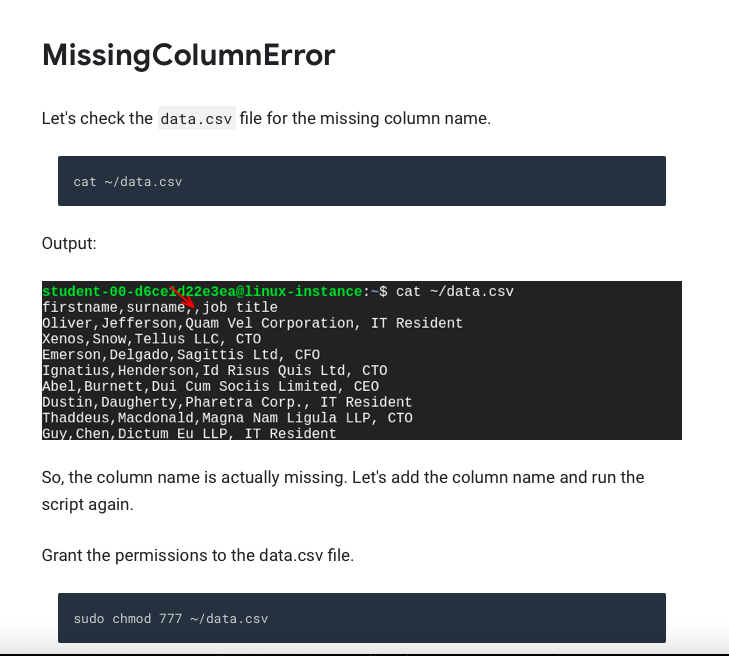
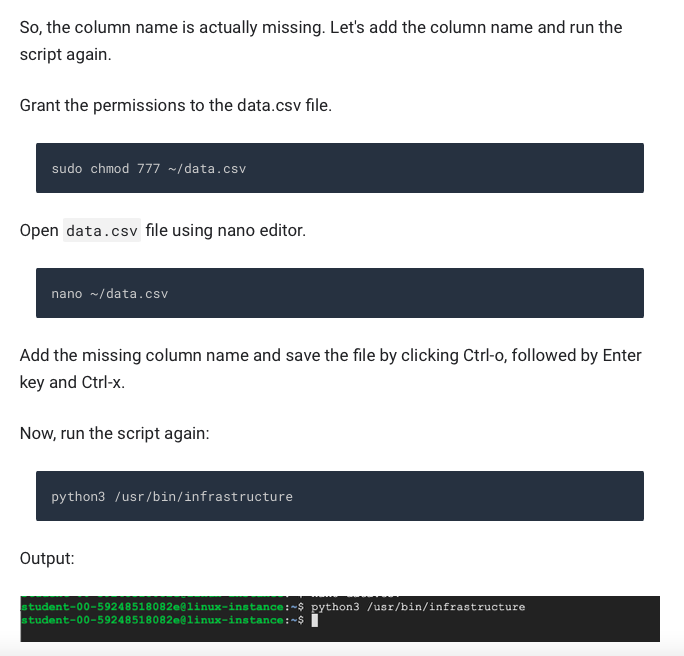
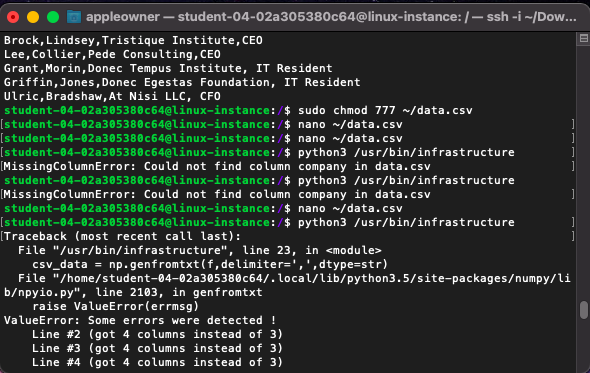
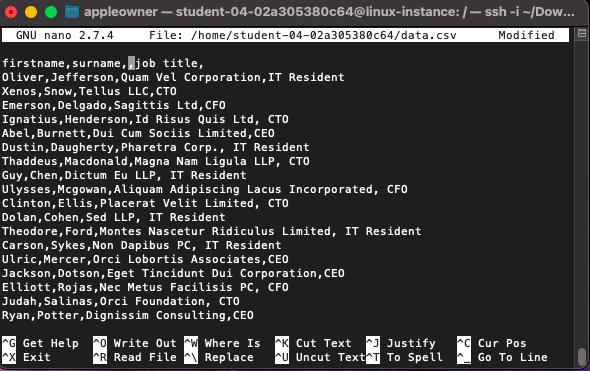
Missing ColumnError Let's check the data.csv file for the missing column name. cat ~/data.csv Output: student-00-d6ce1d22e3ea@linux-instance:-$ cat -/data.csv firstname, surname, job title Oliver, Jefferson, Quam Vel Corporation, IT Resident Xenos, Snow, Tellus LLC, CTO Emerson, Delgado, Sagittis Ltd, CFO Ignatius, Henderson, Id Risus Quis Ltd, CTO Abel, Burnett, Dui Cum sociis Limited, CEO Dustin, Daugherty, Pharetra Corp., IT Resident Thaddeus, Macdonald, Magna Nam Ligula LLP, CTO Guy, Chen, Dictum Eu LLP, IT Resident So, the column name is actually missing. Let's add the column name and run the script again. Grant the permissions to the data.csv file. sudo chmod 777 ~/data.csv So, the column name is actually missing. Let's add the column name and run the script again. Grant the permissions to the data.csv file. sudo chmod 777 ~/data.csv Open data.csv file using nano editor. nano ~/data.csv Add the missing column name and save the file by clicking Ctrl-o, followed by Enter key and Ctrl-x. Now, run the script again: python3 /usr/bin/infrastructure Output: student-00-59248518082e@linux-instance: $ python3 /usr/bin/infrastructure student-00-59248518082e@linux-instance:-$ P appleowner - student-04-02a305380c64@linux-instance:/- ssh -i -/Dow... Brock, Lindsey, Tristique Institute, CEO Lee, Collier, Pede Consulting, CEO Grant, Morin,Donec Tempus Institute, IT Resident Griffin, Jones, Donec Egestas Foundation, IT Resident Ulric, Bradshaw, At Nisi LLC, CFO student-04-02a305380c64@linux-instance:/$ sudo chmod 777 ./data.csv [student-04-02a305380c64@linux-instance: $ nano /data.csv ] [student-04-02a305388c64@linux-instance: $ nano /data.csv ] [student-84-92a365388c64@linux-instance: $ python3 /usr/bin/infrastructure [Missing ColumnError: Could not find column company in data.csv student-84-92a365388c64@linux-instance: $ python3 /usr/bin/infrastructure [Missing ColumnError: Could not find column company in data.csv ] student-04-02a305380c64@linux-instance: $ nano n/data.csv (student-04-02a305380c64@linux-instance: $ python3 /usr/bin/infrastructure ] [Traceback (most recent call last): ] File "/usr/bin/infrastructure", line 23, in
Step by Step Solution
There are 3 Steps involved in it

Get step-by-step solutions from verified subject matter experts
 Study Help