







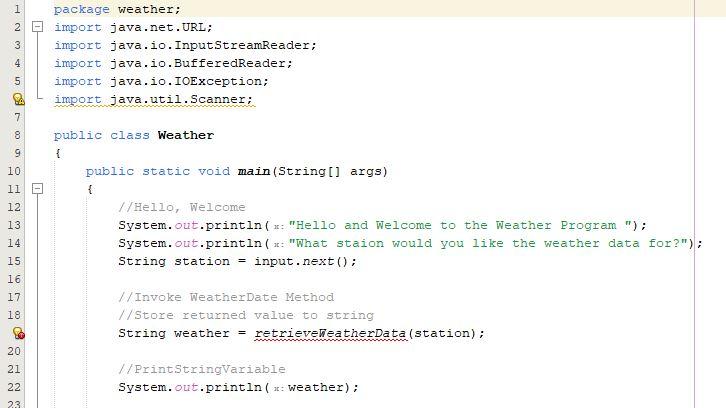
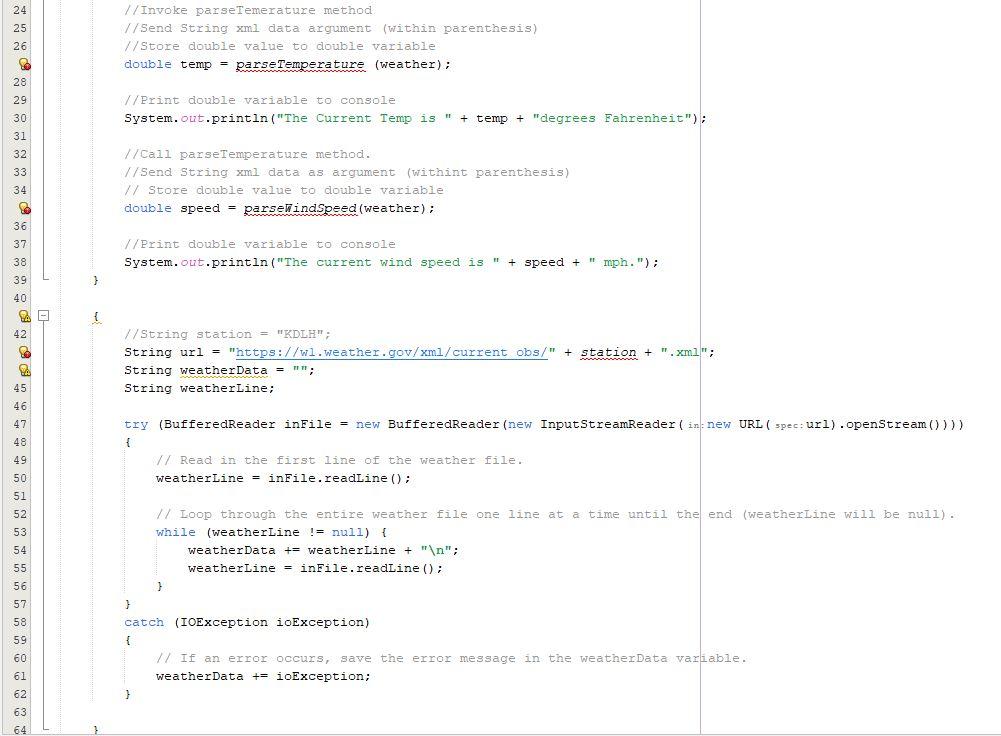
Question: Hello, This code is erroring out as un-compliable. This is a METHOD assignment. Instructions are listed below my code. The strategy we've used so far
Hello, This code is erroring out as un-compliable. This is a METHOD assignment. Instructions are listed below my code.
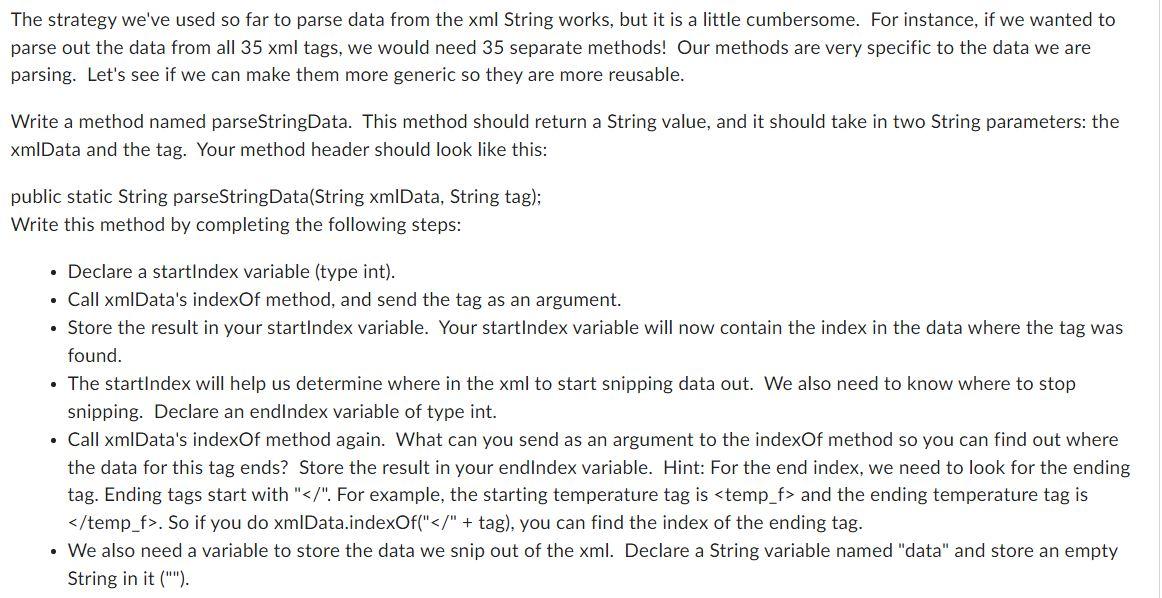
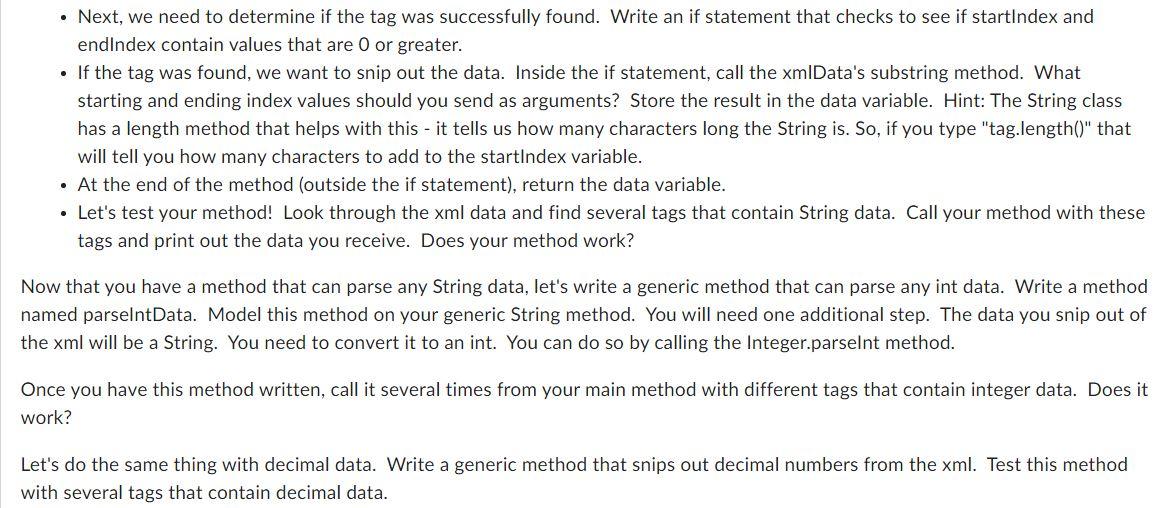
The strategy we've used so far to parse data from the xml String works, but it is a little cumbersome. For instance, if we wanted to parse out the data from all 35xml tags, we would need 35 separate methods! Our methods are very specific to the data we are parsing. Let's see if we can make them more generic so they are more reusable. Write a method named parseStringData. This method should return a String value, and it should take in two String parameters: the xmIData and the tag. Your method header should look like this: public static String parseStringData(String xmIData, String tag); Write this method by completing the following steps: - Declare a startlndex variable (type int). - Call xmIData's indexOf method, and send the tag as an argument. - Store the result in your startIndex variable. Your startIndex variable will now contain the index in the data where the tag was found. - The startlndex will help us determine where in the xml to start snipping data out. We also need to know where to stop snipping. Declare an endlndex variable of type int. - Call xmIData's indexOf method again. What can you send as an argument to the indexOf method so you can find out where the data for this tag ends? Store the result in your endlndex variable. Hint: For the end index, we need to look for the ending tag. Ending tags start with "". For example, the starting temperature tag is and the ending temperature tag is temp_f >. So if you do xmIData.indexOf("" + tag), you can find the index of the ending tag. - We also need a variable to store the data we snip out of the xml. Declare a String variable named "data" and store an empty String in it (""). - Next, we need to determine if the tag was successfully found. Write an if statement that checks to see if startlndex and endlndex contain values that are 0 or greater. - If the tag was found, we want to snip out the data. Inside the if statement, call the xmIData's substring method. What starting and ending index values should you send as arguments? Store the result in the data variable. Hint: The String class has a length method that helps with this - it tells us how many characters long the String is. So, if you type "tag.length()" that will tell you how many characters to add to the startlndex variable. - At the end of the method (outside the if statement), return the data variable. - Let's test your method! Look through the xml data and find several tags that contain String data. Call your method with these tags and print out the data you receive. Does your method work? Now that you have a method that can parse any String data, let's write a generic method that can parse any int data. Write a method named parselntData. Model this method on your generic String method. You will need one additional step. The data you snip out of the xml will be a String. You need to convert it to an int. You can do so by calling the Integer.parselnt method. Once you have this method written, call it several times from your main method with different tags that contain integer data. Does it work? Let's do the same thing with decimal data. Write a generic method that snips out decimal numbers from the xml. Test this method with several tags that contain decimal data
Step by Step Solution
There are 3 Steps involved in it

Get step-by-step solutions from verified subject matter experts
 Study Help