







Question: Hello, this is for programming with the java language. We are to create a program that takes a program employee and create two other programs
Hello, this is for programming with the java language. We are to create a program that takes a program employee and create two other programs that extend employee and implement serializable so that we can send to and download from an external file. Please read the assignment carefully, the hardest part is the u command and the d command program part. I attempted this assignment but I have over 80 errors, I really need your help please. So below is the assignment sheet, below that are several programs that the professor used for his version of the assignment. We can use his utilities program for writing doubles into money form. Also his reading in strings program. However we have to create the parent program, I suppose we can call it Employees2, and then the hourlyemployee as well as salary employee programs. Also there is the code for writing increasing the array size and the input object file and output object file programs. Please read carefully. You do not have to use any of his codes however it does have to be constrained to the contents of this assignment. Please make it clear in showing what program does what and separate them so I know that they dont al go in the same program. Please mak that clear. Thank you for your help!
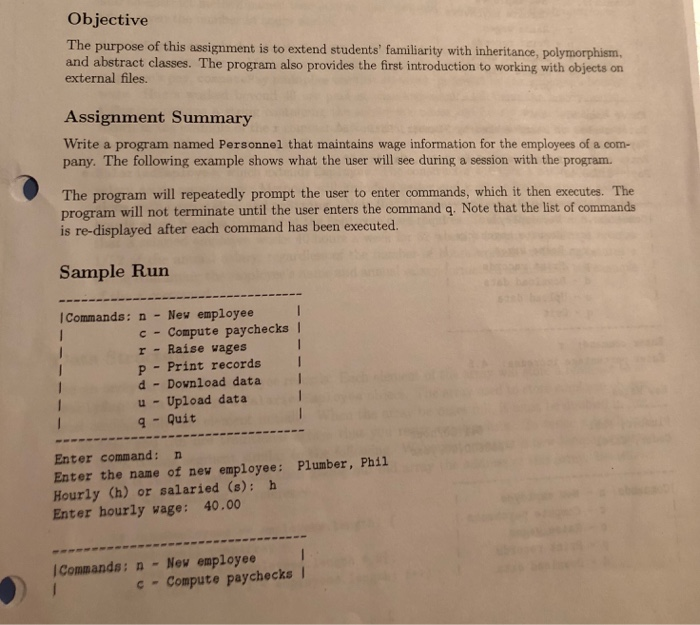
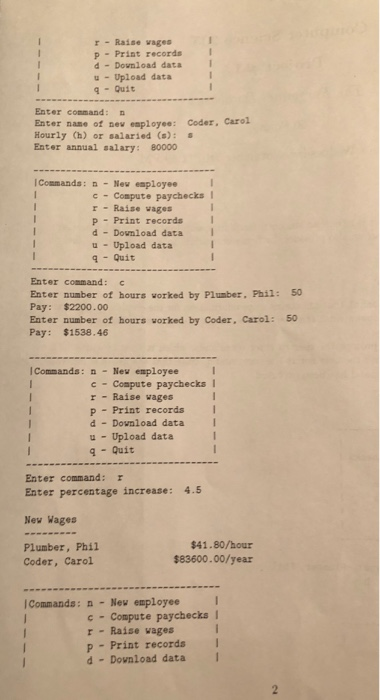
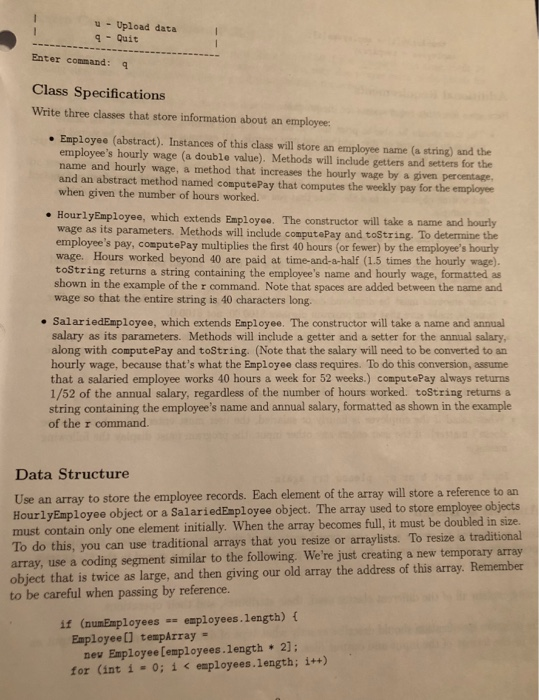
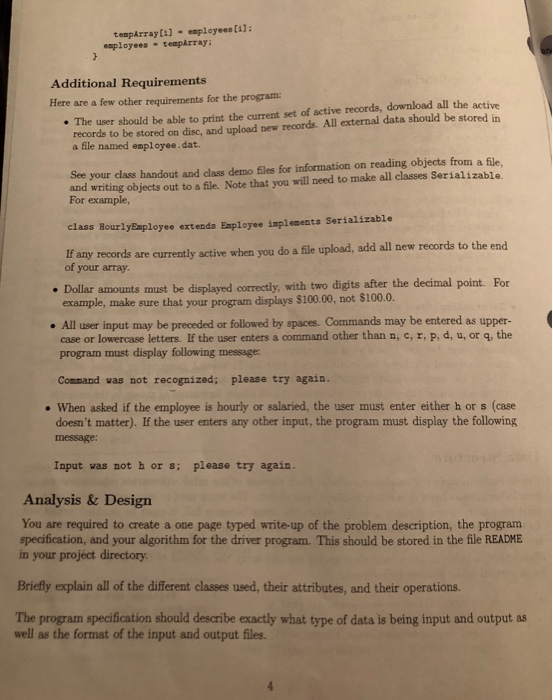
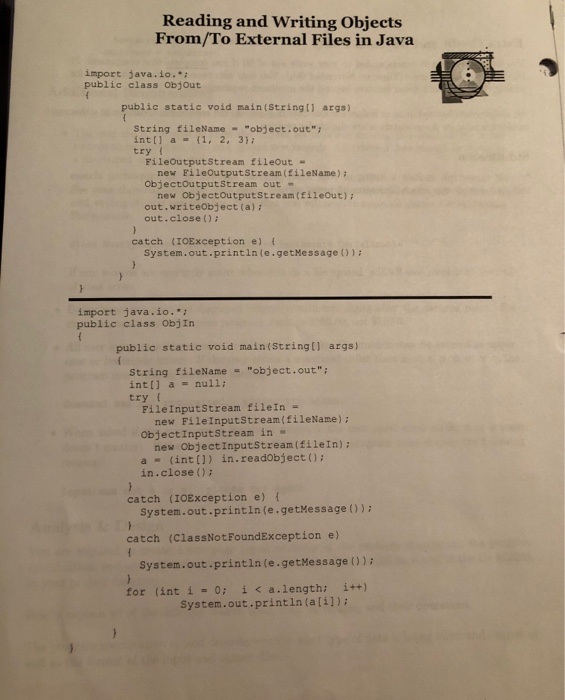
Below are codes used by the professor to create his version of this assignment.
-personnel.java program : this is his version of the assignment. It is good for seeing where and how he uses important part such as increasing the array and use it the input and output file programs.
-ObjIn.java
-ObjOut.java
-Utilities.java : A "helper" class that provides class methods needed by the HourlyEmployee and SalariedEmployee classes, such as the todollars method.
-print.java : method for clearing screen and something else.
-sort.java : has methods for sorting
-convert.java : converts things?
-SimpleIO.java : this is something he uses for when getting the commands from the user, I think itll be useful.
////////////////////////////////////////////////////////////////////////
//Personnel.java main program
import java.io.*;
import jpb.*;
public class Personnel {
public static void main(String[] args) {
// Create an array to store the employee records
Employee[] employees = new Employee[1];
// Declare a variable that tracks the number of employees
int numEmployees = 0;
// Read and execute commands
while (true) {
// Display list of commands
System.out.println(
"---------------------------------- " +
"|Commands: n - New employee | " +
"| c - Compute paychecks | " +
"| r - Raise wages | " +
"| p - Print records | " +
"| d - Download data | " +
"| u - Upload data | " +
"| q - Quit | " +
"----------------------------------");
// Prompt the user to enter a command
SimpleIO.prompt("Enter command: ");
String command = SimpleIO.readLine().trim();
// Use a cascaded if statement to determine which
// command was entered
if (command.equalsIgnoreCase("p"))
{
for (int i = 0; i
System.out.println(employees[i]);
}
else if (command.equalsIgnoreCase("u")) {
String fileName = "employee.dat";
try {
FileInputStream fileIn =
new FileInputStream(fileName);
ObjectInputStream in =
new ObjectInputStream(fileIn);
Employee[] temp = (Employee[]) in.readObject();
System.out.println("Now uploading these records...");
for (int i = 0; i
if (temp[i] != null)
System.out.println(temp[i]);
for (int i = 0; i
{
if (numEmployees == employees.length) {
Employee[] tempArray =
new Employee[employees.length * 2];
for (int j = 0; j
tempArray[j] = employees[j];
employees = tempArray;
}
employees[numEmployees] = temp[i];
numEmployees++;
}
// Prompt user for name of new employee
in.close();
} catch (IOException e) {
System.out.println(e.getMessage());
} catch (ClassNotFoundException e) {
System.out.println(e.getMessage());
}
}
else if (command.equalsIgnoreCase("d")) {
String fileName = "employee.dat";
try {
FileOutputStream fileOut =
new FileOutputStream(fileName);
ObjectOutputStream out =
new ObjectOutputStream(fileOut);
out.writeObject(employees);
System.out.println("Now downloading these records...");
for (int i = 0; i
System.out.println(employees[i]);
out.close();
} catch (IOException e) {
System.out.println(e.getMessage());
}
}
else if (command.equalsIgnoreCase("n")) {
// *** New employee ***
// If the employees array is full, double its size
if (numEmployees == employees.length) {
Employee[] tempArray =
new Employee[employees.length * 2];
for (int i = 0; i
tempArray[i] = employees[i];
employees = tempArray;
}
// Prompt user for name of new employee
SimpleIO.prompt("Enter name of new employee: ");
String name = SimpleIO.readLine().trim();
// Repeat until valid input is entered
while (true) {
// Ask user whether employee will be hourly or
// salaried
SimpleIO.prompt("Hourly (h) or salaried (s): ");
String status = SimpleIO.readLine().trim();
// Create a new HourlyEmployee or SalariedEmployee
// object and store in employees array
if (status.equalsIgnoreCase("h")) {
double wage = readDouble("Enter hourly wage: ");
employees[numEmployees] =
new HourlyEmployee(name, wage);
break;
} else if (status.equalsIgnoreCase("s")) {
double salary = readDouble("Enter annual salary: ");
employees[numEmployees] =
new SalariedEmployee(name, salary);
break;
} else
System.out.println("Input was not h or s; please " +
"try again.");
}
numEmployees++;
} else if (command.equalsIgnoreCase("c")) {
// *** Compute paychecks ***
for (int i = 0; i
double hoursWorked =
readDouble("Enter number of hours worked by " +
employees[i].getName() + ": ");
double pay = employees[i].computePay(hoursWorked);
System.out.println("Pay: $" + Utilities.toDollars(pay));
}
} else if (command.equalsIgnoreCase("r")) {
// *** Raise wages ***
double percentage = readDouble("Enter percentage increase: ");
System.out.println(" New Wages ---------");
for (int i = 0; i
employees[i].increasePay(percentage);
System.out.println(employees[i]);
}
} else if (command.equalsIgnoreCase("q")) {
// *** Quit ***
return;
} else {
// *** Illegal command ***
System.out.println("Command was not recognized; " +
"please try again.");
}
System.out.println();
}
}
///////////////////////////////////////////////////////////
// NAME: readDouble
// BEHAVIOR: Prompts the user to enter a number, reads
// the user's input, and converts it to double
// form.
// PARAMETERS: prompt - the prompt to be displayed
// RETURNS: User's input after conversion to double
///////////////////////////////////////////////////////////
private static double readDouble(String prompt) {
SimpleIO.prompt(prompt);
String userInput = SimpleIO.readLine();
return Convert.toDouble(userInput);
}
}
///////////////////////////////////////////////////////////////
//ObjIn.java program used to input a file
import java.io.*;
public class ObjIn
{
public static void main(String[] args)
{
String fileName = "object.out";
int[] a = null;
try {
FileInputStream fileIn =
new FileInputStream(fileName);
ObjectInputStream in =
new ObjectInputStream(fileIn);
a = (int[]) in.readObject();
in.close();
}
catch (IOException e) {
System.out.println(e.getMessage());
}
catch (ClassNotFoundException e)
{
System.out.println(e.getMessage());
}
for (int i = 0; i
System.out.println(a[i]);
}
}
//ObjOut.java program used to download to a file
import java.io.*;
public class ObjOut
{
public static void main(String[] args)
{
String fileName = "object.out";
int[] a = {1, 2, 3};
try {
FileOutputStream fileOut =
new FileOutputStream(fileName);
ObjectOutputStream out =
new ObjectOutputStream(fileOut);
out.writeObject(a);
out.close();
}
catch (IOException e) {
System.out.println(e.getMessage());
}
}
}
// ----------------------------------------------------------
// Utilities
// ----------------------------------------------------------
//
// A "helper" class that provides class methods needed by the
// HourlyEmployee and SalariedEmployee classes
class Utilities {
///////////////////////////////////////////////////////////
// NAME: pad
// BEHAVIOR: Pads a string to a specified length by
// adding spaces to the end. If the string
// exceeds the specified length, it is
// truncated to that length.
// PARAMETERS: str - the string to be padded
// n - the desired length after padding
// RETURNS: str, with spaces added at the end so that
// the total length is n. If the length of str
// exceeds n, a truncated version of str is
// returned.
///////////////////////////////////////////////////////////
public static String pad(String str, int n) {
if (str.length() > n)
return str.substring(0, n);
while (str.length()
str += " ";
return str;
}
///////////////////////////////////////////////////////////
// NAME: toDollars
// BEHAVIOR: Converts a double value that represents a
// dollar amount to a string
// PARAMETERS: amount - a dollar amount
// RETURNS: A string containing amount, with exactly two
// digits after the decimal point
///////////////////////////////////////////////////////////
public static String toDollars(double amount) {
long roundedAmount = Math.round(amount * 100);
long dollars = roundedAmount / 100;
long cents = roundedAmount % 100;
if (cents
return dollars + ".0" + cents;
else
return dollars + "." + cents;
}
}
//////////////////////////////////////////////////////////////////
package Utils;
import jpb.*;
//Print.java so this has a method for clearing the screen and some line method
public class Print
{
public static void clearScreen()
{
System.out.println("\u001b[H\u001b[2J");
}
public static void Line(int n, char ch)
{
for (int i=1; i
System.out.print(ch);
System.out.println();
}
}
////////////////////////////////////////////////////////////
//Sort.java this contains methods for sorting strings, chars, and integers.
package Utils;
import jpb.*;
public class Sort
{
public static int[] integers(int[] ar)
{
int temp; int pass = 0;
boolean anotherPassNeeded = true;
int currentBottom = ar.length;
while(anotherPassNeeded)
{
anotherPassNeeded = false;
for(int curr=0; curr
if(ar[curr+1]
{
temp = ar[curr];
ar[curr] = ar[curr+1];
ar[curr+1] = temp;
anotherPassNeeded = true;
}
currentBottom = currentBottom-1;
}
return ar;
}
public static char[] chars(char[] ar)
{
char temp; int pass = 0;
boolean anotherPassNeeded = true;
int currentBottom = ar.length;
while(anotherPassNeeded)
{
anotherPassNeeded = false;
for(int curr=0; curr
if(ar[curr+1]
{
temp = ar[curr];
ar[curr] = ar[curr+1];
ar[curr+1] = temp;
anotherPassNeeded = true;
}
currentBottom = currentBottom-1;
}
return ar;
}
public static String[] strings(String[] ar)
{
String temp; int pass = 0;
boolean anotherPassNeeded = true;
int currentBottom = ar.length;
while(anotherPassNeeded)
{
anotherPassNeeded = false;
for(int curr=0; curr
Objective The purpose of this assignment is to extend students' familiarity with inheritance, polymorphism. and abstract classes. The program also provides the first introduction to working with objects on external files. Assignment Summary Write a program named Personnel that maintains wage information for the employees of a com- pany. The following example shows what the user will see during a session with the program. The program will repeatedly prompt the user to enter commands, which it then executes. The program will not terminate until the user enters the command q. Note that the list of commands is re-displayed after each command has been executed. Sample Run ICommands: n - New employee I c -Compute paychecks I r Raise vages p Print records d Dovnload data u-Upload data q Quit Enter command: n Enter the name of new employee: Plumber, Phi1 Hourly (h) or salaried (s): h Enter hourly wage: 40.00 l Commands: n -Nev employee c " compute paychecks l if((ar[curr].compareTo(ar[curr+1]))
{
temp = ar[curr];
ar[curr] = ar[curr+1];
ar[curr+1] = temp;
anotherPassNeeded = true;
}
currentBottom = currentBottom-1;
}
return ar;
}
}
/////////////////////////////////////////
// Provides methods to convert a string containing a number
// to double or float form
package jpb;
public class Convert {
// Converts the string s to double form; terminates the
// program if s does not represent a valid double value
public static double toDouble(String s) {
double d = 0.0;
try {
d = Double.valueOf(s).doubleValue();
} catch (NumberFormatException e) {
System.out.println("Error in Convert.toDouble: " +
e.getMessage());
System.exit(-1);
}
return d;
}
// Converts the string s to float form; terminates the
// program if s does not represent a valid float value
public static float toFloat(String s) {
float f = 0.0f;
try {
f = Float.valueOf(s).floatValue();
} catch (NumberFormatException e) {
System.out.println("Error in Convert.toFloat: " +
e.getMessage());
System.exit(-1);
}
return f;
}
}
////////////////////////////////////////////////////////////:::::
// Provides prompt and readLine methods for console input
package jpb;
import java.io.*;
public class SimpleIO {
private static InputStreamReader streamIn =
new InputStreamReader(System.in);
private static BufferedReader in =
new BufferedReader(streamIn, 1);
// Displays the string s without terminating the current
// line
public static void prompt(String s) {
System.out.print(s);
System.out.flush();
}
// Reads and returns a single line of input entered by the
// user; terminates the program if an exception is thrown
public static String readLine() {
String line = null;
try {
line = in.readLine();
} catch (IOException e) {
System.out.println("Error in SimpleIO.readLine: " +
e.getMessage());
System.exit(-1);
}
return line;
}
}
////////////////////////////////////////////////////
Step by Step Solution
There are 3 Steps involved in it
1 Expert Approved Answer
Step: 1 Unlock

Question Has Been Solved by an Expert!
Get step-by-step solutions from verified subject matter experts
Step: 2 Unlock
Step: 3 Unlock
 Study Help