







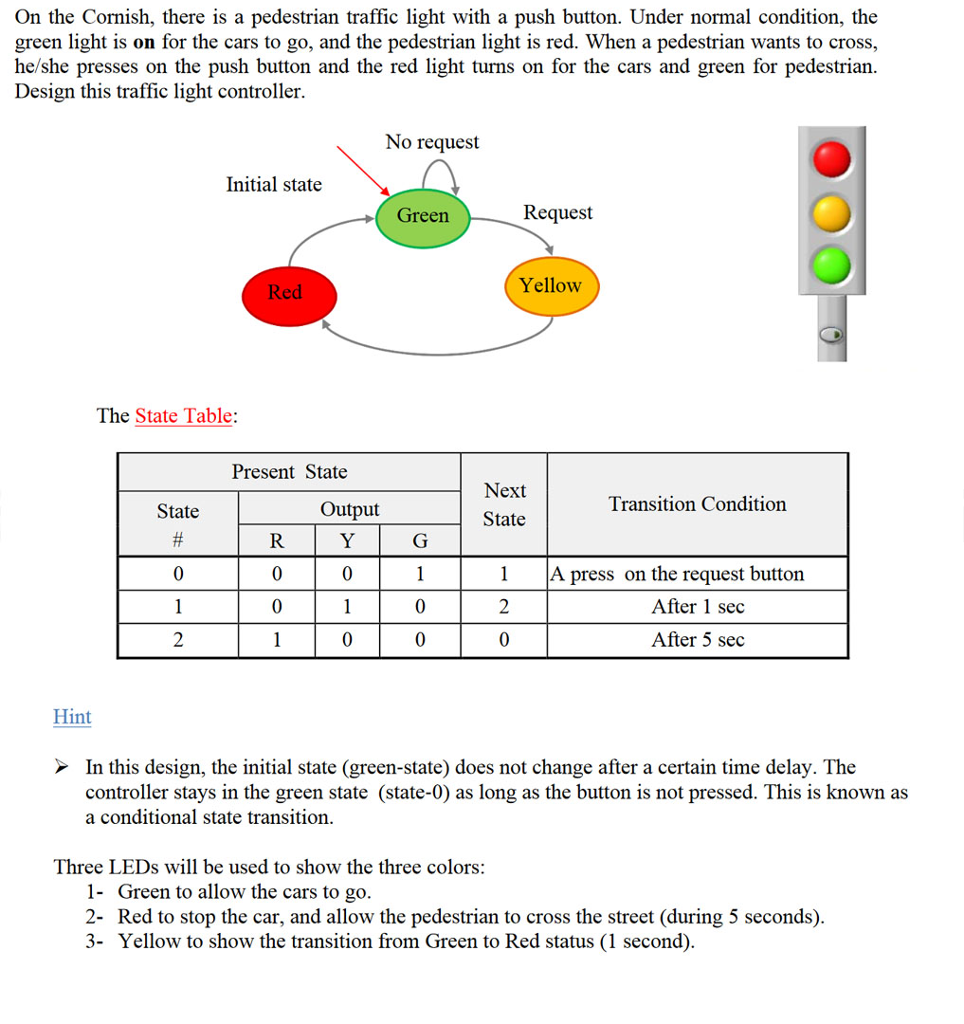
Question: Hello ,this is the question and also given a code on ARMSim.192 below, we should manage the timing to match the question .. can you
Hello ,this is the question and also given a code on ARMSim.192 below, we should manage the timing to match the question .. can you please help me asap
.equ SWI_Exit, 0x11 .equ SWI_GetTicks, 0x6d
.equ SWI_SetStreetLight, 0x100 .equ SWI_CheckXWalkButton, 0x101 .equ SWI_SetXWalk, 0x102
.equ LIGHT_BLACK, 0x00 .equ LIGHT_RED, 0x01 .equ LIGHT_YELLOW, 0x02 .equ LIGHT_GREEN, 0x03
.equ MAIN_STREET, 0x00 .equ SIDE_STREET, 0x01
.equ DONT_WALK, 0x00 .equ WALK, 0x01 .equ HURRY, 0x02
.text .global _start _start: bl Init bl ResetTimer mn05: bl ElapsedTime cmp r0,#0 @12 bgt mn10
bl CheckSideStreetButton cmp r0,#0 beq mn05 bl wait05
mn10: mov r0,#MAIN_STREET mov r1,#HURRY bl SetWalk mov r0,#4 @4 bl wait
mov r0,#MAIN_STREET mov r1,#DONT_WALK bl SetWalk
mov r0,#MAIN_STREET mov r1,#LIGHT_YELLOW bl SetLight
mov r0,#1 @4 bl wait
mov r0,#MAIN_STREET mov r1,#LIGHT_RED bl SetLight
mov r0,#SIDE_STREET mov r1,#LIGHT_GREEN bl SetLight
mov r0,#SIDE_STREET mov r1,#WALK bl SetWalk
bl ResetTimer
mn20: bl ElapsedTime cmp r0,#8 bgt mn25
bl CheckMainStreetButton cmp r0,#0 beq mn20 mn25: mov r0,#SIDE_STREET mov r1,#HURRY bl SetWalk
mov r0,#4 @4 bl wait
mov r0,#SIDE_STREET mov r1,#LIGHT_YELLOW bl SetLight
mov r0,#SIDE_STREET mov r1,#DONT_WALK bl SetWalk
mov r0,#1 bl wait
mov r0,#SIDE_STREET mov r1,#LIGHT_RED bl SetLight
mov r0,#MAIN_STREET mov r1,#LIGHT_GREEN bl SetLight
mov r0,#MAIN_STREET mov r1,#WALK bl SetWalk bl ResetTimer bal mn05
@ wait for r0 seconds wait: stmfd sp!,{r0-r2,lr} mov r2,r0 swi SWI_GetTicks mov r1,r0 wait05: swi SWI_GetTicks subs r0,r0,r1 rsblt r0,r0,#0 mov r0,r0,lsr#10 cmp r0,r2 blt wait05 ldmfd sp!,{r0-r2,pc}
@R0:main or side @R1:state SetWalk: swi SWI_SetXWalk mov pc,lr
@R0:main or side @R1:state SetLight: swi SWI_SetStreetLight mov pc,lr
Init: stmfd sp!,{r0-r1,lr} mov r0,#MAIN_STREET mov r1,#WALK bl SetWalk
mov r0,#SIDE_STREET mov r1,#DONT_WALK bl SetWalk
mov r0,#MAIN_STREET mov r1,#LIGHT_GREEN bl SetLight
mov r0,#SIDE_STREET mov r1,#LIGHT_RED bl SetLight
ldmfd sp!,{r0-r1,pc}
ElapsedTime: stmfd sp!,{r1-r2,lr} swi SWI_GetTicks ldr r1,=timer ldr r2,[r1] sub r0,r0,r2 mov r0,r0,lsr#10 ldmfd sp!,{r1-r2,pc}
ResetTimer: stmfd sp!,{r0-r1,lr} swi SWI_GetTicks ldr r1,=timer str r0,[r1] ldmfd sp!,{r0-r1,pc}
CheckMainStreetButton: mov r0,#MAIN_STREET swi SWI_CheckXWalkButton mov pc,lr
CheckSideStreetButton: mov r0,#SIDE_STREET swi SWI_CheckXWalkButton mov pc,lr
.data timer: .word 0
.end
On the Cornish, there is a pedestrian traffic light with a push button. Under normal condition, the green light is on for the cars to go, and the pedestrian light is red. When a pedestrian wants to cross, he/she presses on the push button and the red light turns on for the cars and green for pedestrian Design this traffic light controller. No request Initial state Request Green Yellow Red The State Table: Present State Next Transition Condition Output State State 0 1 1 Apress on the request button 1 0 2 After 1 sec After 5 sec. Hint In this design, the initial state (green-state) does not change after a certain time delay. The controller stays in the green state (state-0) as long as the button is not pressed. This is known as a conditional state transition. Three LEDs will be used to show the three colors: 1- Green to allow the cars to go. 2- Red to stop the car, and allow the pedestrian to cross the street (during 5 seconds) 3- Yellow to show the transition from Green to Red status (1 second). On the Cornish, there is a pedestrian traffic light with a push button. Under normal condition, the green light is on for the cars to go, and the pedestrian light is red. When a pedestrian wants to cross, he/she presses on the push button and the red light turns on for the cars and green for pedestrian Design this traffic light controller. No request Initial state Request Green Yellow Red The State Table: Present State Next Transition Condition Output State State 0 1 1 Apress on the request button 1 0 2 After 1 sec After 5 sec. Hint In this design, the initial state (green-state) does not change after a certain time delay. The controller stays in the green state (state-0) as long as the button is not pressed. This is known as a conditional state transition. Three LEDs will be used to show the three colors: 1- Green to allow the cars to go. 2- Red to stop the car, and allow the pedestrian to cross the street (during 5 seconds) 3- Yellow to show the transition from Green to Red status (1 second)
Step by Step Solution
There are 3 Steps involved in it

Get step-by-step solutions from verified subject matter experts
 Study Help