







Question: help asap. please solve the last part which is part f in Simulink ( Matlab ). i tried to do it and i got error.
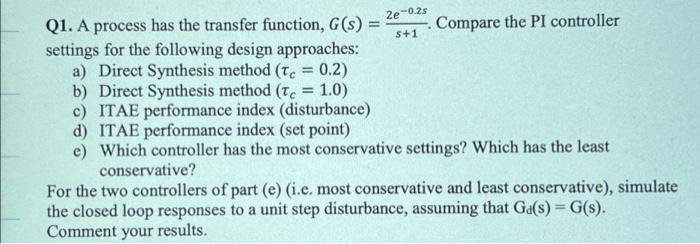
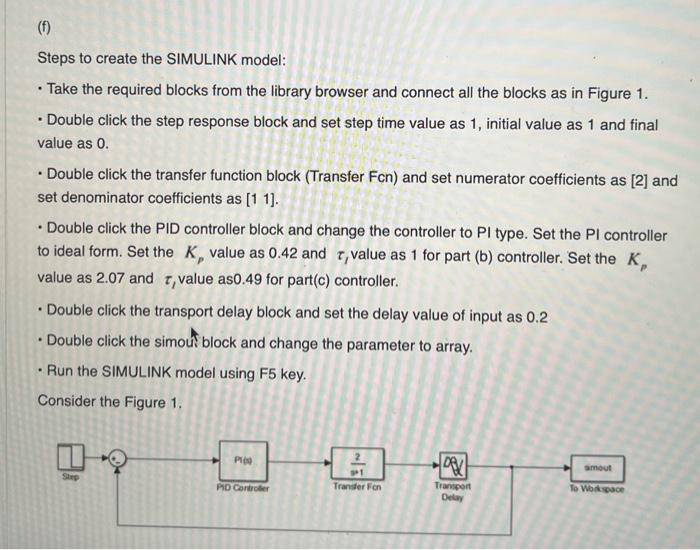

2e-0.25 S+1 Q1. A process has the transfer function, G(s) Compare the PI controller settings for the following design approaches: a) Direct Synthesis method (Tc = 0.2) b) Direct Synthesis method (Te = 1.0) c) ITAE performance index (disturbance) d) ITAE performance index (set point) e) Which controller has the most conservative settings? Which has the least conservative? For the two controllers of part (e) (i.e. most conservative and least conservative), simulate the closed loop responses to a unit step disturbance, assuming that Ga(s)=G(s). Comment your results. (1) Steps to create the SIMULINK model: Take the required blocks from the library browser and connect all the blocks as in Figure 1. Double click the step response block and set step time value as 1, initial value as 1 and final value as 0. Double click the transfer function block (Transfer Fcn) and set numerator coefficients as [2] and set denominator coefficients as (1 1). Double click the PID controller block and change the controller to Pl type. Set the Pl controller to ideal form. Set the K, value as 0.42 and t, value as 1 for part (b) controller. Set the K, value as 2.07 and t, value as0.49 for part(c) controller. Double click the transport delay block and set the delay value of input as 0.2 Double click the simouf block and change the parameter to array. Run the SIMULINK model using F5 key. Consider the Figure 1. . Pro DRU mout Shep PO Controber Transfer Fon Transport Delay To Workspace Type the following in the MATLAB command window and press enter. plot(tout simout, tout, simout1) legend('controller b)', 'controller c)'); 2e-0.25 S+1 Q1. A process has the transfer function, G(s) Compare the PI controller settings for the following design approaches: a) Direct Synthesis method (Tc = 0.2) b) Direct Synthesis method (Te = 1.0) c) ITAE performance index (disturbance) d) ITAE performance index (set point) e) Which controller has the most conservative settings? Which has the least conservative? For the two controllers of part (e) (i.e. most conservative and least conservative), simulate the closed loop responses to a unit step disturbance, assuming that Ga(s)=G(s). Comment your results. (1) Steps to create the SIMULINK model: Take the required blocks from the library browser and connect all the blocks as in Figure 1. Double click the step response block and set step time value as 1, initial value as 1 and final value as 0. Double click the transfer function block (Transfer Fcn) and set numerator coefficients as [2] and set denominator coefficients as (1 1). Double click the PID controller block and change the controller to Pl type. Set the Pl controller to ideal form. Set the K, value as 0.42 and t, value as 1 for part (b) controller. Set the K, value as 2.07 and t, value as0.49 for part(c) controller. Double click the transport delay block and set the delay value of input as 0.2 Double click the simouf block and change the parameter to array. Run the SIMULINK model using F5 key. Consider the Figure 1. . Pro DRU mout Shep PO Controber Transfer Fon Transport Delay To Workspace Type the following in the MATLAB command window and press enter. plot(tout simout, tout, simout1) legend('controller b)', 'controller c)')
Step by Step Solution
There are 3 Steps involved in it

Get step-by-step solutions from verified subject matter experts
 Study Help