Question: Help implementing a readers writers program. ------------------------------ Implement the readers/writers problem solution described in section 7.1.2 of the OSC textbook (pages 290-293; Module 3 Part
Help implementing a readers writers program.
------------------------------
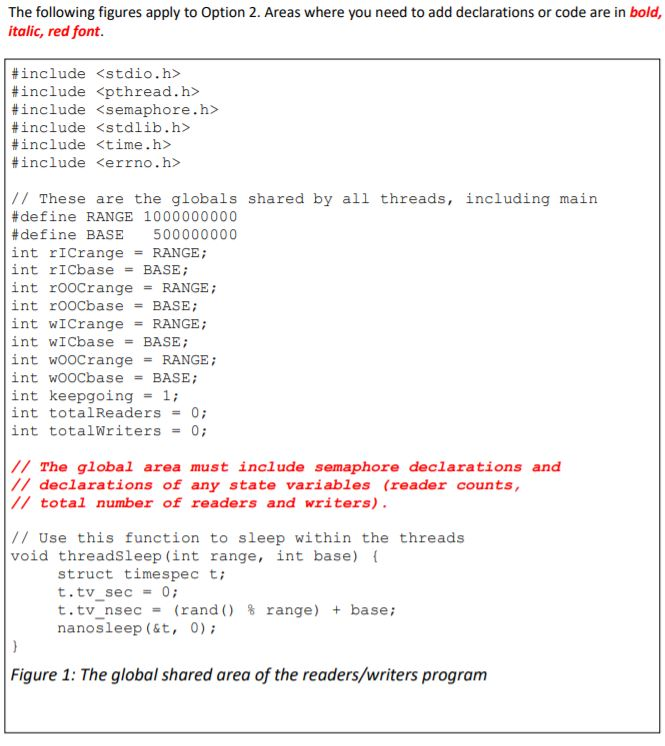
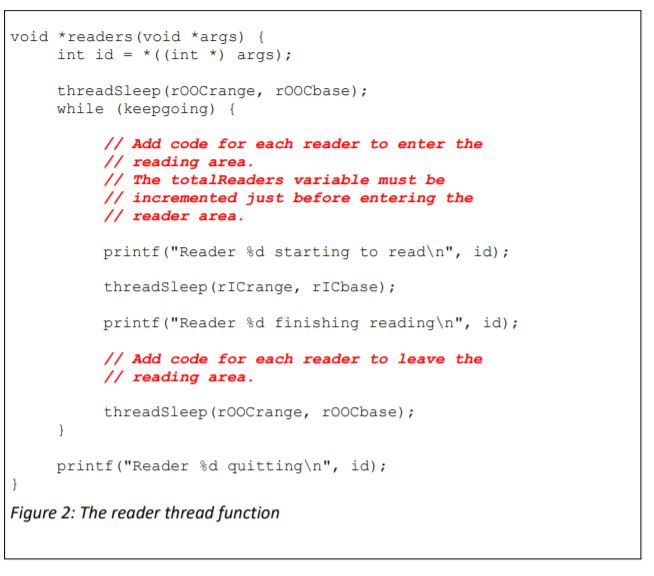
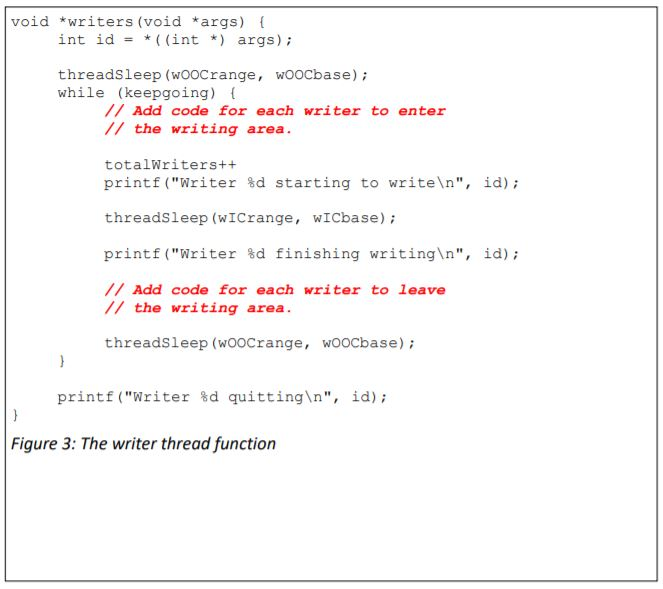
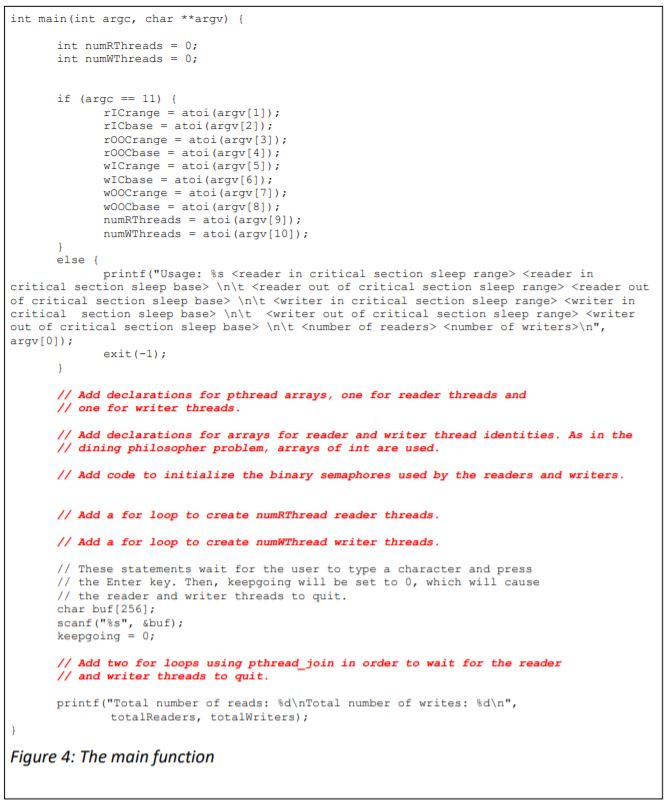
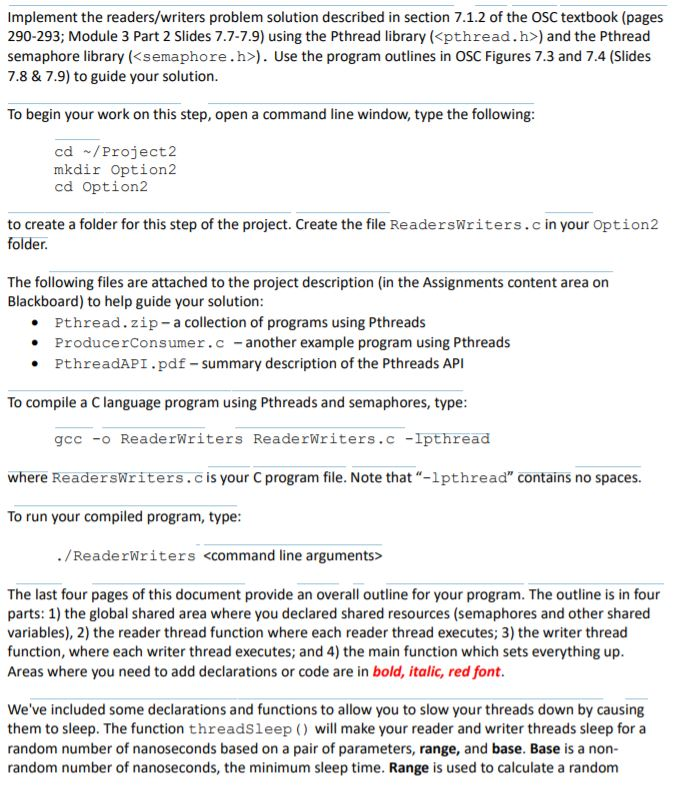
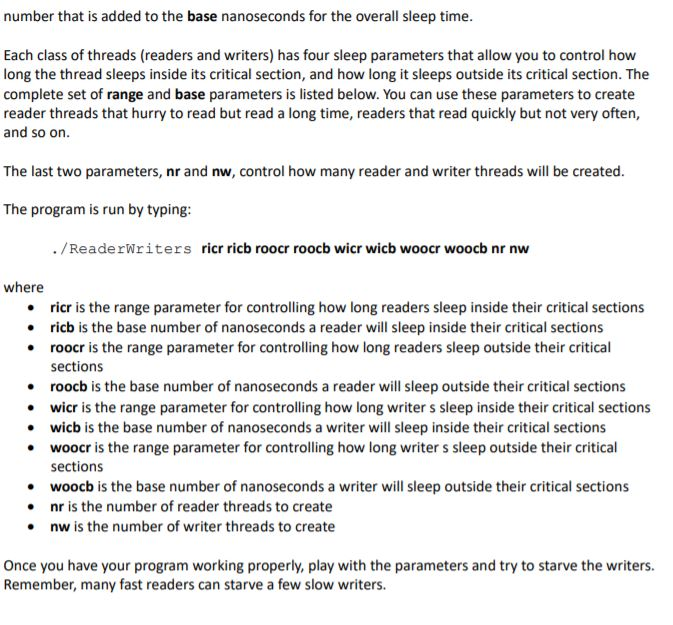
Implement the readers/writers problem solution described in section 7.1.2 of the OSC textbook (pages 290-293; Module 3 Part 2 Slides 7.7-7.9) using the Pthread library () and the Pthread semaphore library (). Use the program outlines in OSC Figures 7.3 and 7.4 (Slides 7.8 & 7.9) to guide your solution. To begin your work on this step, open a command line window, type the following: cd / Project 2 mkdir Option2 cd Option2 to create a folder for this step of the project. Create the file ReadersWriters.c in your Option2 folder. The following files are attached to the project description in the Assignments content area on Blackboard) to help guide your solution: Pthread.zip- a collection of programs using Pthreads ProducerConsumer.c-another example program using Pthreads PthreadAPI.pdf - summary description of the Pthreads API To compile a Clanguage program using Pthreads and semaphores, type: gcc - ReaderWriters ReaderWriters.c -lpthread where ReadersWriters.c is your C program file. Note that "-lpthread" contains no spaces. To run your compiled program, type: ./ReaderWriters The last four pages of this document provide an overall outline for your program. The outline is in four parts: 1) the global shared area where you declared shared resources (semaphores and other shared variables), 2) the reader thread function where each reader thread executes; 3) the writer thread function, where each writer thread executes; and 4) the main function which sets everything up. Areas where you need to add declarations or code are in bold, italic, red font. We've included some declarations and functions to allow you to slow your threads down by causing them to sleep. The function threadsleep() will make your reader and writer threads sleep for a random number of nanoseconds based on a pair of parameters, range, and base. Base is a non- random number of nanoseconds, the minimum sleep time. Range is used to calculate a random number that is added to the base nanoseconds for the overall sleep time. Each class of threads (readers and writers) has four sleep parameters that allow you to control how long the thread sleeps inside its critical section, and how long it sleeps outside its critical section. The complete set of range and base parameters is listed below. You can use these parameters to create reader threads that hurry to read but read a long time, readers that read quickly but not very often, and so on. The last two parameters, nr and nw, control how many reader and writer threads will be created. The program is run by typing: ./ReaderWriters ricr ricb roocr roocb wicr wicb woocr woocb nr nw where ricr is the range parameter for controlling how long readers sleep inside their critical sections ricb is the base number of nanoseconds a reader will sleep inside their critical sections roocr is the range parameter for controlling how long readers sleep outside their critical sections roocb is the base number of nanoseconds a reader will sleep outside their critical sections wicr is the range parameter for controlling how long writer s sleep inside their critical sections wicb is the base number of nanoseconds a writer will sleep inside their critical sections woocr is the range parameter for controlling how long writers sleep outside their critical sections woocb is the base number of nanoseconds a writer will sleep outside their critical sections nr is the number of reader threads to create nw is the number of writer threads to create Once you have your program working properly, play with the parameters and try to starve the writers. Remember, many fast readers can starve a few slow writers. The following figures apply to Option 2. Areas where you need to add declarations or code are in bold, italic, red font. #include #include #include #include #include #include // These are the globals shared by all threads, including main #define RANGE 1000000000 #define BASE 500000000 int riCrange = RANGE; int riCbase = BASE; int rooCrange = RANGE; int rooCbase = BASE; int wiCrange = RANGE; int wiCbase = BASE; int wooCrange = RANGE; int wooCbase = BASE; int keepgoing = 1; int totalReaders = 0; int totalWriters = 0; // The global area must include semaphore declarations and // declarations of any state variables (reader counts, // total number of readers and writers). // Use this function to sleep within the threads void threadsleep (int range, int base) { struct time spec t; t.tv_sec = 0; t.tv_nsec = (rand() % range) + base; nanosleep (&t, 0); Figure 1: The global shared area of the readers/writers program void *readers (void *args) { int id = *((int *) args); threadsleep (rooCrange, roocbase); while (keepgoing) { // Add code for each reader to enter the // reading area. // The totalReaders variable must be // incremented just before entering the // reader area. printf ("Reader &d starting to read ", id); threadSleep (r I Crange, riCbase); printf ("Reader %d finishing reading ", id); // Add code for each reader to leave the // reading area. threadsleep (rooCrange, rooCbase); printf ("Reader %d quitting ", id); Figure 2: The reader thread function void *writers (void *args) { int id = *((int *) args); threadsleep (wooCrange, wooCbase); while (keepgoing) { // Add code for each writer to enter // the writing area. totalWriters++ printf ("Writer %d starting to write ", id); threadsleep (WICrange, WICbase); printf ("Writer %d finishing writing ", id); // Add code for each writer to leave // the writing area. threadsleep (WooCrange, wooCbase); printf ("Writer %d quitting ", id); Figure 3: The writer thread function int main(int argc, char **argv) int numRThreads = 0; int numwthreads = 0; if (argc == 11) TICrange = atoi (argv[1]); TICbase = atoi (argv[2]); rooCrange = atoi (argv[3]); rooCbase = atoi (argv[4]); WICrange = atoi (argv[5]); WICbase = atoi (argv[6]); WOOCrange = atoi (argv[7]); WOOCbase = atoi (argv[8]); numrThreads = atoi (argv[9]); num Threads = atoi (argv[10]); else printf ("Usage: %s Creader in critical section sleep range> \t \t \t \t ", argv[0]); exit(-1); // Add declarations for pthread arrays, one for reader threads and // one for writer threads. // Add declarations for arrays for reader and writer thread identities. As in the // dining philosopher problem, arrays of int are used. // Add code to initialize the binary semaphores used by the readers and writers. // Add a for loop to create numRThread reader threads. // Add a for loop to create numThread writer threads. // These statements wait for the user to type a character and press // the Enter key. Then, keepgoing will be set to 0, which will cause // the reader and writer threads to quit. char buf (256) scanf("%s", sbuf); keepgoing = 0; // Add two for loops using pthread_join in order to wait for the reader // and writer threads to quit. printf("Total number of reads: d Total number of writes: td ", totalReaders, totalWriters); Figure 4: The main function Implement the readers/writers problem solution described in section 7.1.2 of the OSC textbook (pages 290-293; Module 3 Part 2 Slides 7.7-7.9) using the Pthread library () and the Pthread semaphore library (). Use the program outlines in OSC Figures 7.3 and 7.4 (Slides 7.8 & 7.9) to guide your solution. To begin your work on this step, open a command line window, type the following: cd / Project 2 mkdir Option2 cd Option2 to create a folder for this step of the project. Create the file ReadersWriters.c in your Option2 folder. The following files are attached to the project description in the Assignments content area on Blackboard) to help guide your solution: Pthread.zip- a collection of programs using Pthreads ProducerConsumer.c-another example program using Pthreads PthreadAPI.pdf - summary description of the Pthreads API To compile a Clanguage program using Pthreads and semaphores, type: gcc - ReaderWriters ReaderWriters.c -lpthread where ReadersWriters.c is your C program file. Note that "-lpthread" contains no spaces. To run your compiled program, type: ./ReaderWriters The last four pages of this document provide an overall outline for your program. The outline is in four parts: 1) the global shared area where you declared shared resources (semaphores and other shared variables), 2) the reader thread function where each reader thread executes; 3) the writer thread function, where each writer thread executes; and 4) the main function which sets everything up. Areas where you need to add declarations or code are in bold, italic, red font. We've included some declarations and functions to allow you to slow your threads down by causing them to sleep. The function threadsleep() will make your reader and writer threads sleep for a random number of nanoseconds based on a pair of parameters, range, and base. Base is a non- random number of nanoseconds, the minimum sleep time. Range is used to calculate a random number that is added to the base nanoseconds for the overall sleep time. Each class of threads (readers and writers) has four sleep parameters that allow you to control how long the thread sleeps inside its critical section, and how long it sleeps outside its critical section. The complete set of range and base parameters is listed below. You can use these parameters to create reader threads that hurry to read but read a long time, readers that read quickly but not very often, and so on. The last two parameters, nr and nw, control how many reader and writer threads will be created. The program is run by typing: ./ReaderWriters ricr ricb roocr roocb wicr wicb woocr woocb nr nw where ricr is the range parameter for controlling how long readers sleep inside their critical sections ricb is the base number of nanoseconds a reader will sleep inside their critical sections roocr is the range parameter for controlling how long readers sleep outside their critical sections roocb is the base number of nanoseconds a reader will sleep outside their critical sections wicr is the range parameter for controlling how long writer s sleep inside their critical sections wicb is the base number of nanoseconds a writer will sleep inside their critical sections woocr is the range parameter for controlling how long writers sleep outside their critical sections woocb is the base number of nanoseconds a writer will sleep outside their critical sections nr is the number of reader threads to create nw is the number of writer threads to create Once you have your program working properly, play with the parameters and try to starve the writers. Remember, many fast readers can starve a few slow writers. The following figures apply to Option 2. Areas where you need to add declarations or code are in bold, italic, red font. #include #include #include #include #include #include // These are the globals shared by all threads, including main #define RANGE 1000000000 #define BASE 500000000 int riCrange = RANGE; int riCbase = BASE; int rooCrange = RANGE; int rooCbase = BASE; int wiCrange = RANGE; int wiCbase = BASE; int wooCrange = RANGE; int wooCbase = BASE; int keepgoing = 1; int totalReaders = 0; int totalWriters = 0; // The global area must include semaphore declarations and // declarations of any state variables (reader counts, // total number of readers and writers). // Use this function to sleep within the threads void threadsleep (int range, int base) { struct time spec t; t.tv_sec = 0; t.tv_nsec = (rand() % range) + base; nanosleep (&t, 0); Figure 1: The global shared area of the readers/writers program void *readers (void *args) { int id = *((int *) args); threadsleep (rooCrange, roocbase); while (keepgoing) { // Add code for each reader to enter the // reading area. // The totalReaders variable must be // incremented just before entering the // reader area. printf ("Reader &d starting to read ", id); threadSleep (r I Crange, riCbase); printf ("Reader %d finishing reading ", id); // Add code for each reader to leave the // reading area. threadsleep (rooCrange, rooCbase); printf ("Reader %d quitting ", id); Figure 2: The reader thread function void *writers (void *args) { int id = *((int *) args); threadsleep (wooCrange, wooCbase); while (keepgoing) { // Add code for each writer to enter // the writing area. totalWriters++ printf ("Writer %d starting to write ", id); threadsleep (WICrange, WICbase); printf ("Writer %d finishing writing ", id); // Add code for each writer to leave // the writing area. threadsleep (WooCrange, wooCbase); printf ("Writer %d quitting ", id); Figure 3: The writer thread function int main(int argc, char **argv) int numRThreads = 0; int numwthreads = 0; if (argc == 11) TICrange = atoi (argv[1]); TICbase = atoi (argv[2]); rooCrange = atoi (argv[3]); rooCbase = atoi (argv[4]); WICrange = atoi (argv[5]); WICbase = atoi (argv[6]); WOOCrange = atoi (argv[7]); WOOCbase = atoi (argv[8]); numrThreads = atoi (argv[9]); num Threads = atoi (argv[10]); else printf ("Usage: %s Creader in critical section sleep range> \t \t \t \t ", argv[0]); exit(-1); // Add declarations for pthread arrays, one for reader threads and // one for writer threads. // Add declarations for arrays for reader and writer thread identities. As in the // dining philosopher problem, arrays of int are used. // Add code to initialize the binary semaphores used by the readers and writers. // Add a for loop to create numRThread reader threads. // Add a for loop to create numThread writer threads. // These statements wait for the user to type a character and press // the Enter key. Then, keepgoing will be set to 0, which will cause // the reader and writer threads to quit. char buf (256) scanf("%s", sbuf); keepgoing = 0; // Add two for loops using pthread_join in order to wait for the reader // and writer threads to quit. printf("Total number of reads: d Total number of writes: td ", totalReaders, totalWriters); Figure 4: The main function









 Study Help