







Question: HELP IN DATABASE CMPSC CMPSC 321 Relational Database Theory and Design Lab 4: Inner joins and outer joins Task 1: Some fun with joins and
HELP IN DATABASE CMPSC
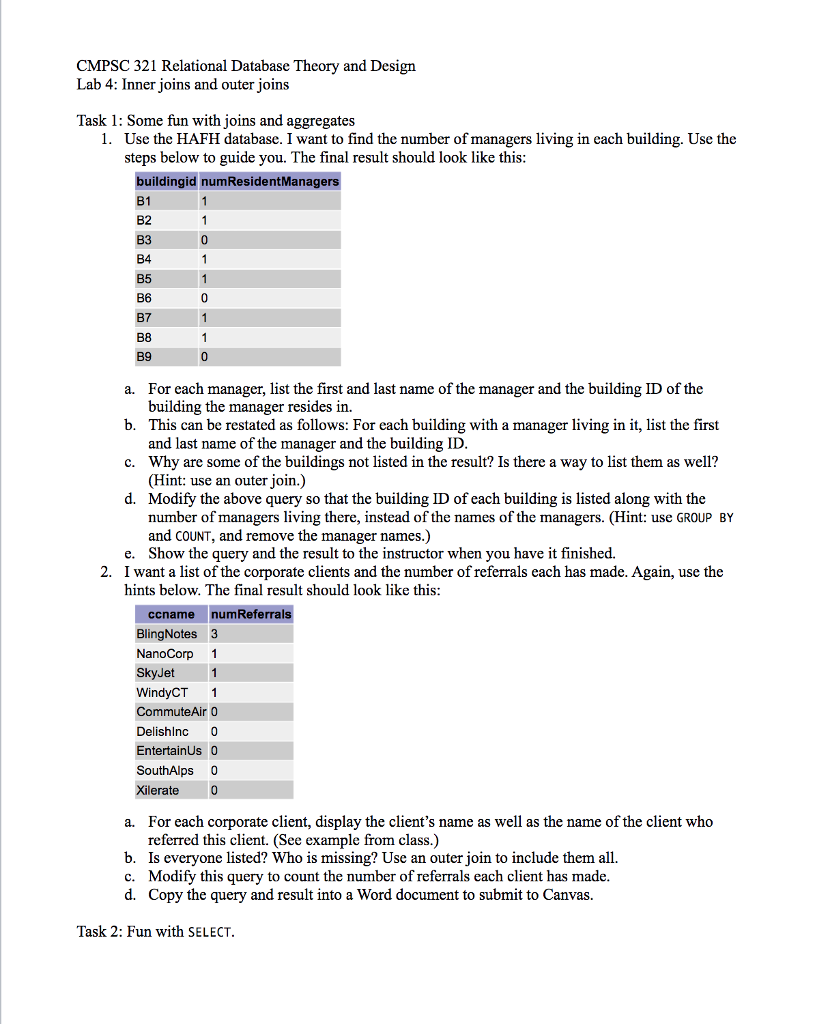
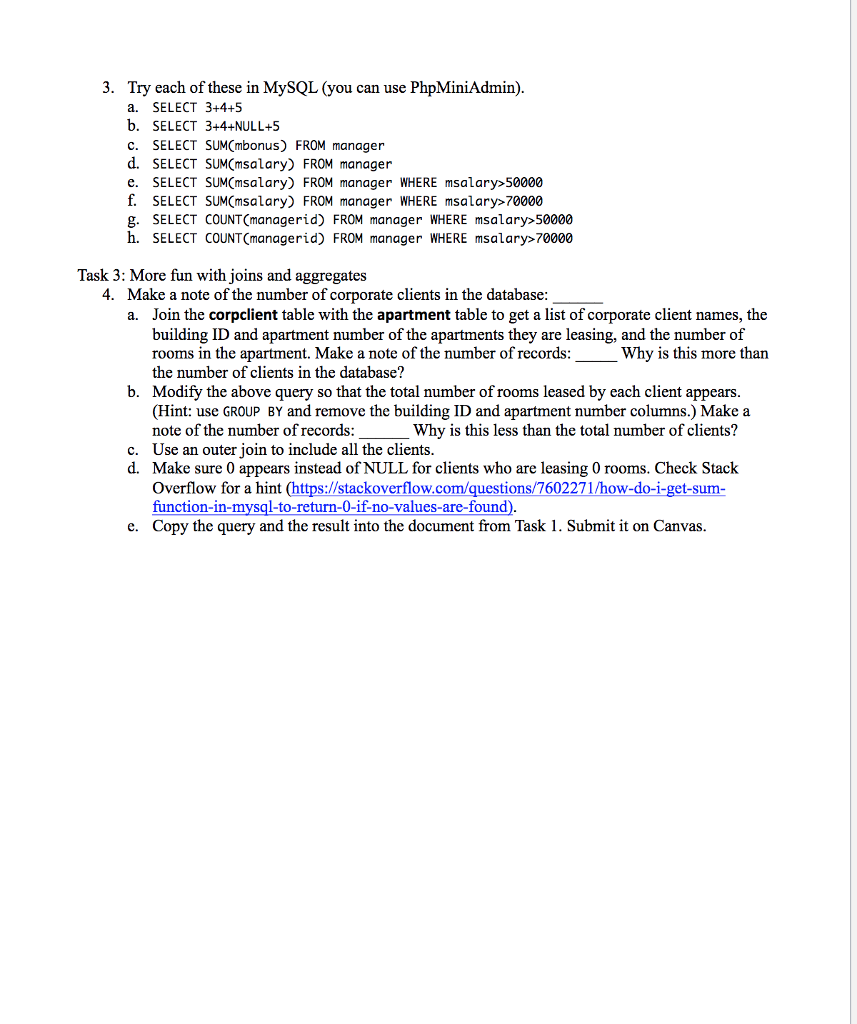
CMPSC 321 Relational Database Theory and Design Lab 4: Inner joins and outer joins Task 1: Some fun with joins and aggregates 1. Use the HAFH database. I want to find the number of managers living in each building. Use the steps below to guide you. The final result should look like this buildingid numResidentManagers B1 B2 B3 B4 B5 B6 B7 B8 B9 For each manager, list the first and last name of the manager and the building ID of the building the manager resides in. This can be restated as follows: For each building with a manager living in it, list the first and last name of the manager and the building ID Why are some of the buildings not listed in the result? Is there a way to list them as well? (Hint: use an outer join.) Modify the above query so that the building ID of each building is listed along with the number of managers living there, instead of the names of the managers. (Hint: use GROUP BY and COUNT, and remove the manager names.) Show the query and the result to the instructor when you have it finished. a. b. c. d. e. I want a list of the corporate clients and the number of referrals each has made. Again, use the hints below. The final result should look like this 2. ccname numReferrals BlingNotes 3 NanoCorp 1 SkyJet1 WindyCT 1 CommuteAir 0 Delishlnc 0 EntertainUs 0 SouthAlps 0 Xilerate 0 For each corporate client, display the client's name as well as the name of the client who referred this client. (See example from class.) Is everyone listed? Who is missing? Use an outer join to include them all. Modify this query to count the number of referrals each client has made Copy the query and result into a Word document to submit to Canvas. a. b. c. d. Task 2: Fun with SELECT. CMPSC 321 Relational Database Theory and Design Lab 4: Inner joins and outer joins Task 1: Some fun with joins and aggregates 1. Use the HAFH database. I want to find the number of managers living in each building. Use the steps below to guide you. The final result should look like this buildingid numResidentManagers B1 B2 B3 B4 B5 B6 B7 B8 B9 For each manager, list the first and last name of the manager and the building ID of the building the manager resides in. This can be restated as follows: For each building with a manager living in it, list the first and last name of the manager and the building ID Why are some of the buildings not listed in the result? Is there a way to list them as well? (Hint: use an outer join.) Modify the above query so that the building ID of each building is listed along with the number of managers living there, instead of the names of the managers. (Hint: use GROUP BY and COUNT, and remove the manager names.) Show the query and the result to the instructor when you have it finished. a. b. c. d. e. I want a list of the corporate clients and the number of referrals each has made. Again, use the hints below. The final result should look like this 2. ccname numReferrals BlingNotes 3 NanoCorp 1 SkyJet1 WindyCT 1 CommuteAir 0 Delishlnc 0 EntertainUs 0 SouthAlps 0 Xilerate 0 For each corporate client, display the client's name as well as the name of the client who referred this client. (See example from class.) Is everyone listed? Who is missing? Use an outer join to include them all. Modify this query to count the number of referrals each client has made Copy the query and result into a Word document to submit to Canvas. a. b. c. d. Task 2: Fun with SELECT
Step by Step Solution
There are 3 Steps involved in it

Get step-by-step solutions from verified subject matter experts
 Study Help