







Question: Help! Java Programming 5th edition chapter 12 page 871 number 19 Below the instructions for this program, I've been working on this and this is
Help!
Java Programming 5th edition chapter 12 page 871 number 19
Below the instructions for this program, I've been working on this and this is what I have so far and I need some help with it . I'm wondering in the display bill method and the itemStateChanged method if there is a way to make it an array so I dont have to type as much. I'm also wondering if instead of using setLocation, setSize if I can use like (BorderLayout.NORTH) or something like that.
Write a GUI application program, to create a menu for a pizza shop. Use check boxes, radio buttons, and a JButton to allow a customer to make selections and process their order. Use a text area to display the customer?s order and the amount due. A sample menu and a customer?s order is shown in Figure below:
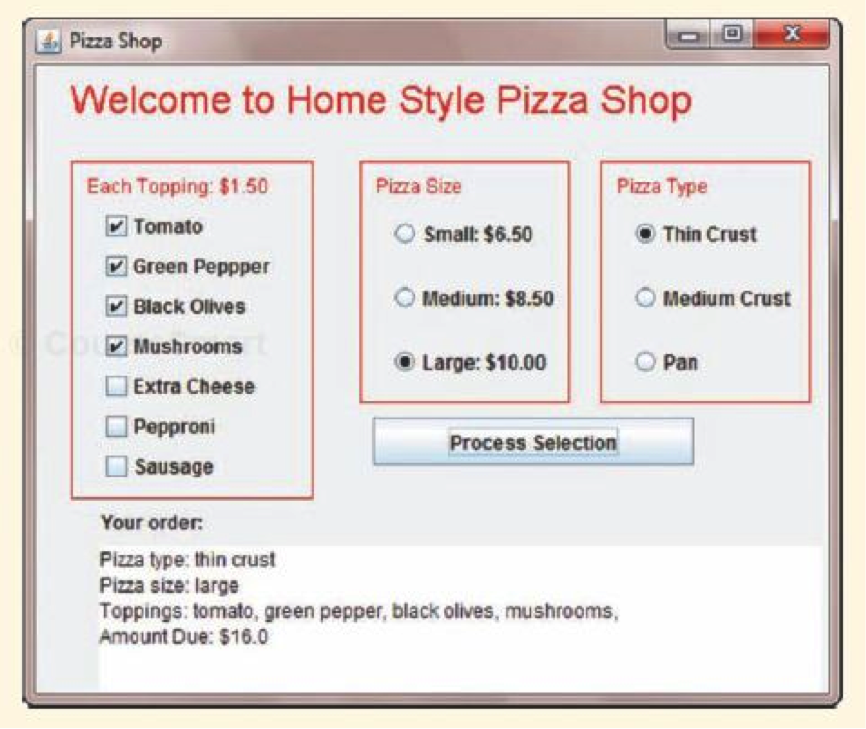
import java.awt.*; import java.awt.event.*; import javax.swing.*;
public class PizzaShop extends JFrame implements ItemListener, ActionListener { private JCheckBox tomatoCB, greenPepperCB, blackOlivesCB, mushroomsCB, extraCheeseCB, pepperoniCB, sausageCB; private JRadioButton smallRB, mediumRB, largeRB; private JRadioButton thinCrustRB, mediumCrustRB, panRB; private ButtonGroup PizzaSize, PizzaType;
private JLabel toppingsL, sizeL, crustL; private JTextArea bill;
public void init() { //Creating the frame label setTitle("Pizza Shop");
Container c = getContentPane(); c.setLayout(null);
//Create checkBoxes for different topping options toppingsL = new JLabel("Each Topping: $1.50"); tomatoCB = new JCheckBox("Tomato"); greenPepperCB = new JCheckBox("Green Pepper"); blackOlivesCB = new JCheckBox("Black Olives"); mushroomsCB = new JCheckBox("Mushrooms"); extraCheeseCB = new JCheckBox("Extra Cheese"); pepperoniCB = new JCheckBox("Pepperoni"); sausageCB = new JCheckBox("Sausage");
//Create radioButtons for the different pizza size options sizeL = new JLabel("Pizza Size"); smallRB = new JRadioButton("Small: $6.50); mediumRB = new JRadioButton("Medium: $8.50); largeRB = new JRadioButton("Large: $10.00);
//Create radioButtons for the different pizza crust options crustL = new JLabel("Pizza Type"); thinCrustRB = new JRadioButton("Thin Crust"); mediumCrustRB = new JRadioButton("Medium Crust"); panRB = new JRadioButton("Pan");
//Set the size for different topping options toppingsL.setSize(150,30); tomatoCB.setSize(120,30); greenPepperCB.setSize(120,30); blackOlivesCB.setSize(120,30); mushroomsCB.setSize(120,30); extraCheeseCB.setSize(120,30); pepperoniCB.setSize(120,30); sausageCB.setSize(120,30);
//Set the size for the different pizza size options sizeL.setSize(120,30); smallRB.setSize(120,30); mediumRB.setSize(120,30); largeRB.setSize(120,30);
//Set the size for the different pizza crust options crustL.setSize(120,30); thinCrustRB.setSize(110,30); mediumCrustRB.setSize(110,30); panRB.setSize(110,30);
//Set the location for different topping options toppingsL.setLocation(30,70); tomatoCB.setLocation(40,100); greenPepperCB.setLocation(40,130); blackOlivesCB.setLocation(40,160); mushroomsCB.setLocation(40,190); extraCheeseCB.setLocation(40,220); pepperoniCB.setLocation(40,250); sausageCB.setLocation(40,280);
//Set the location for the different pizza size options sizeL.setLocatin(190,70); smallRB.setLocation(200,100); mediumRB.setLocation(200,140); largeRB.setLocation(200,180);
//Set the location for the different pizza crust options crustL.setLocation(360,70); thinCrustRB.setLocation(380,100); mediumCrustRB.setLocation(380,140); panRB.setLocation(380,180);
//Add the addItemListener tomatoCB.addItemListener(this); greenPepperCB.addItemListener(this); blackOlivesCB.addItemListener(this); mushroomsCB.addItemListener(this); extraCheeseCB.addItemListener(this); pepperoniCB.addItemListener(this); sausageCB.addItemListener(this);
smallRB.addItemListener(this); mediumRB.addItemListener(this); largeRB.addItemListener(this);
thinCrustRB.addItemListener(this); mediumCrustRB.addItemListener(this); panRB.addItemListener(this);
c.add(toppingsL); c.add(tomatoCB); c.add(greenPepperCB); c.add(blackOlivesCB); c.add(mushroomsCB); c.add(extraCheeseCB); c.add(pepperoniCB); c.add(sausageCB); c.add(sizeL); c.add(smallRB); c.add(mediumRB); c.add(largeRB);
c.add(crustL); c.add(thinCrustRB); c.add(mediumCrustRB); c.add(panRB);
//Create the button group PizzaSize = new ButtonGroup(); PizzaSize.add(smallRB); PizzaSize.add(mediumRB); PizzaSize.add(largeRB);
PizzaType = new ButtonGroup(); PizzaType.add(thinCrustRB); PizzaType.add(mediumCrustRB); PizzaType.add(panRB);
//Create the Process Selection button JButton button = new JButton("Process Selection"); button.setSize(200,30); button.setLocation(200,240); button.setLocation(200,240); button.addActionListener(this); } public void paint(Graphics g) { super.paint(g); g.setColor(Color.red); g.drawRect(30,100,140,240); g.drawRect(190,100,140,150); g.drawRect(355,100,150,150);
g.setFont(new Font("Arial", Font.BOLD,24); g.drawString("Welcome to Home Style Pizza Shop", 40,80); } public void itemStateChanged(ItemEvent e) { } private void displayBill() { } public void actionPerformed(ActionEvent event) { } public static void main(String[] args) { } }//end class
Pizza Shop Welcome to Home Style Pizza Shop Pizza Type Pizza Size Each Topping $1.50 Tomato O Small: $6.50 Thin Crust Green Peppper O Medium: $8.50 O Medium Crust Black Olives Mushrooms O Pan Large: $10.00 Extra Cheese Pepproni Process Selection Sausage Your order: Pizza type: thin crust Pizza Size: large Toppings: tomato, green pepper, black olives, mushrooms, Amount Due: $16.0 Pizza Shop Welcome to Home Style Pizza Shop Pizza Type Pizza Size Each Topping $1.50 Tomato O Small: $6.50 Thin Crust Green Peppper O Medium: $8.50 O Medium Crust Black Olives Mushrooms O Pan Large: $10.00 Extra Cheese Pepproni Process Selection Sausage Your order: Pizza type: thin crust Pizza Size: large Toppings: tomato, green pepper, black olives, mushrooms, Amount Due: $16.0
Step by Step Solution
There are 3 Steps involved in it

Get step-by-step solutions from verified subject matter experts
 Study Help