







Question: help Keep up the great work! Now view the contents of my_data to see what we've come up with. [ begin{array}{l} text { - my_data
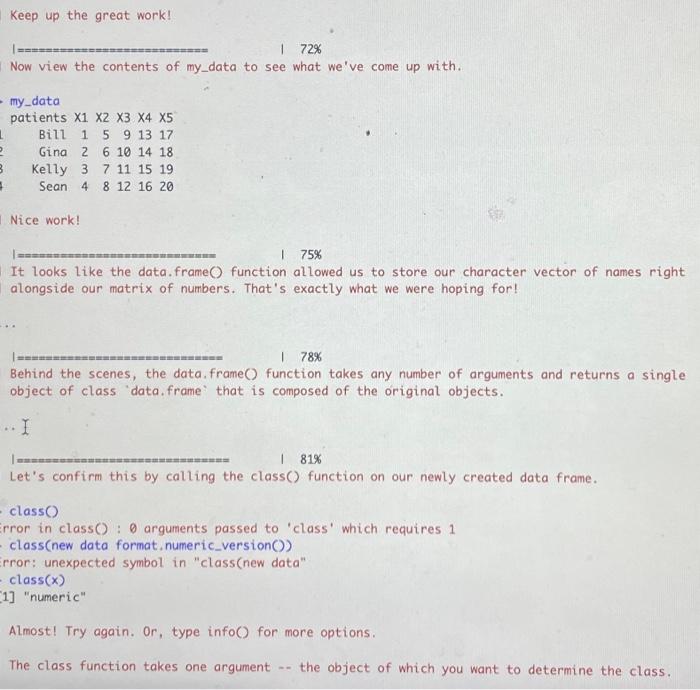
Keep up the great work! Now view the contents of my_data to see what we've come up with. \[ \begin{array}{l} \text { - my_data } \\ \text { patients } x_{1} \quad x_{2} \quad x_{3} \quad x_{4} \quad x_{5} \\ \begin{array}{llllll} \text { Bill } & 1 & 5 & 9 & 13 & 17 \end{array} \\ \begin{array}{llllll} \text { Gina } & 2 & 6 & 10 & 14 & 18 \end{array} \\ \begin{array}{llllll} \text { Kelly } & 3 & 7 & 11 & 15 & 19 \end{array} \\ \text { Sean } \begin{array}{llllll} 4 & 8 & 12 & 16 & 20 \end{array} \\ \end{array} \] Nice work! I It looks like the data.frame O function allowed us to store our character vector of names right alongside our matrix of numbers. That's exactly what we were hoping for! Behind the scenes, the data. frame ( function takes any number of arguments and returns a single object of class 'data. frame' that is composed of the original objects. . I Let's confirm this by calling the class() function on our newly created data frame. class O irror in class O : arguments passed to 'class' which requires 1 - class(new data format, numeric_version()) irror: unexpected symbol in "class(new data" class(x) [1] "numeric" Almost! Try again. Or, type info() for more options. The class function takes one argument -- the object of which you want to determine the class
Step by Step Solution
There are 3 Steps involved in it

Get step-by-step solutions from verified subject matter experts
 Study Help