



Question: Help me pleaseeeeeeee Record the chart of account reference number underneath each column to be posted to the general ledger then post the journal totals
Help me pleaseeeeeeee
Record the chart of account reference number underneath each column to be posted to the general ledger then post the journal totals to the general ledger. Please note predictive text is available for the general ledger details fields. When posting totals to the Bank Account general ledger account from the Cash Payments Journal and the Cash Receipts Journal use the generic terms 'Payments' and 'Receipts' in the details field. When posting from the sales, purchases, cash payments and cash receipts journals, you must enter in the details the opposing debit/credits as per the column headings in the respective journals (e.g. When posting to Accounts Payable 200 from the Cash Payments Journal, the details field will be Bank Account/Discount Received/GST Paid (Outlays)).
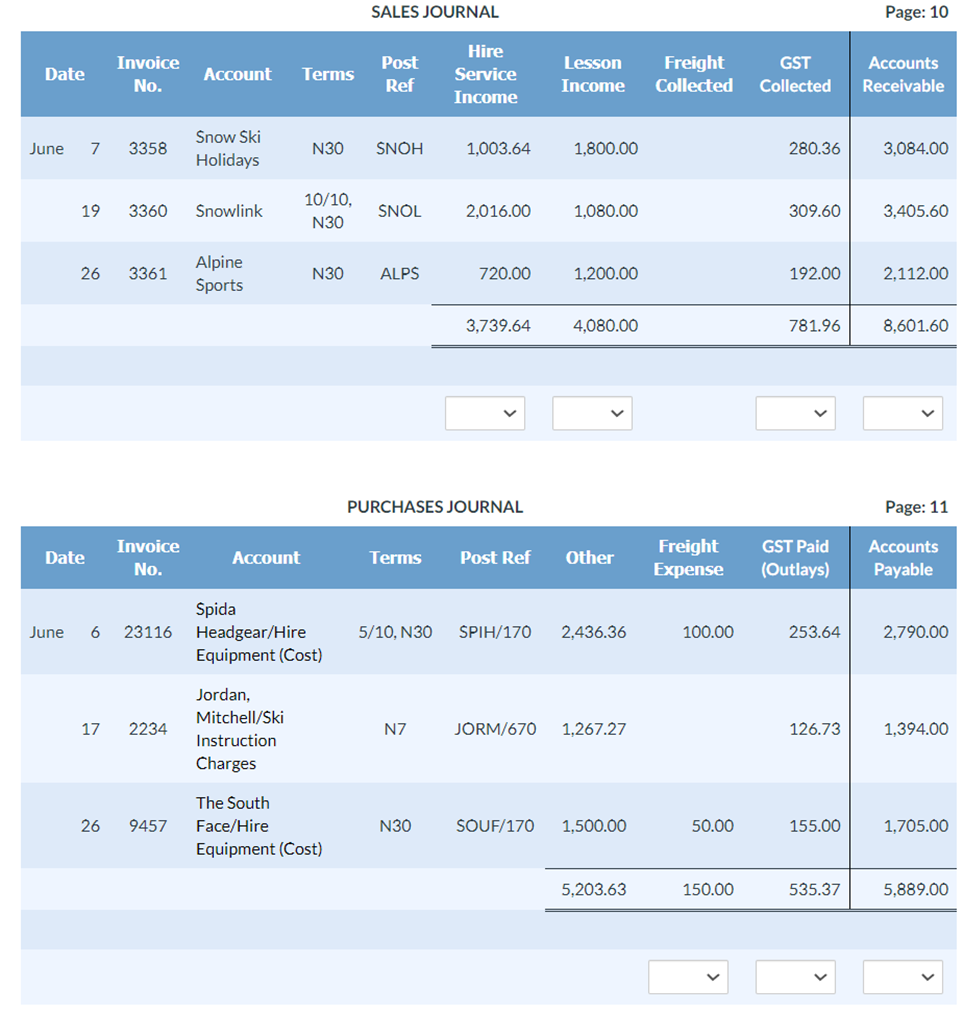
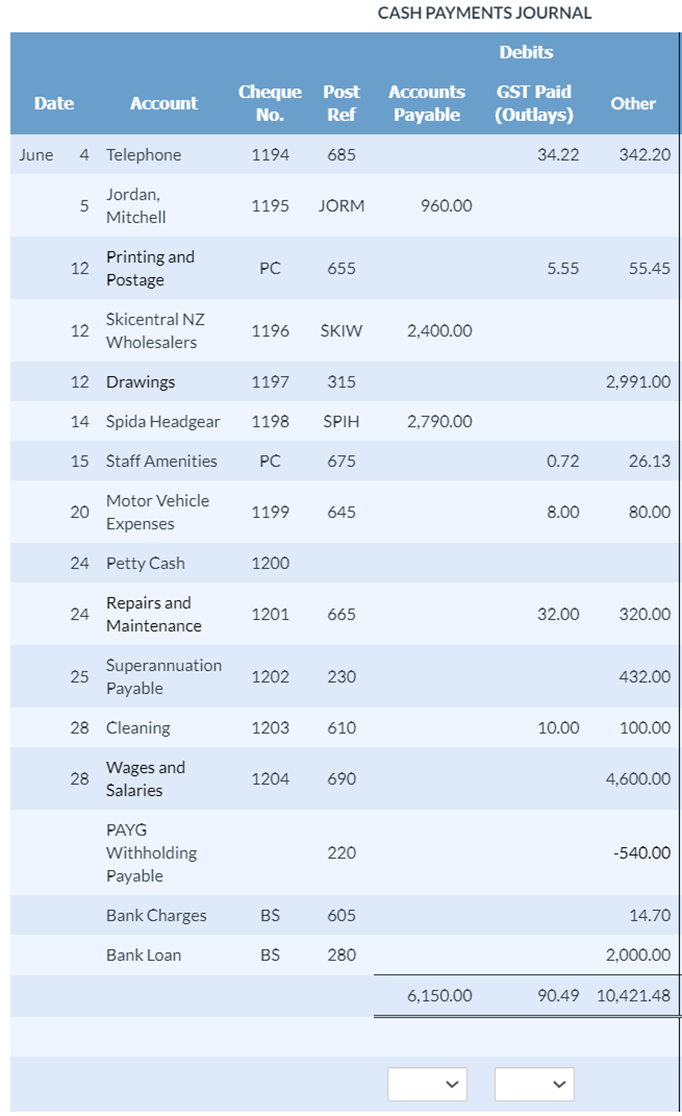
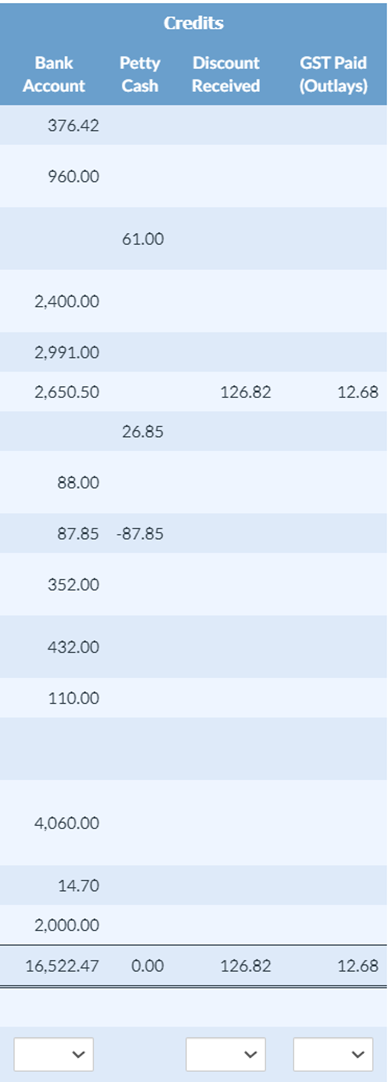
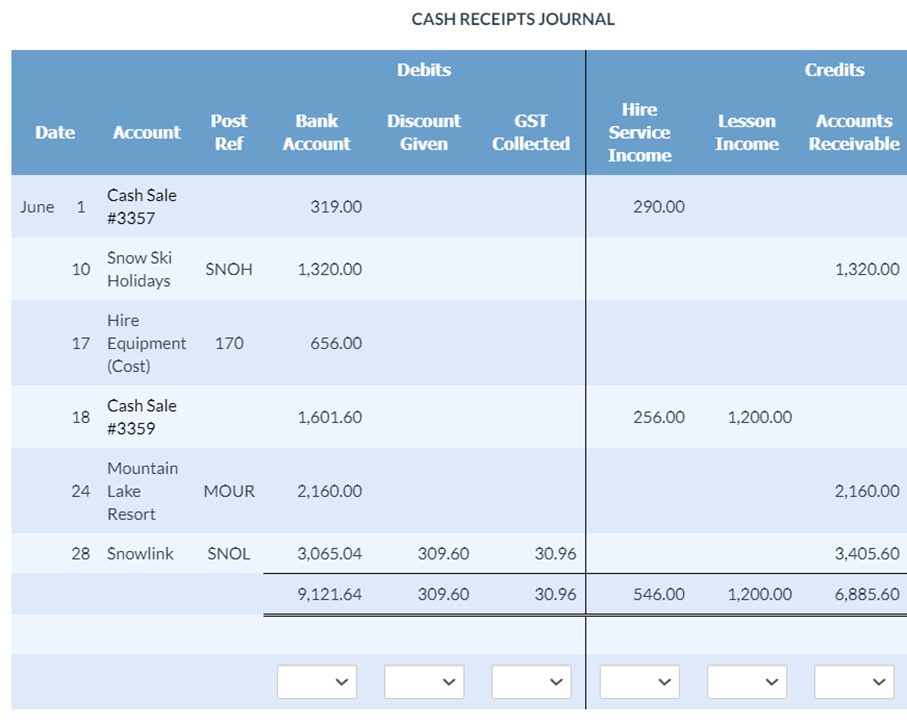
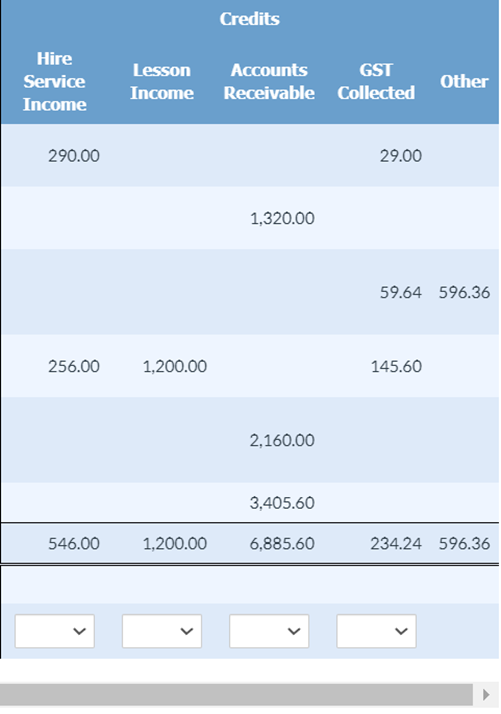
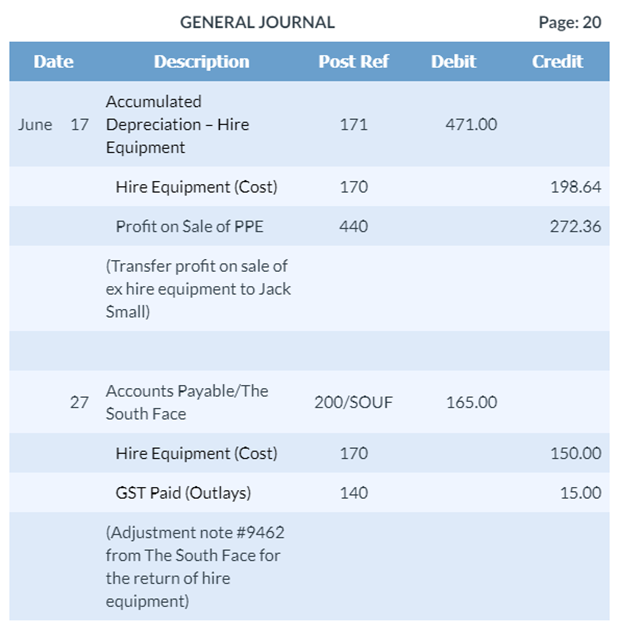
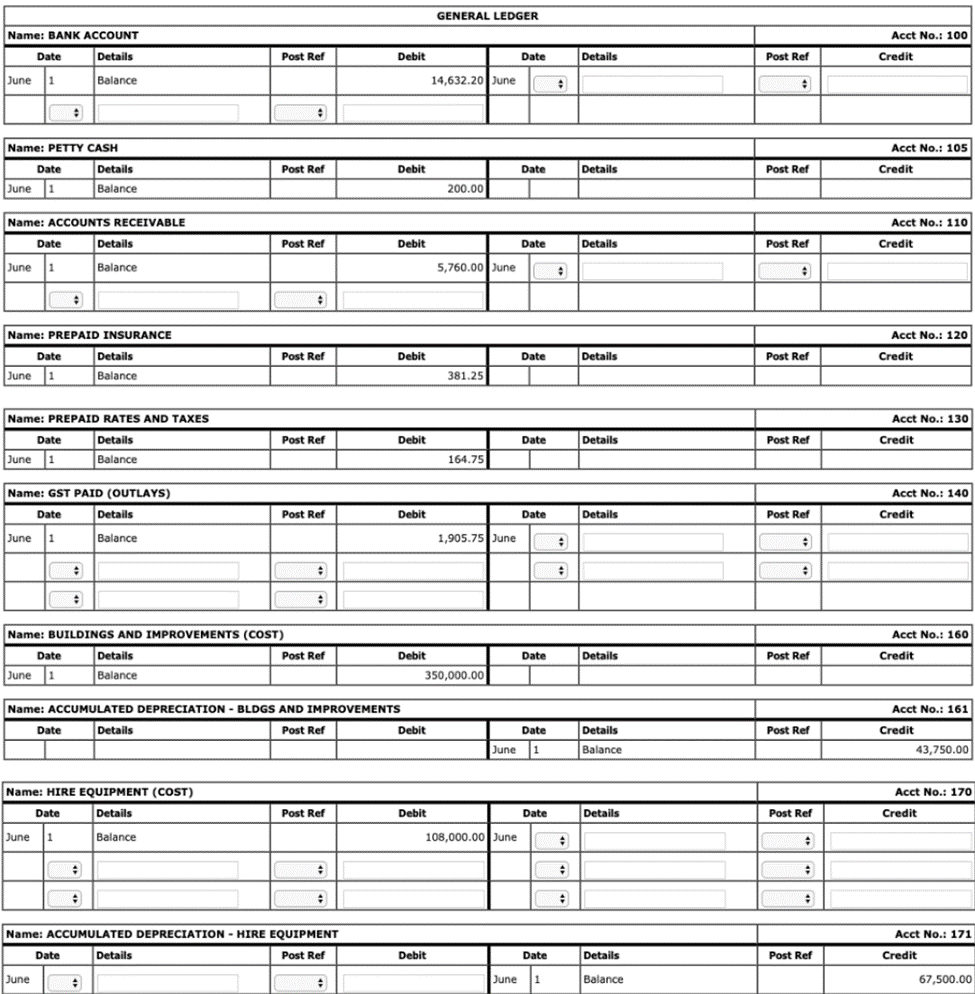
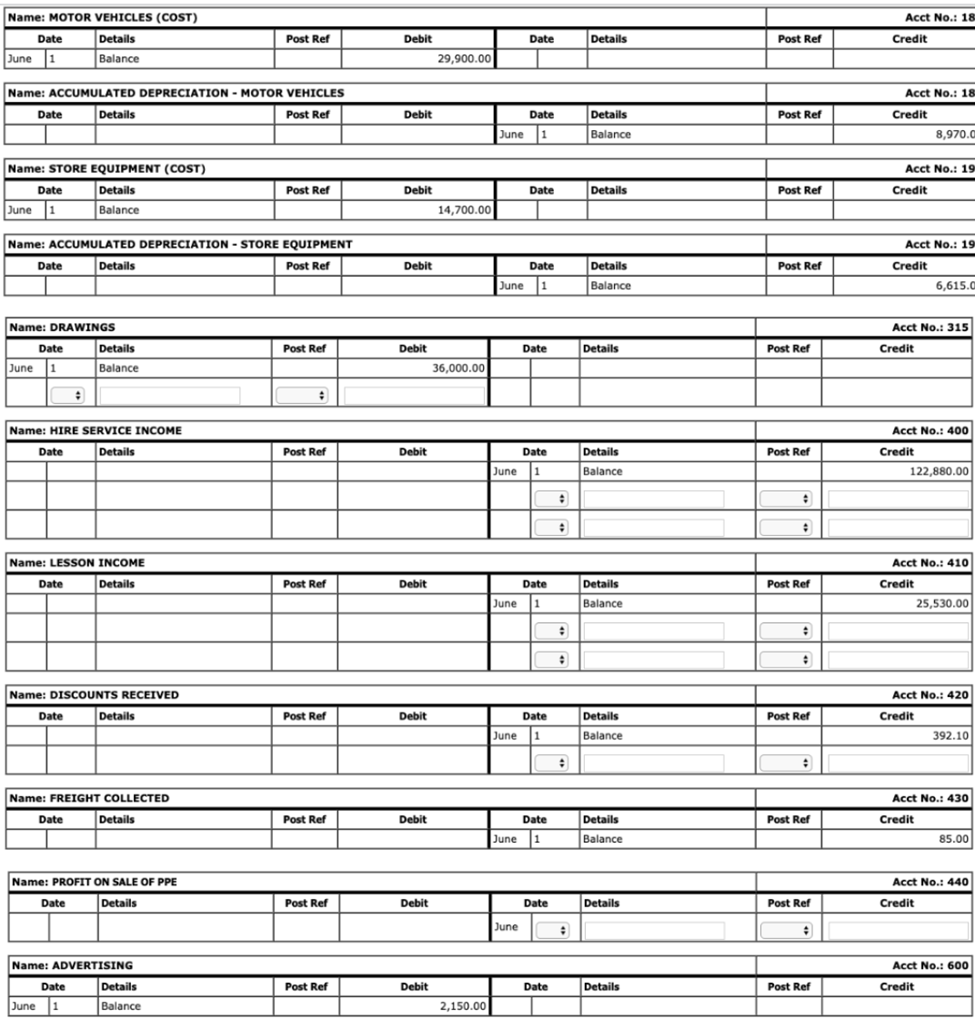
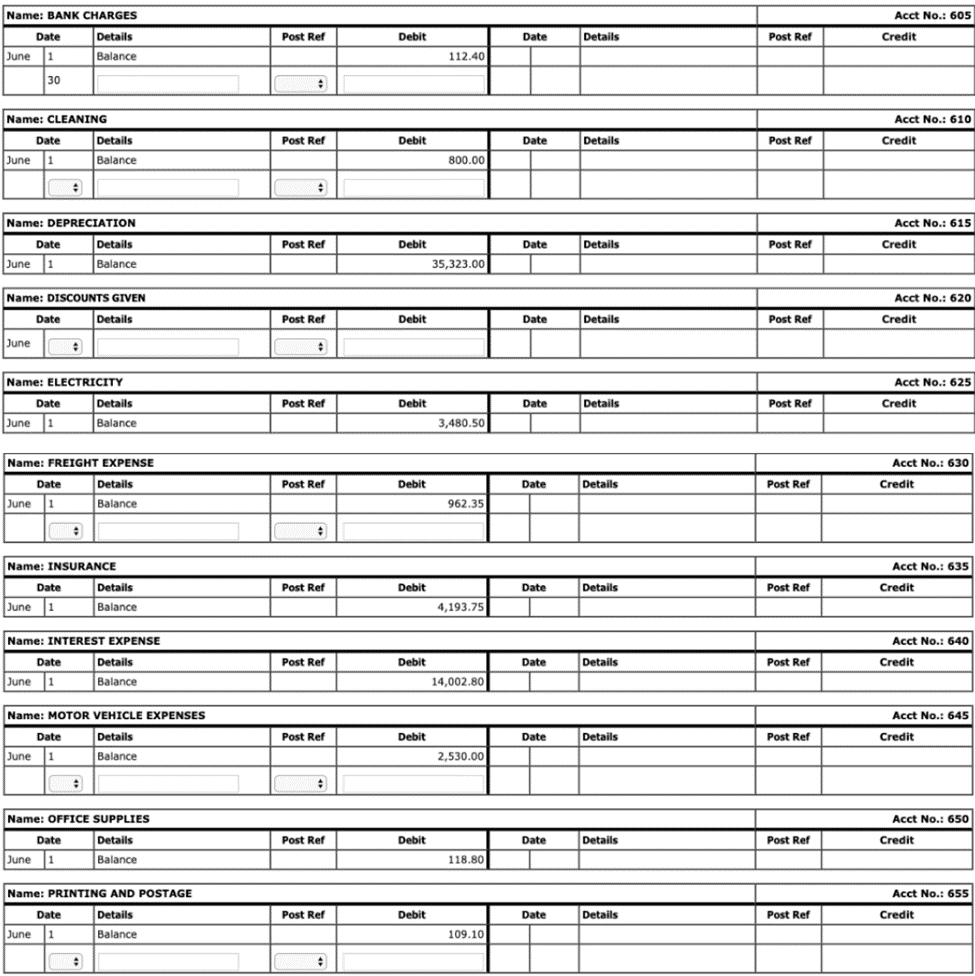
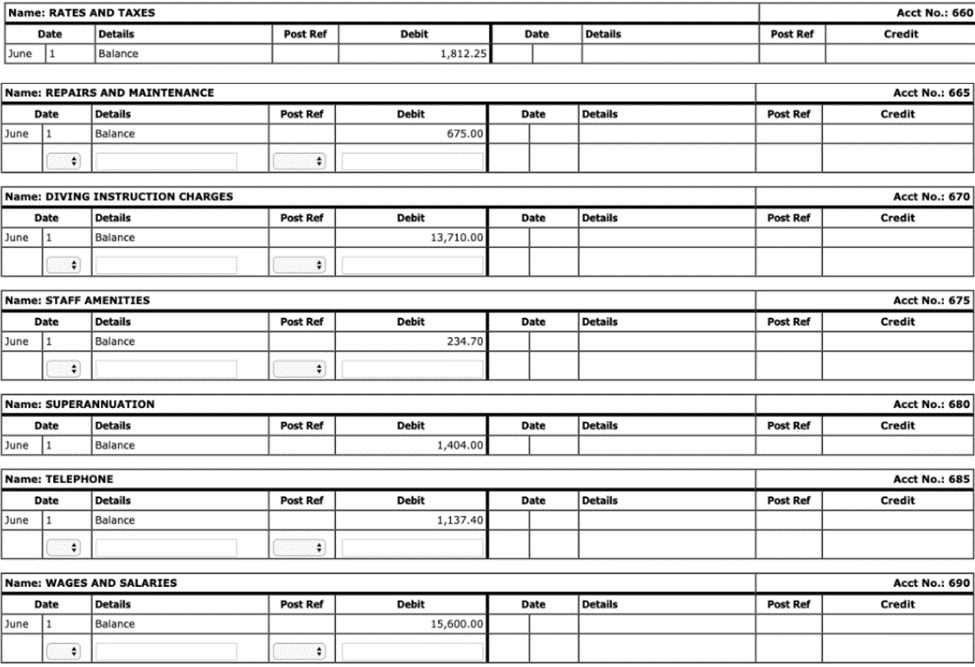
SALES JOURNAL Page: 10 PURCHASES JOURNAL Page: 11 CASH PAYMENTS JOURNAL Credits \begin{tabular}{cccc} \hline BankAccount & PettyCash & DiscountReceived & GSTPaid(Outlays) \\ \hline 376.42 & & & \end{tabular} 960.00 61.00 2,400.00 2,991.002,650.50126.8212.68 26.85 88.0087.8587.85 352.00 432.00 110.00 4,060.00 \begin{tabular}{rrrr} 14.70 & & & \\ 2,000.00 & & & \\ \hline 16,522.47 & 0.00 & 126.82 & 12.68 \\ \hline \end{tabular} CACHDFCFIDTC INIIDNAI Credits 59.64596.36 256.001,200.00 145.60 2,160.00 546.00 3,405.601,200.006,885.60 Name: ACCOUNTS RECEIVABLE Name: ACCUMULATED DEPRECIATION - MOTOR VEHICLES Name: ACCUMULATED DEPRECIATION - STORE EQUIPMENT \begin{tabular}{|l|l|l|l|l|l|l|l|l|} \hline \multicolumn{2}{|l|}{ Name: ADVERTINGG } & \\ \hline \multicolumn{2}{|c|}{ Date } & Details & Post Ref & Debit & Date & Details \\ \hline June & 1 & Balance & & 2,150.00 & & & \\ \hline \end{tabular} Name: BANK CHARGES Name: INTEREST EXPENSE Name: PRINTING AND POSTAGE Name: RATES AND TAXES Name: REPAIRS AND MAINTENANCE Name: DIVING INSTRUCTION CHARGES Name: STAFF AMENITIES Name: TELEPHONE Name: WAGES AND SALARIES SALES JOURNAL Page: 10 PURCHASES JOURNAL Page: 11 CASH PAYMENTS JOURNAL Credits \begin{tabular}{cccc} \hline BankAccount & PettyCash & DiscountReceived & GSTPaid(Outlays) \\ \hline 376.42 & & & \end{tabular} 960.00 61.00 2,400.00 2,991.002,650.50126.8212.68 26.85 88.0087.8587.85 352.00 432.00 110.00 4,060.00 \begin{tabular}{rrrr} 14.70 & & & \\ 2,000.00 & & & \\ \hline 16,522.47 & 0.00 & 126.82 & 12.68 \\ \hline \end{tabular} CACHDFCFIDTC INIIDNAI Credits 59.64596.36 256.001,200.00 145.60 2,160.00 546.00 3,405.601,200.006,885.60 Name: ACCOUNTS RECEIVABLE Name: ACCUMULATED DEPRECIATION - MOTOR VEHICLES Name: ACCUMULATED DEPRECIATION - STORE EQUIPMENT \begin{tabular}{|l|l|l|l|l|l|l|l|l|} \hline \multicolumn{2}{|l|}{ Name: ADVERTINGG } & \\ \hline \multicolumn{2}{|c|}{ Date } & Details & Post Ref & Debit & Date & Details \\ \hline June & 1 & Balance & & 2,150.00 & & & \\ \hline \end{tabular} Name: BANK CHARGES Name: INTEREST EXPENSE Name: PRINTING AND POSTAGE Name: RATES AND TAXES Name: REPAIRS AND MAINTENANCE Name: DIVING INSTRUCTION CHARGES Name: STAFF AMENITIES Name: TELEPHONE Name: WAGES AND SALARIES
Step by Step Solution
There are 3 Steps involved in it

Get step-by-step solutions from verified subject matter experts