







Question: help me with exercise 2 Procedure : Create an image in MS PAINT The values of the elements of the following matrix can be either
help me with exercise 2
Procedure : Create an image in MS PAINT
The values of the elements of the following matrix can be either 0 or 1. No other value is allowed. This is called a binary matrix and, if plotted as an image, it is called a binary image.
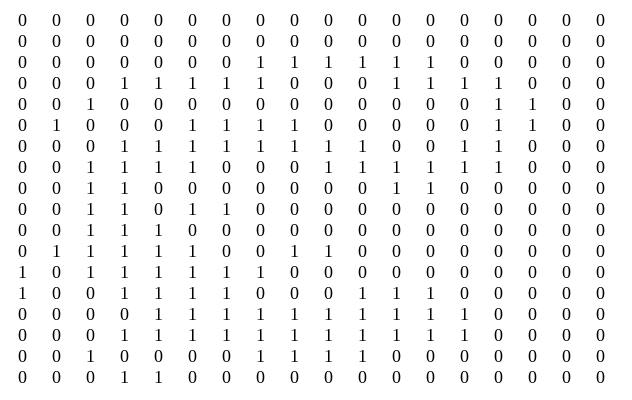
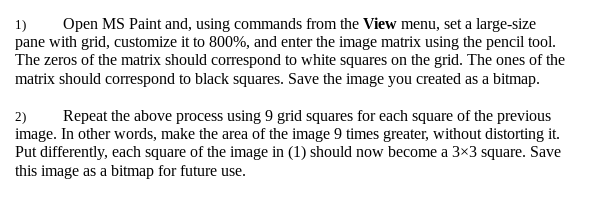
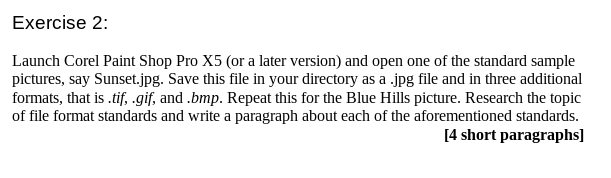
0 0 0 0 0 0 0 0 0 0 0 0 1 1 0 0 0 0 0 0 0 0 0 0 0 0 0 1 10 0 0 0 1 0 1 0 1 0 1 1 1 0 1 0 0 0 0 0 0 0 1 0 0 0 0 0 1 0 0 1 1 1 1 1 1 1 1 0 1 0 1 0 0 0 0 0 0 0 0 0 0 0 10 0 0 0 0 0 0 1 1 11 1 1 1 1 0 0 0 0 0 0 | 0 0 0 0 0 1 1 1 1 0 0 111 1 1 1 1 11 0 | 0 0 11 0 0 0 0 0 0 0 0 11 0 10 0 10 0 1 0 0 | 0 0 0 0 0 1 10 0 1 1 0 111 1 0 0 0 1 11 0 0 0 1 1 11 1 1 11 1 1 1 1 1 1 1 0 0 0 1 1 1 1 1 0 0 0 0 0 0 0 0 0 0 0 0 0 0 0 0 1 1 0 0 0 1 1 1 1 0 0 0 0 11 0 0 0 1 1 0 0 1 1 0 1 1 1 10 1 1 0 0 0 0 0 0 0 0 0 0 0 0 0 0 0 0 0 0 0 0 0 0 0 1 1 0 0 0 1 1 1 0 0 1 1 1 0 0 0 0 0 0 0 0 0 0 0 0 0 0 0 0 0 0 0 0 0 0 0 0 0 0 0 0 0 0 0 0 0 0 0 0 0 0 0 0 0 0 0 0 0 0 0 0 1) Open MS Paint and, using commands from the View menu, set a large-size pane with grid, customize it to 800%, and enter the image matrix using the pencil tool. The zeros of the matrix should correspond to white squares on the grid. The ones of the matrix should correspond to black squares. Save the image you created as a bitmap. 2) Repeat the above process using 9 grid squares for each square of the previous image. In other words, make the area of the image 9 times greater, without distorting it. Put differently, each square of the image in (1) should now become a 3x3 square. Save this image as a bitmap for future use. Exercise 2: Launch Corel Paint Shop Pro X5 (or a later version) and open one of the standard sample pictures, say Sunset.jpg. Save this file in your directory as a .jpg file and in three additional formats, that is .tif, .gif, and .bmp. Repeat this for the Blue Hills picture. Research the topic of file format standards and write a paragraph about each of the aforementioned standards. [4 short paragraphs) 0 0 0 0 0 0 0 0 0 0 0 0 1 1 0 0 0 0 0 0 0 0 0 0 0 0 0 1 10 0 0 0 1 0 1 0 1 0 1 1 1 0 1 0 0 0 0 0 0 0 1 0 0 0 0 0 1 0 0 1 1 1 1 1 1 1 1 0 1 0 1 0 0 0 0 0 0 0 0 0 0 0 10 0 0 0 0 0 0 1 1 11 1 1 1 1 0 0 0 0 0 0 | 0 0 0 0 0 1 1 1 1 0 0 111 1 1 1 1 11 0 | 0 0 11 0 0 0 0 0 0 0 0 11 0 10 0 10 0 1 0 0 | 0 0 0 0 0 1 10 0 1 1 0 111 1 0 0 0 1 11 0 0 0 1 1 11 1 1 11 1 1 1 1 1 1 1 0 0 0 1 1 1 1 1 0 0 0 0 0 0 0 0 0 0 0 0 0 0 0 0 1 1 0 0 0 1 1 1 1 0 0 0 0 11 0 0 0 1 1 0 0 1 1 0 1 1 1 10 1 1 0 0 0 0 0 0 0 0 0 0 0 0 0 0 0 0 0 0 0 0 0 0 0 1 1 0 0 0 1 1 1 0 0 1 1 1 0 0 0 0 0 0 0 0 0 0 0 0 0 0 0 0 0 0 0 0 0 0 0 0 0 0 0 0 0 0 0 0 0 0 0 0 0 0 0 0 0 0 0 0 0 0 0 0 1) Open MS Paint and, using commands from the View menu, set a large-size pane with grid, customize it to 800%, and enter the image matrix using the pencil tool. The zeros of the matrix should correspond to white squares on the grid. The ones of the matrix should correspond to black squares. Save the image you created as a bitmap. 2) Repeat the above process using 9 grid squares for each square of the previous image. In other words, make the area of the image 9 times greater, without distorting it. Put differently, each square of the image in (1) should now become a 3x3 square. Save this image as a bitmap for future use. Exercise 2: Launch Corel Paint Shop Pro X5 (or a later version) and open one of the standard sample pictures, say Sunset.jpg. Save this file in your directory as a .jpg file and in three additional formats, that is .tif, .gif, and .bmp. Repeat this for the Blue Hills picture. Research the topic of file format standards and write a paragraph about each of the aforementioned standards. [4 short paragraphs)
Step by Step Solution
There are 3 Steps involved in it

Get step-by-step solutions from verified subject matter experts
 Study Help