







Question: Help needed in java Thanx ! :) /* * Grafix_Thing.java */ import java.awt.*; /** * Template code file for basic Java graphics * Make sure
Help needed in java Thanx ! :)
/* * Grafix_Thing.java */
import java.awt.*;
/** * Template code file for basic Java graphics * Make sure to add all graphics code in the paint method, * NOT the main method. * @SuppressWarnings("serial") public class Grafix_Thing extends javax.swing.JFrame {
public void paint(Graphics g) { // draw the window title, menu, buttons super.paint(g);
// get the Graphics context for the canvas Graphics pen = canvas.getGraphics();
// *** add pen Graphics method calls after this line ***
/** * ********************************************************* * WARNING!!! DO NOT ADD OR MODIFY CODE BELOW THIS LINE!!! * * ********************************************************* */ } // end paint
/** * Creates new form NB_Grafix_Thing2 */ public Grafix_Thing() { initComponents(); }
/** * This method is called from within the constructor to initialize the form. * WARNING: Do NOT modify this code. The content of this method is always * regenerated by the NB_Grafix_Thing2 Editor. */ // //GEN-BEGIN:initComponents private void initComponents() {
canvas = new javax.swing.JPanel(); resetBtn = new javax.swing.JButton();
setDefaultCloseOperation(javax.swing.WindowConstants.EXIT_ON_CLOSE); setTitle("My Drawing Form");
canvas.setBackground(new java.awt.Color(255, 255, 255)); canvas.setLayout(new java.awt.BorderLayout()); getContentPane().add(canvas, java.awt.BorderLayout.CENTER);
resetBtn.setText("Reset"); resetBtn.addActionListener(new java.awt.event.ActionListener() { public void actionPerformed(java.awt.event.ActionEvent evt) { resetBtnActionPerformed(evt); } }); getContentPane().add(resetBtn, java.awt.BorderLayout.PAGE_END);
setSize(new java.awt.Dimension(816, 639)); setLocationRelativeTo(null); }// //GEN-END:initComponents
private void resetBtnActionPerformed(java.awt.event.ActionEvent evt) {//GEN-FIRST:event_resetBtnActionPerformed repaint(); }//GEN-LAST:event_resetBtnActionPerformed
/** * @param args the command line arguments */ public static void main(String args[]) { /* Set the Nimbus look and feel */ // /* If Nimbus (introduced in Java SE 6) is not available, stay with the default look and feel */ try { for (javax.swing.UIManager.LookAndFeelInfo info : javax.swing.UIManager.getInstalledLookAndFeels()) { if ("Nimbus".equals(info.getName())) { javax.swing.UIManager.setLookAndFeel(info.getClassName()); break; } } } catch (ClassNotFoundException ex) { java.util.logging.Logger.getLogger(Grafix_Thing.class.getName()).log(java.util.logging.Level.SEVERE, null, ex); } catch (InstantiationException ex) { java.util.logging.Logger.getLogger(Grafix_Thing.class.getName()).log(java.util.logging.Level.SEVERE, null, ex); } catch (IllegalAccessException ex) { java.util.logging.Logger.getLogger(Grafix_Thing.class.getName()).log(java.util.logging.Level.SEVERE, null, ex); } catch (javax.swing.UnsupportedLookAndFeelException ex) { java.util.logging.Logger.getLogger(Grafix_Thing.class.getName()).log(java.util.logging.Level.SEVERE, null, ex); } // //
/* Create and display the form */ java.awt.EventQueue.invokeLater(new Runnable() { public void run() { new Grafix_Thing().setVisible(true); } }); } // end main method
// Variables declaration - do not modify//GEN-BEGIN:variables private javax.swing.JPanel canvas; private javax.swing.JButton resetBtn; // End of variables declaration//GEN-END:variables } // end Grafix_Thing class
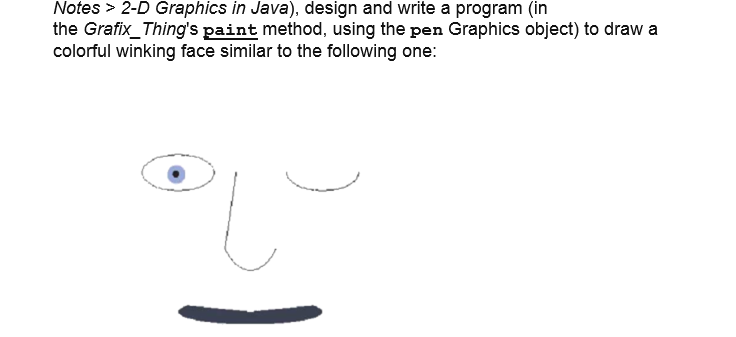
Notes > 2-D Graphics in Java), design and write a program (in the Grafix_Thing's paint method, using the pen Graphics object) to draw a colorful winking face similar to the following one
Step by Step Solution
There are 3 Steps involved in it

Get step-by-step solutions from verified subject matter experts
 Study Help