







Question: help on excel 1 Open the start file and go to the February sheet. Upon opering the workbock, you notece that the Fetruary workaheet is
help on excel
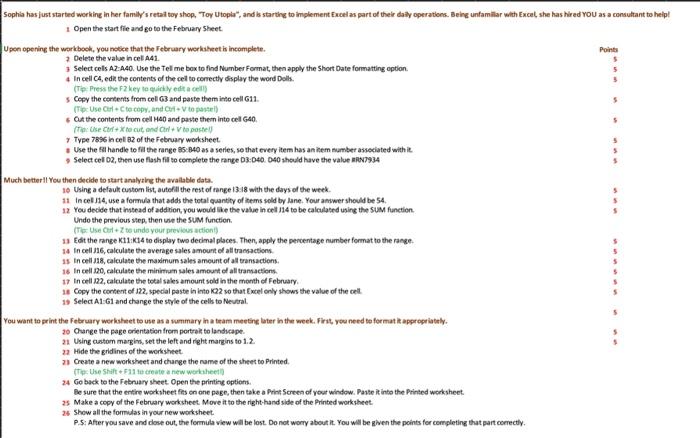
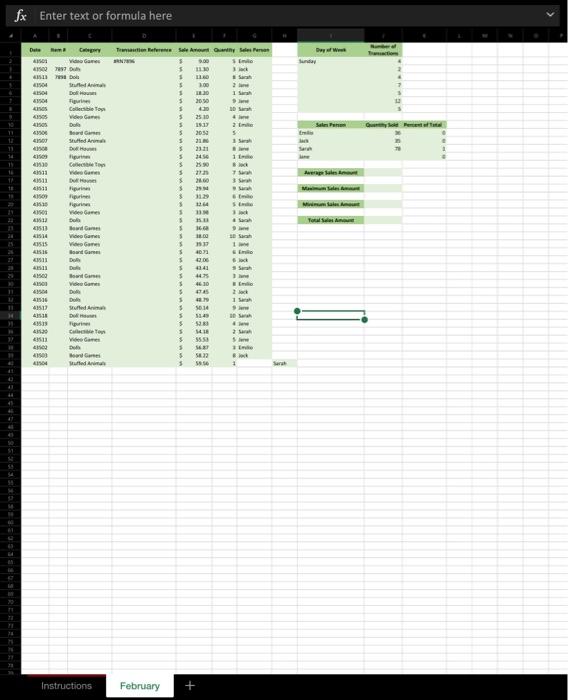
1 Open the start file and go to the February sheet. Upon opering the workbock, you notece that the Fetruary workaheet is incomplete. 7 Delete the value in cel A41. 3 Select cels AZ: A40. Use the Tel me box to find Number Fonmat, then apply the Short Date formatting option. 4 In cell C4, edat the contents of the cell to conectly sisplay the word Dolls. (Tip: Press the f2 key lo quichly edit a colil) 5 Copy the centerts frem coll 63 and paste them into cell 611. (Tip Use Corl + C te copy, and CAr + V to pastril) s. Cat the contents from cell HaO and paste them into cell GAO. Type 7386 in cel a2 of the Febnary worksheet. s Use the tal handle to fa the range 85:040 as a series, se that every item has an inem number asseciated with it. \$ Select cel 02, then use flash fill to complete the range 03:040. 040 sheuld have the value anv934 Much better II You then decide to start analyzing the avalable data. is Using a defaukt custom list, autefili the rest of range 13.18 with the days of the week. 11 in cel .114, use a formula that adds the total quantily of litems sold by lane. Your amwer should be 54. 12 You decide that instead of addrion, you would ine the value in cell 114 to be calculatrd using the 54M function. Undo the previous step, then use the SuM function. (The Use Cr+Z to unda your previous actioni) 13 Edit the range K11:K14 to display two decimal places. Then, apply the pencentage number format to the range. 14 in cell 116 , calculate the average sales amount of all tramactions. is in cell 118 , calculate the maximum sales amount of all transaction. is In cell 200 , calculate the minimum sales amount of all transactions. 17 In cell 22 , calculate the total sales amount sold in the month of February. is Copy the content of in2, special paste in into KQ22 wo that 6 xcel only shows the value of the cell. 1) Select A1-Gl and change the style of the cells to Neveral. You want to print the Fetruary worksheet to use as a vummary in a team meetine later in the week. Firit, you need te format it apgrogriately. 20. Oange the page crientation from portreil to landvape. 21 Using castom margin, set the left and right margins to 1.2 . 2 Hide the gridines of the worksheet. 21. Create a new worksheet and charge the name of the sheet to Printed. 24 Go back to the Fetruary sheet Open the printine options. Be sure that the entire workiheet fas on one page, then take a Print Screen of your window. Paste it into the Printed worksheet. 25 Make a copy of the February worksheet. Move it to the right-hand side of the Printed worksheet: 25 Show all the formulas in your new worksheet. P.S: After you save and dose out, the formula view wall be lost. Do not worry about it. You will be given the points for completing that part correctly. fx Enter text or formula here
Step by Step Solution
There are 3 Steps involved in it

Get step-by-step solutions from verified subject matter experts
 Study Help