







Question: Help on this please! thank you 2. Type the declaration, element, header information, and element. Use the strict DTD and Hello World as the content
Help on this please! thank you
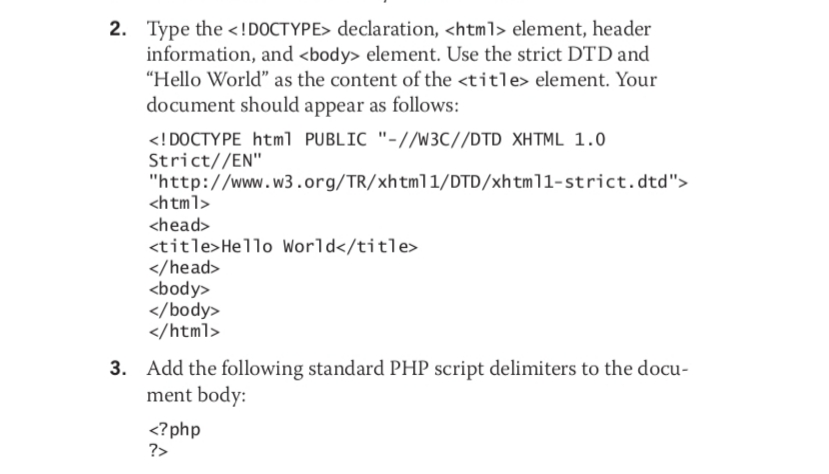
2. Type the declaration, element, header information, and element. Use the strict DTD and "Hello World" as the content of the
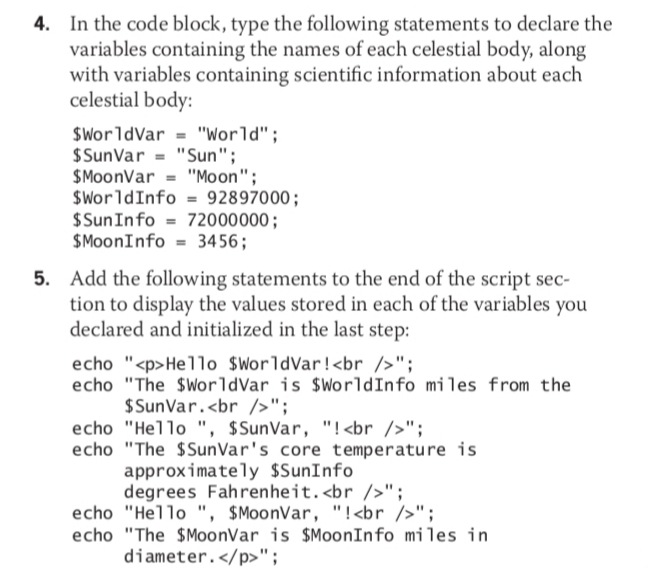
3. Add the following standard PHP script delimiters to the docu- ment body: 4. In the code block, type the following statements to declare the variables containing the names of each celestial body, along with variables containing scientific information about each celestial body: $WorldVar - "World"; $ Sun Var = "Sun"; $MoonVar = "Moon"; $WorldInfo = 92897000; $Sun Info = 72000000; $Moon Info = 3456; Add the following statements to the end of the script sec- tion to display the values stored in each of the variables you declared and initialized in the last step: echo "
Hello WorldVar!
"; echo "The WorldVar is $WorldInfo miles from the $ SunVar.
"; echo "Hello", $SunVar, "!
"; echo "The $SunVar's core temperature is approximately $SunInfo degrees Fahrenheit.
"; echo "Hello", $Moonvar, "!
"; echo "The MoonVar is $Moon Info miles in diameter.
Step by Step Solution
There are 3 Steps involved in it

Get step-by-step solutions from verified subject matter experts
 Study Help