







Question: Help please! 1. Numerically verify the relation below by implementing the expression in MATLAB and using the equality operator to check for equality 18 +
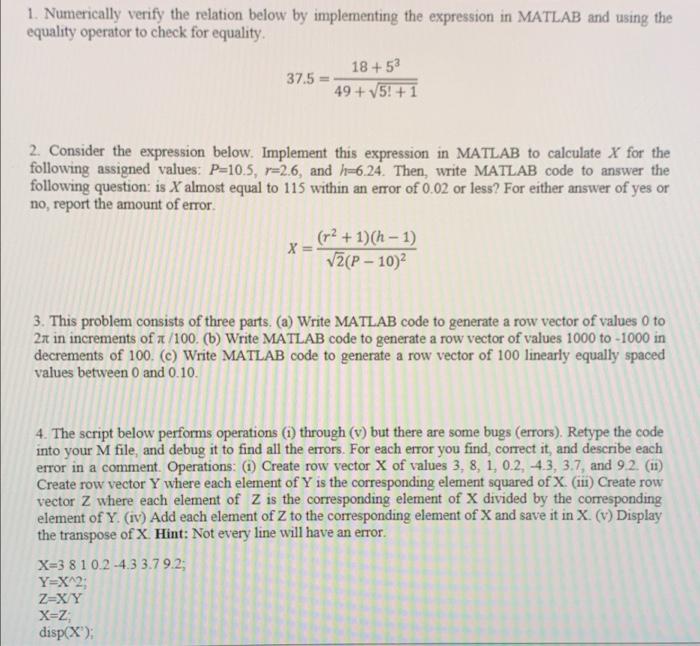
1. Numerically verify the relation below by implementing the expression in MATLAB and using the equality operator to check for equality 18 + 5 37.5 49 + V5! + 1 2. Consider the expression below. Implement this expression in MATLAB to calculate X for the following assigned values: P=10.5, r=2.6, and 1-6.24. Then, write MATLAB code to answer the following question: is X almost equal to 115 within an error of 0.02 or less? For either answer of yes or no, report the amount of error. (r2 + 1)(h - 1) X= V (P-10) 3. This problem consists of three parts. (a) Write MATLAB code to generate a row vector of values 0 to 21 in increments of n/100. (b) Write MATLAB code to generate a row vector of values 1000 to -1000 in decrements of 100. (C) Write MATLAB code to generate a row vector of 100 linearly equally spaced values between 0 and 0.10. 4. The script below performs operations (1) through (v) but there are some bugs (errors). Retype the code into your M file, and debug it to find all the errors. For each error you find, correct it, and describe each error in a comment Operations: (1) Create row vector X of values 3, 8, 1, 0.2, -4.3, 3.7, and 9.2. (11) Create row vector Y where each element of Y is the corresponding element squared of X (1) Create row vector Z where each element of Z is the corresponding element of X divided by the corresponding element of Y. (IV) Add each element of Z to the corresponding element of X and save it in X. (v) Display the transpose of X. Hint: Not every line will have an error X=3 810.2-4.3 3.79.2; Y=X^2; Z=XY X=Z disp(X)
Step by Step Solution
There are 3 Steps involved in it

Get step-by-step solutions from verified subject matter experts
 Study Help