







Question: Help please!! please answer all and type the answers clearly! thank you! P-2-4a. Differences in QuickBooks terms Explain the difference between Home icon and Home
Help please!! please answer all and type the answers clearly! thank you! 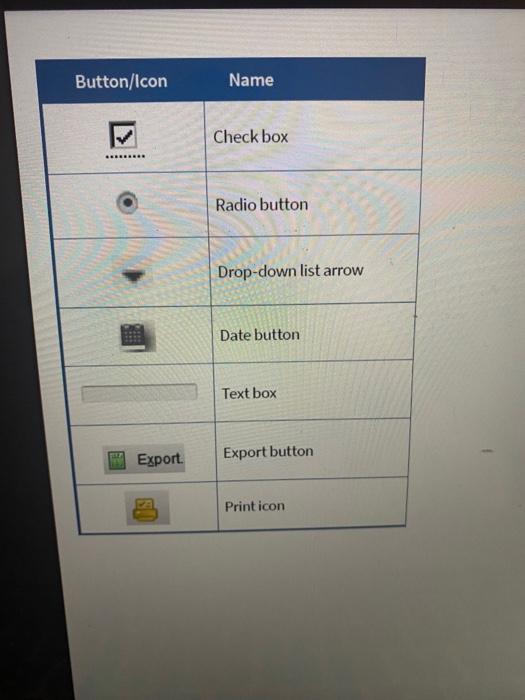
P-2-4a. Differences in QuickBooks terms
Explain the difference between Home icon and Home page.
P-2-4b. Differences in QuickBooks terms
Explain the difference between Maintenance and processing information.
P-2-4c. Differences in QuickBooks terms
Explain the difference between Menu bar and Icon bar.
P-2-4d. Differences in QuickBooks terms
Explain the difference between Vendor Center and Employee Center.
P-2-5a. Default information
Briefly explain what is meant by default information.
P-2-5b. Default information
What is the purpose of having default information in QuickBooks?
P-2-6. Purposes of QuickBooks buttons and icons
State the purpose of each of the buttons or icons in the order that they appear in the table.
Button/Icon Export. Name Check box Radio button Drop-down list arrow Date button Text box Export button Print icon
Step by Step Solution
There are 3 Steps involved in it
1 Expert Approved Answer
Step: 1 Unlock

Question Has Been Solved by an Expert!
Get step-by-step solutions from verified subject matter experts
Step: 2 Unlock
Step: 3 Unlock
 Study Help