







Question: HELP PLEASE WITH EXPLAINING EVERY STEP!! Draw a flowchart outlining the steps to configure the ADC on the MSP432E401Y. Hint: there are 13 steps. void
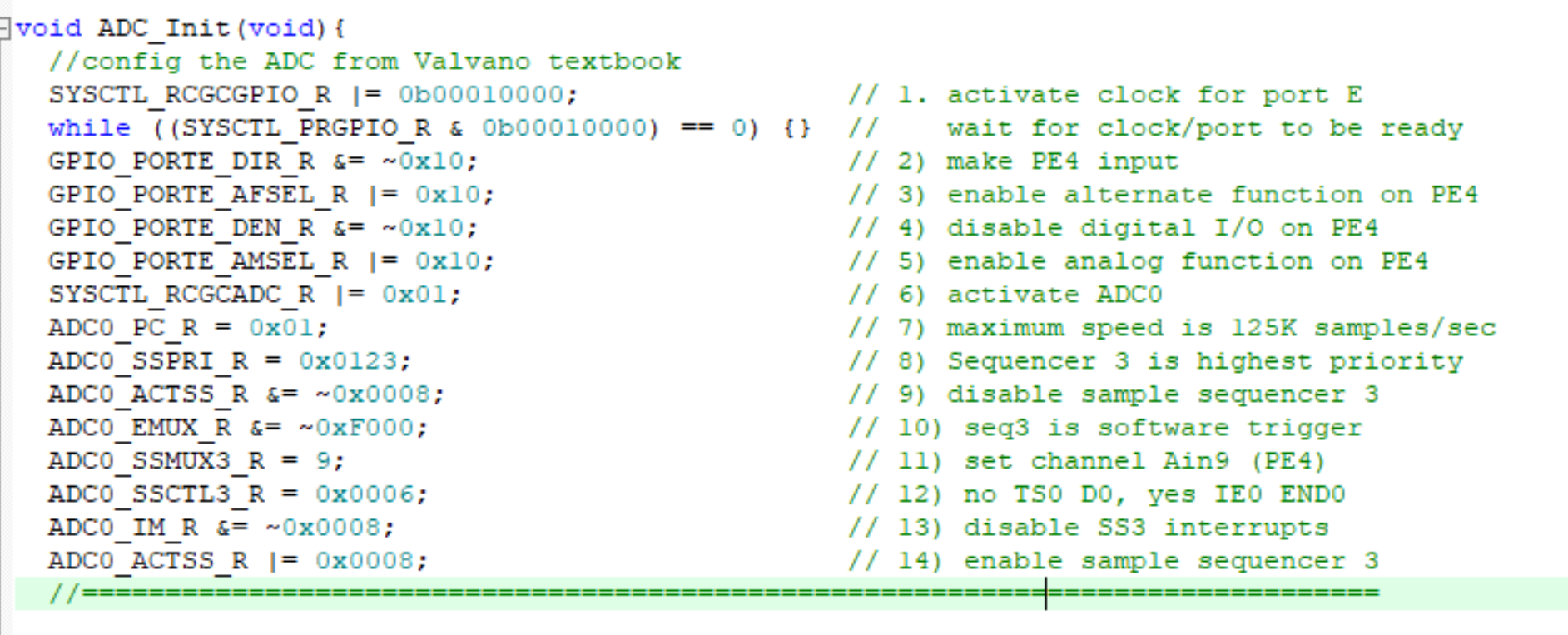 HELP PLEASE WITH EXPLAINING EVERY STEP!!
Draw a flowchart outlining the steps to configure the ADC on the MSP432E401Y. Hint: there are 13 steps.
void ADC_Init(void) { //config the ADC from Valvano textbook SYSCTL RCGCGPIO R = Ob00010000; while ((SYSCTL PRGPIO R & Ob00010000) == 0) {} GPIO PORTE DIR R &= -0x10; GPIO PORTE AFSEL R = Ox10; GPIO PORTE DEN R&= -0x10; GPIO PORTE AMSEL R = Ox10; SYSCTL_RCGCADC_R [= Ox0l; ADCO_PC_R = 0x01; ADCO SSPRI R = Ox0123; ADCO ACTSS R&= 0x0008; ADCO EMUX R&= - OxF000; ADCO SSMUX3 R = 9; ADCO_SSCTL3_R = 0x0006; ADCO IM R&= 0x0008; ADCO ACTSS R = Ox0008; // 1. activate clock for port E // wait for clock/port to be ready // 2) make PE4 input // 3) enable alternate function on PE 4 // 4) disable digital I/O on PE 4 // 5) enable analog function on PE 4 // 6) activate ADCO // 7) maximum speed is 125K samples/sec // 8) Sequencer 3 is highest priority // 9) disable sample sequencer 3 // 10) seq3 is software trigger // 11) set channel Aing (PE4) // 12) no TSO DO, yes IEO ENDO // 13) disable ss3 interrupts // 14) enable sample sequencer 3 == == == == == == == ==== = == == == == == == == ==== = == == == == == == ==== == == == = == == == == ==== == == =
Step by Step Solution
There are 3 Steps involved in it

Get step-by-step solutions from verified subject matter experts
 Study Help