







Question: Help solve code using the comments (python) main.py Console Shell allRestaurants.close() 8 # # # loop the list using a range loop print the index
Help solve code using the comments (python)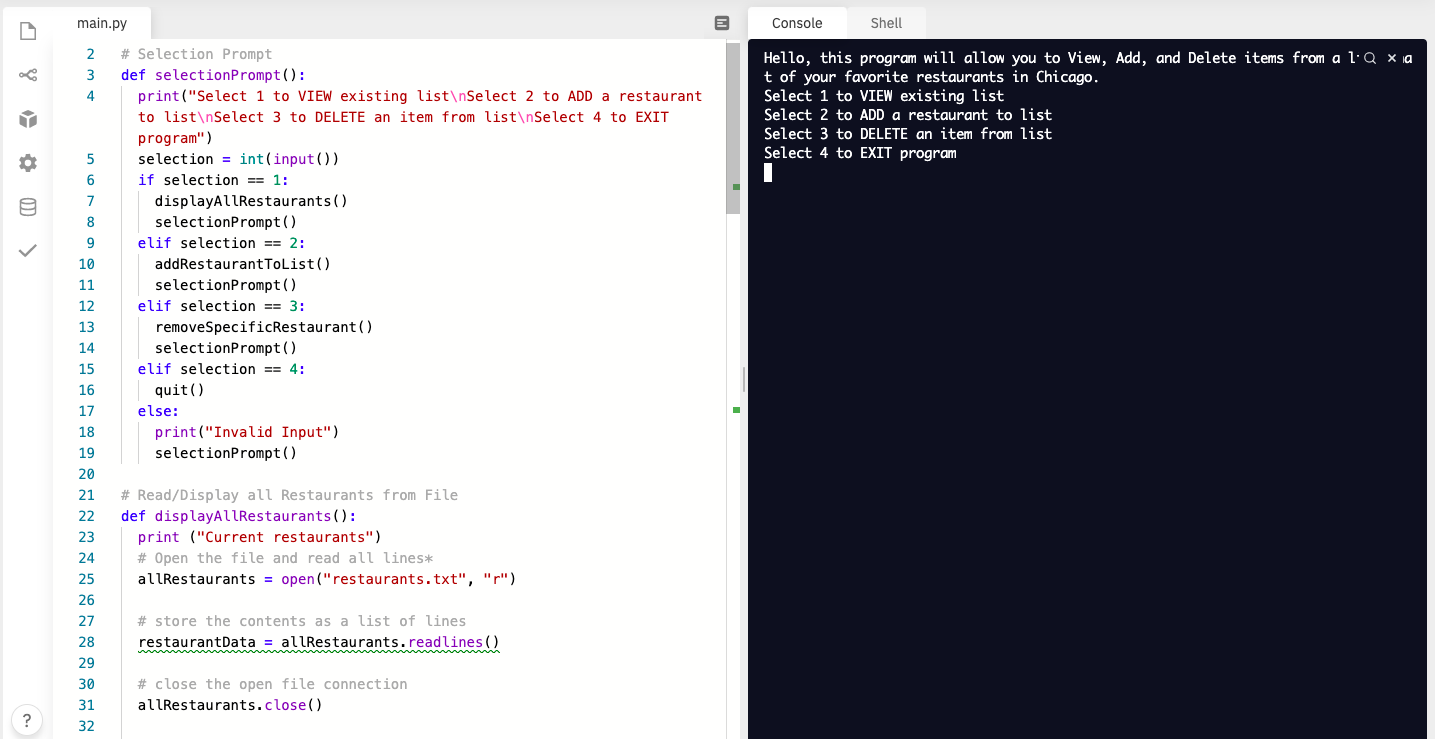
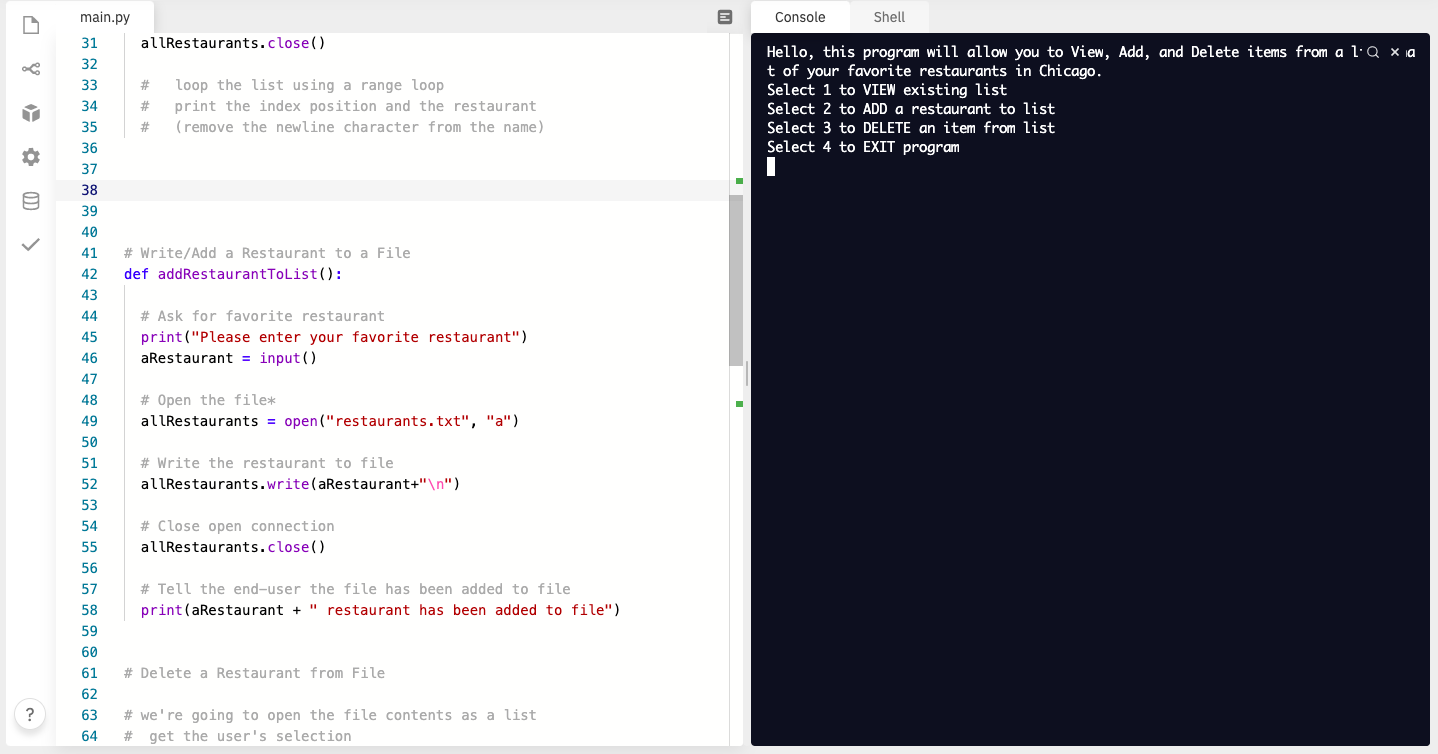
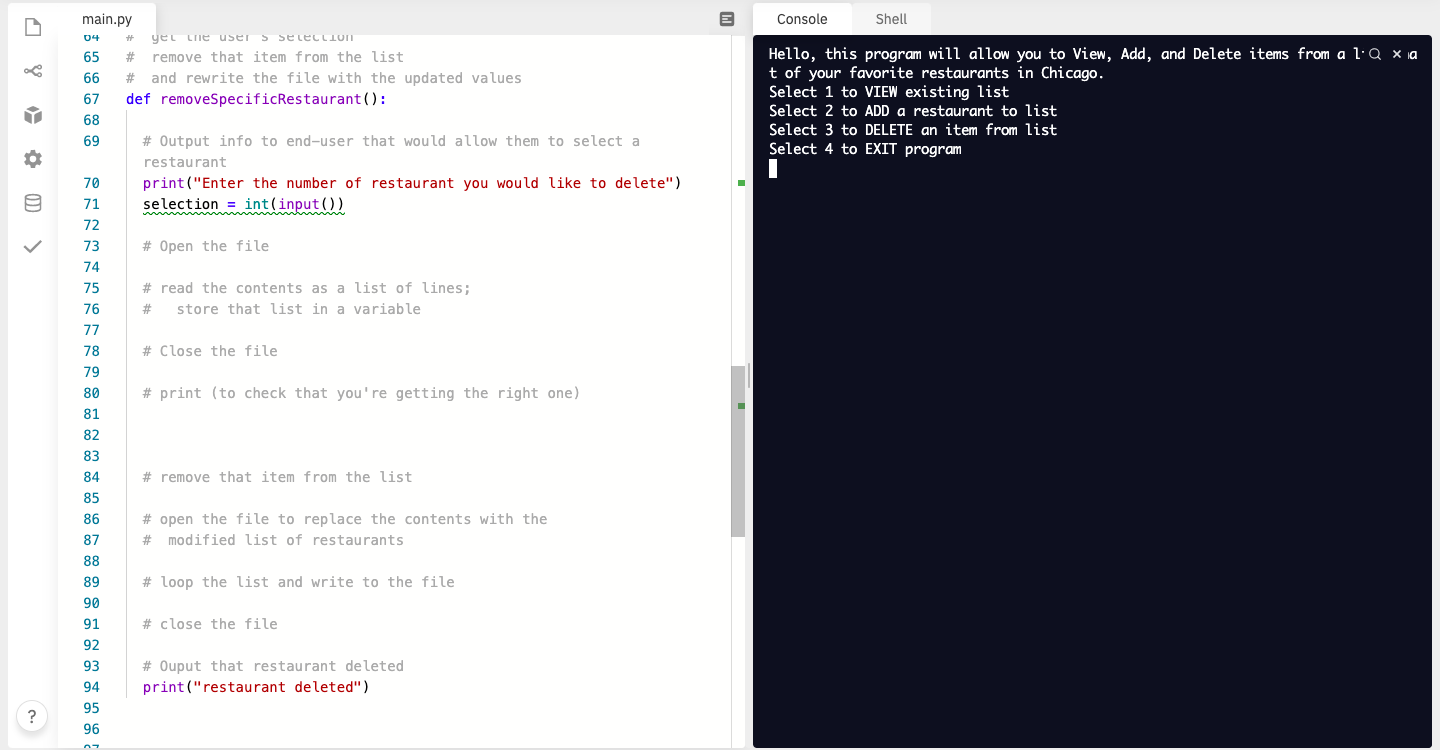
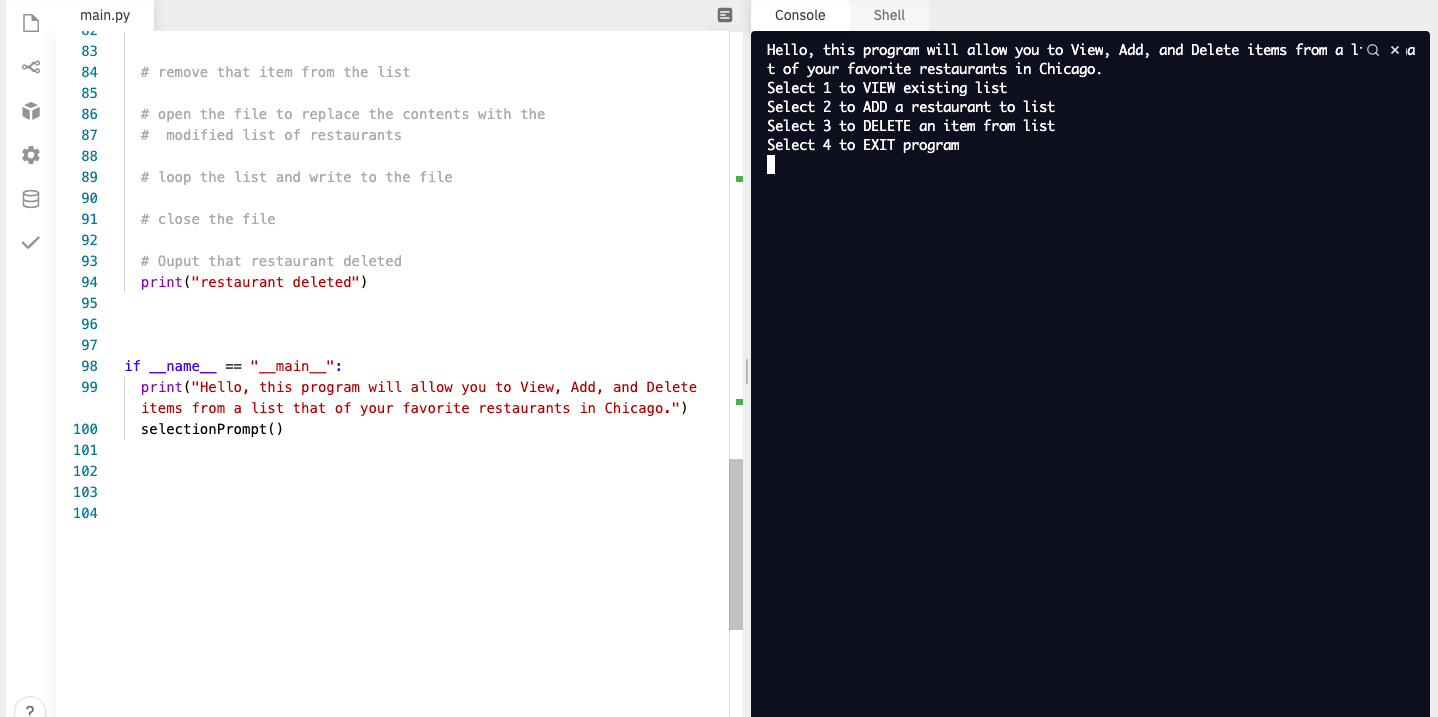
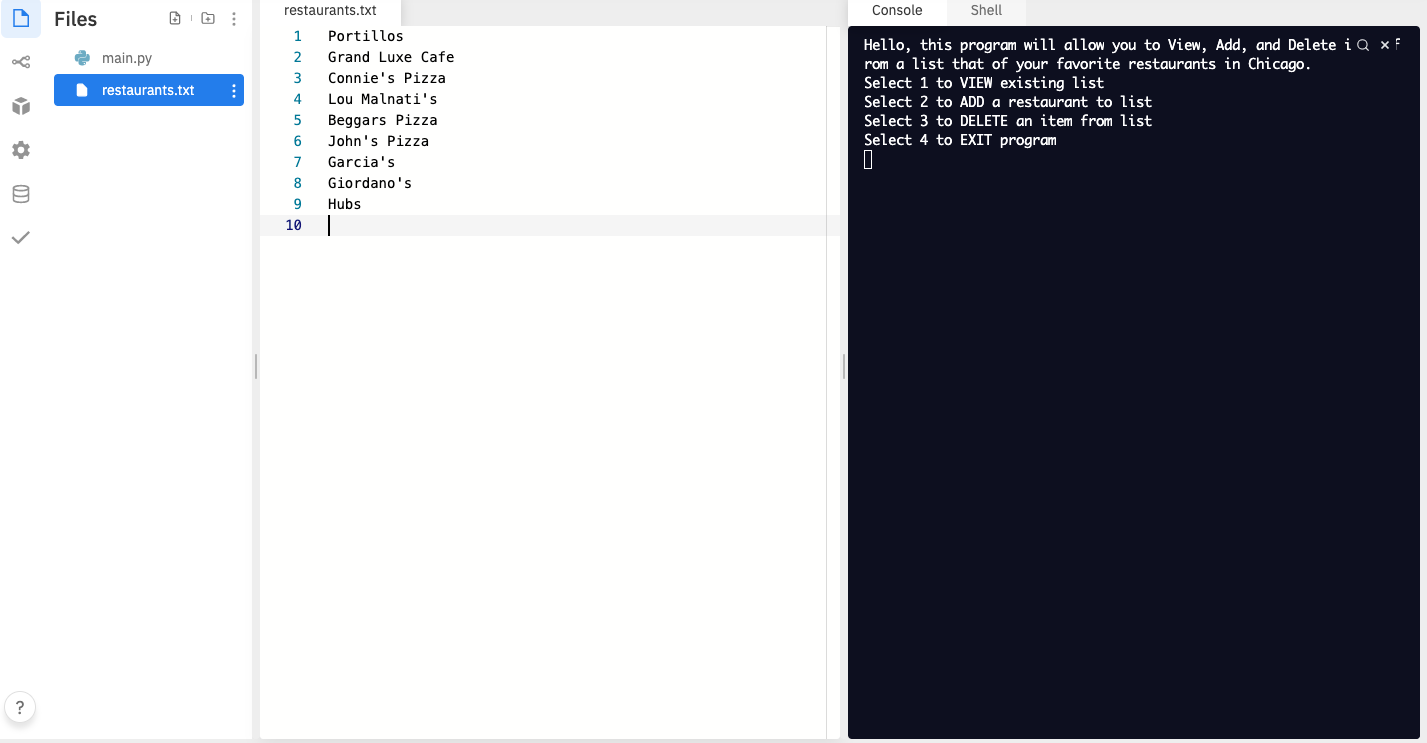
main.py Console Shell allRestaurants.close() 8 # # # loop the list using a range loop print the index position and the restaurant (remove the newline character from the name) 31 32 33 34 35 36 37 38 39 40 41 42 Hello, this program will allow you to View, Add, and Delete items from a liQ x la t of your favorite restaurants in Chicago. Select 1 to VIEW existing list Select 2 to ADD a restaurant to list Select 3 to DELETE an item from list Select 4 to EXIT program 1 OD # Write/Add a Restaurant to a File def addRestaurantToList(): 43 # Ask for favorite restaurant print("Please enter your favorite restaurant") aRestaurant = input() 44 45 46 47 48 49 # Open the file* allRestaurants = open("restaurants.txt", "a") 50 # Write the restaurant to file allRestaurants.write(aRestaurant+" ") # Close open connection allRestaurants.close() 51 52 53 54 55 56 57 58 59 60 61 # Tell the end-user the file has been added to file print(aRestaurant + " restaurant has been added to file") # Delete a Restaurant from File ? 62 63 64 # we're going to open the file contents as a list # get the user's selection Console Shell 04 # Hello, this program will allow you to View, Add, and Delete items from a liq xia t of your favorite restaurants in Chicago. Select 1 to VIEW existing list Select 2 to ADD a restaurant to list Select 3 to DELETE an item from list Select 4 to EXIT program i OD main.py yet he user selection 65 # remove that item from the list 66 # and rewrite the file with the updated values 67 def removeSpecificRestaurant(): 68 69 # Output info to end-user that would allow them to select a restaurant 70 print("Enter the number of restaurant you would like to delete") 71 selection = int(input()) 72 73 # Open the file 74 75 # read the contents as a list of lines; 76 # store that list in a variable 77 78 # Close the file 79 80 # print (to check that you're getting the right one) 81 # remove that item from the list 82 83 84 85 86 87 88 # open the file to replace the contents with the # modified list of restaurants 89 # loop the list and write to the file 90 91 # close the file 92 93 # Ouput that restaurant deleted print("restaurant deleted") 94 95 96 Console Shell Hello, this program will allow you to View, Add, and Delete items from a liq xia t of your favorite restaurants in Chicago. Select 1 to VIEW existing list Select 2 to ADD a restaurant to list Select 3 to DELETE an item from list Select 4 to EXIT program 1 02 main.py 02 83 84 # remove that item from the list 85 86 # open the file to replace the contents with the 87 # modified list of restaurants 88 89 # loop the list and write to the file 90 91 # close the file 92 93 # Ouput that restaurant deleted 94 print("restaurant deleted") 95 96 97 98 if name__ == "__main__": 99 print("Hello, this program will allow you to View, Add, and Delete items from a list that of your favorite restaurants in Chicago.") 100 selection Prompt() 101 102 103 104 restaurants.txt Console Shell Files 1 2 e main.py restaurants.txt : 3 4 Hello, this program will allow you to View, Add, and Delete i Q xf rom a list that of your favorite restaurants in Chicago. Select 1 to VIEW existing list Select 2 to ADD a restaurant to list Select 3 to DELETE an item from list Select 4 to EXIT program Y Portillos Grand Luxe Cafe Connie's Pizza Lou Malnati's Beggars Pizza John's Pizza Garcia's Giordano's Hubs 5 6 7 8 9 10
Step by Step Solution
There are 3 Steps involved in it

Get step-by-step solutions from verified subject matter experts
 Study Help